





Simplifying Bending Operations with the CYBELEC CybTouch 6 C EasyBend
The CYBELEC CybTouch 6 C EasyBend represents a significant advancement in simplifying and optimizing the metal bending process. If you are looking to improve the efficiency and accuracy of your metalworking operations, this article will demonstrate how its intuitive interface and sophisticated functionalities streamline workflow from setup to completion.
Suitable for both experienced operators and those new to bending technology, understanding the capabilities of the CybTouch 6 C EasyBend can lead to measurable gains in precision, repeatability, and overall productivity. Read on to discover how integrating this system can elevate the performance and output quality of your bending tasks.
Introduction
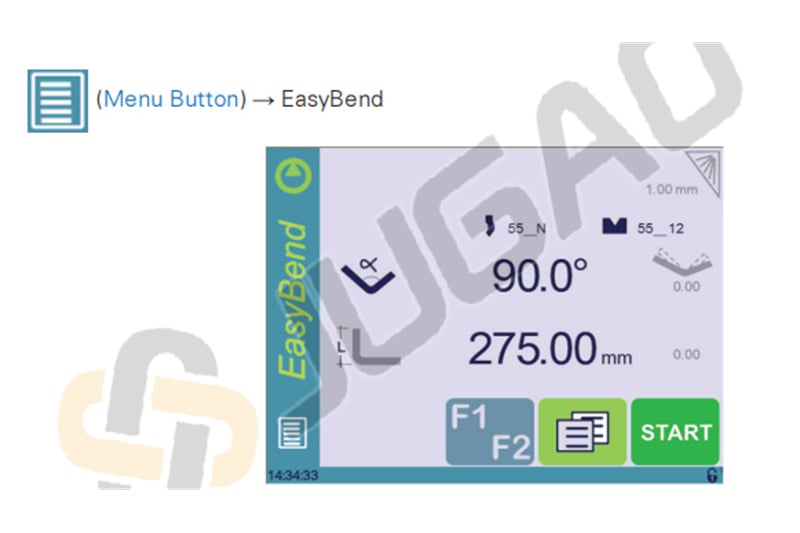
The CYBELEC CybTouch 6 C EasyBend significantly simplifies bending operations through its dedicated EasyBend interface, which is specifically designed for performing individual bends. This function proves especially valuable when external personnel need to interrupt standard production temporarily to execute a single bending operation—typically using the same tooling setup.
A key advantage of the CybTouch 6 C EasyBend is its non-disruptive workflow: accessing the EasyBend page only temporarily pauses the active production program, with no need to save the current state. Upon completing the individual bend, operators can seamlessly return to the main program by selecting the Menu Button and then "Current Program." This streamlined transition minimizes operational interruptions and ensures a swift return to scheduled production.
Performing a Bend on the EasyBend Page
The EasyBend interface features an intuitively designed control layout that streamlines even complex bending operations, enabling operators to consistently achieve high-precision results with minimal training. For comprehensive details regarding these specialized controls and their practical applications in enhancing workflow efficiency, please refer to the Basic Page Description section.
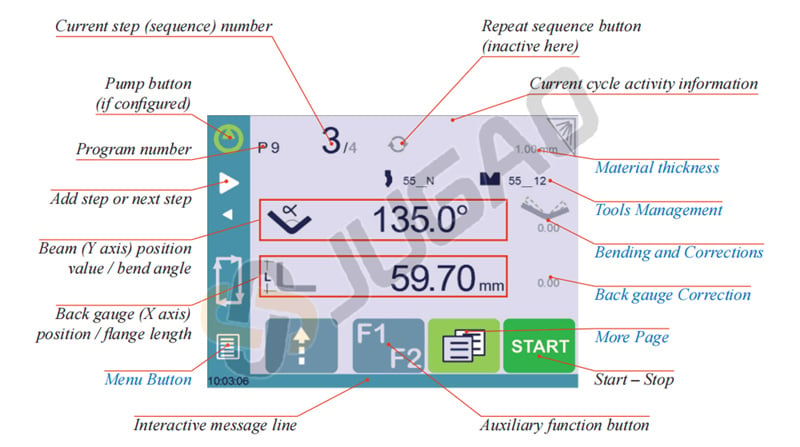
Setting Instructions:
1. Touch the material’s thickness (here 1.00). The More Page is displayed. Enter the Material thickness and the Force.
2. If necessary, touch one of the tool’s icon to select a punch or die. (To
learn how to configure tools, please refer to section Tools Management). 3. Enter the angle
 for the bend you wish to create (here 90°). 4. Enter the flange’s length
 (here 275.00 mm). 5. Press this button
 to go to the More Page and enter the eventually required extra data for the
bend. 6. Start the hydraulic pump motor (by pressing this button
to go to the More Page and enter the eventually required extra data for the
bend. 6. Start the hydraulic pump motor (by pressing this button if available. It turns red when the motor is running).
7. Press the START button to position the machine according to the data that were just entered.
8. When the machine is ready to bend, a OK button is displayed.
9. Press the foot switch to execute the bend.
Error and Warning Messages
It’s essential to understand the types of warning and error messages that may appear while using the CYBELEC CybTouch 6 C EasyBend.
There are two categories of messages you might encounter:
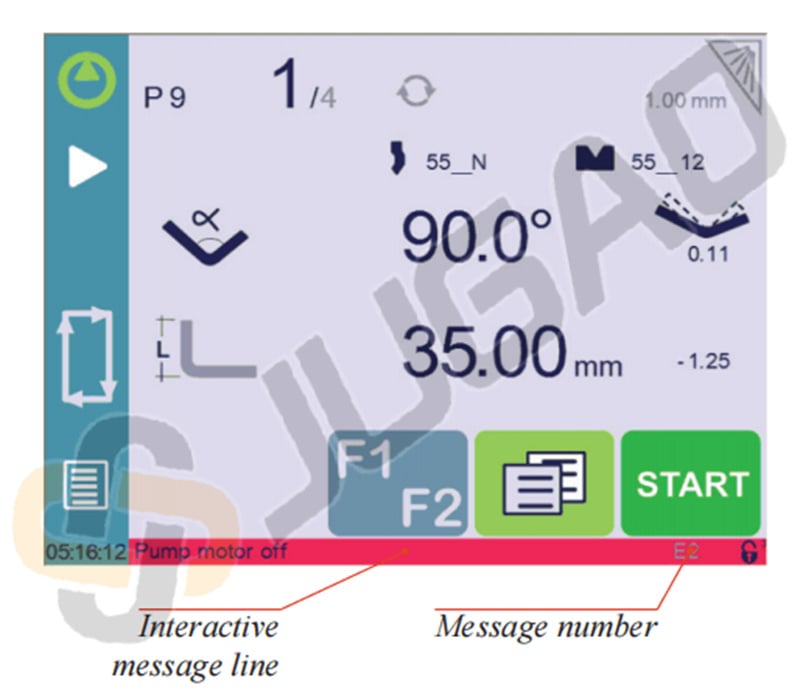
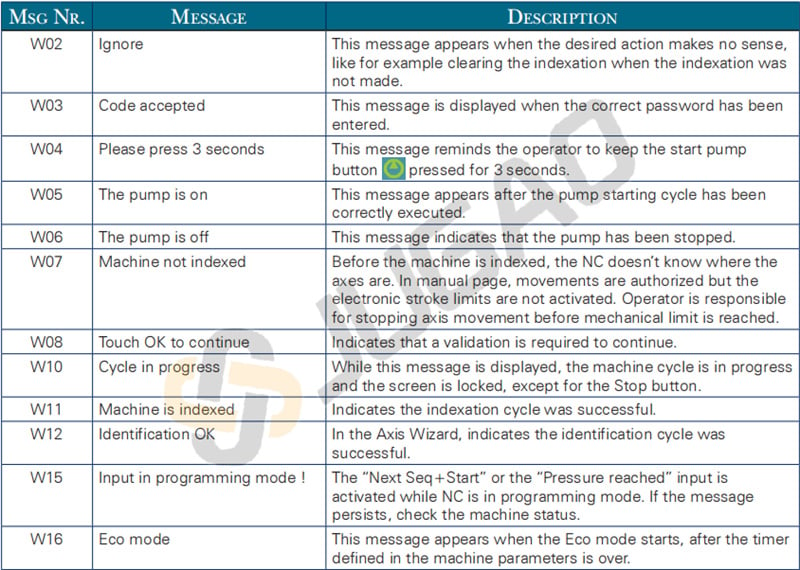
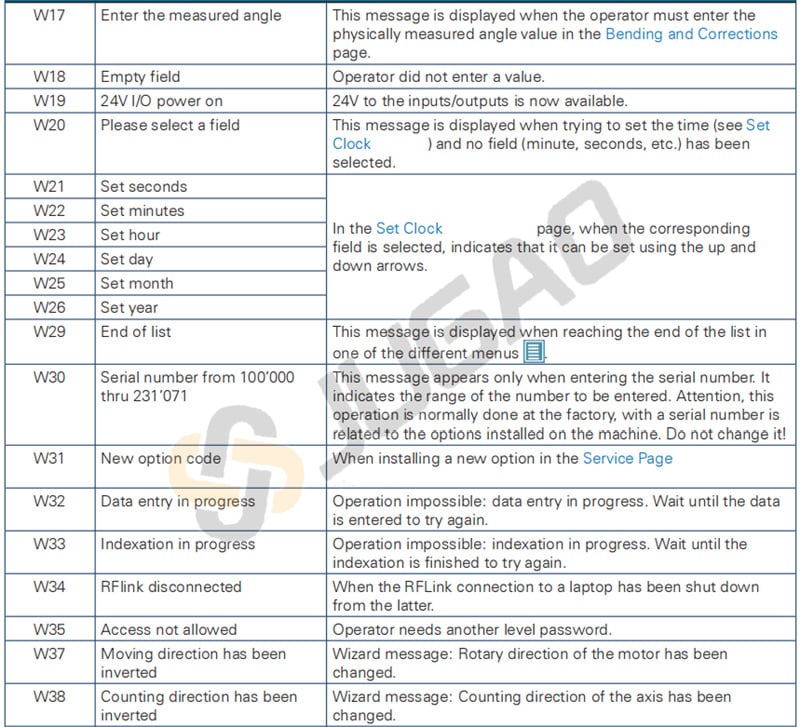
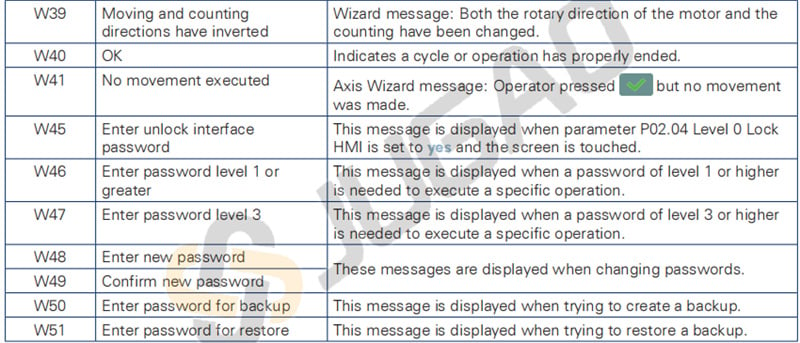
1. Warning Messages: Displayed on a green background, these messages provide information or instructions to the user. They are typically temporary and will disappear automatically once acknowledged or the situation is resolved. These messages are part of the proactive approach of the CYBELEC CybTouch 6 C EasyBend to keep you informed without disrupting workflow.
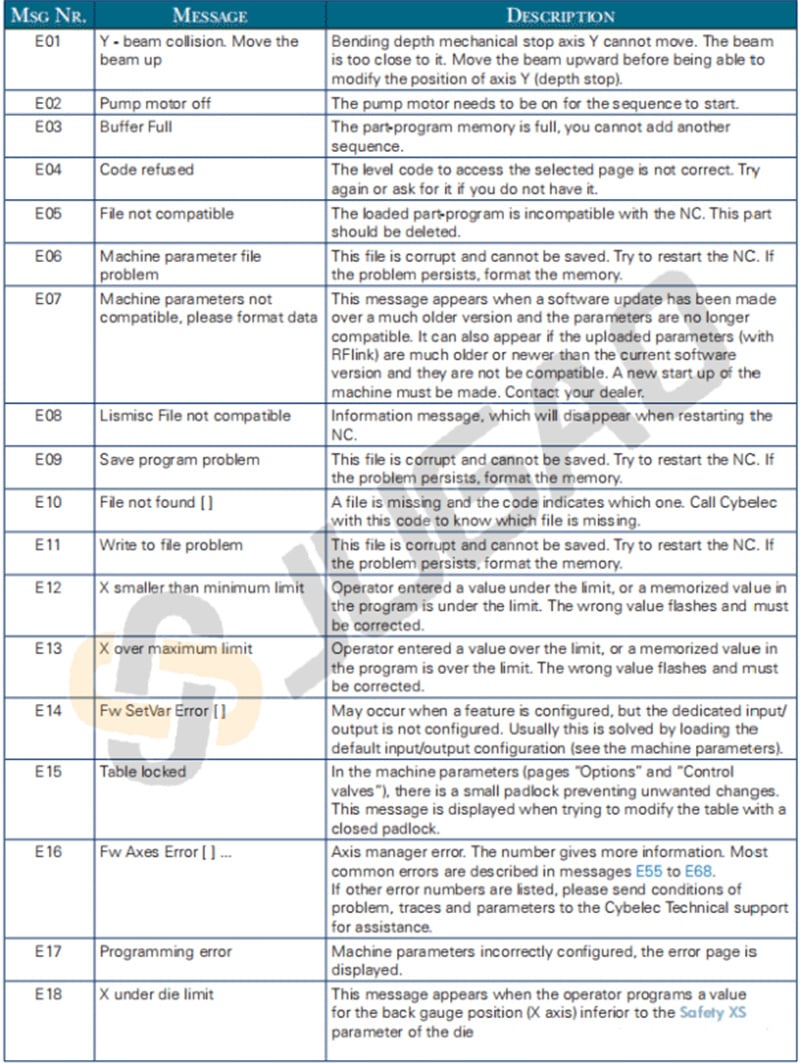
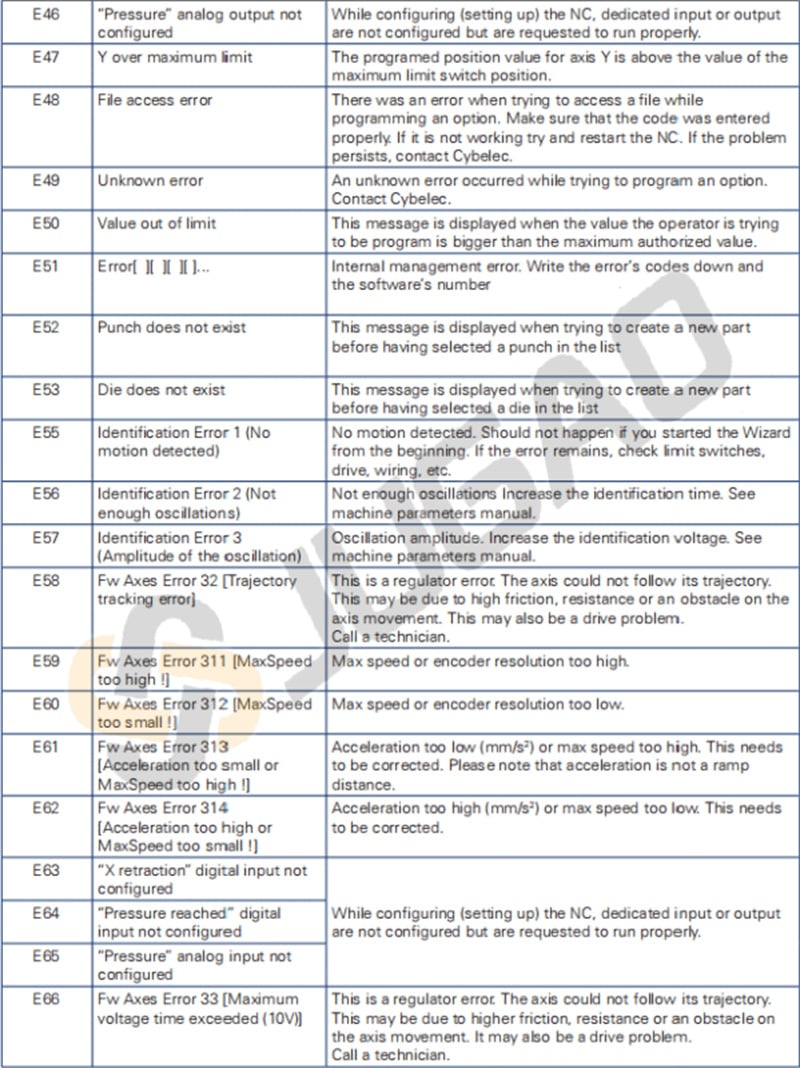
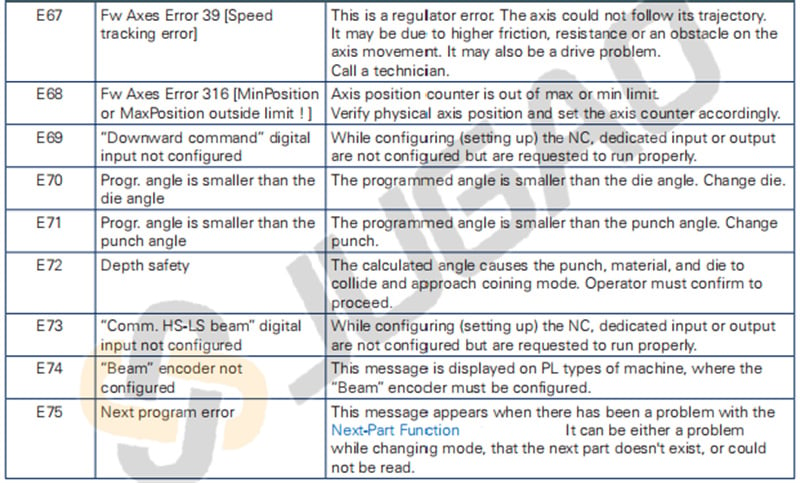
2. Error Messages: These are more critical alerts shown on a red background. They indicate an error on the machine or NC (numerical control), and may require prompt intervention by the user or a technician. The CYBELEC CybTouch 6 C EasyBend ensures that the nature of these errors is communicated clearly to facilitate quick resolution and minimize downtime.
When reporting error messages, please always indicate the error number at the end of the line. This number also refers to the first column in the section below.
Warning Messages

Error Messages
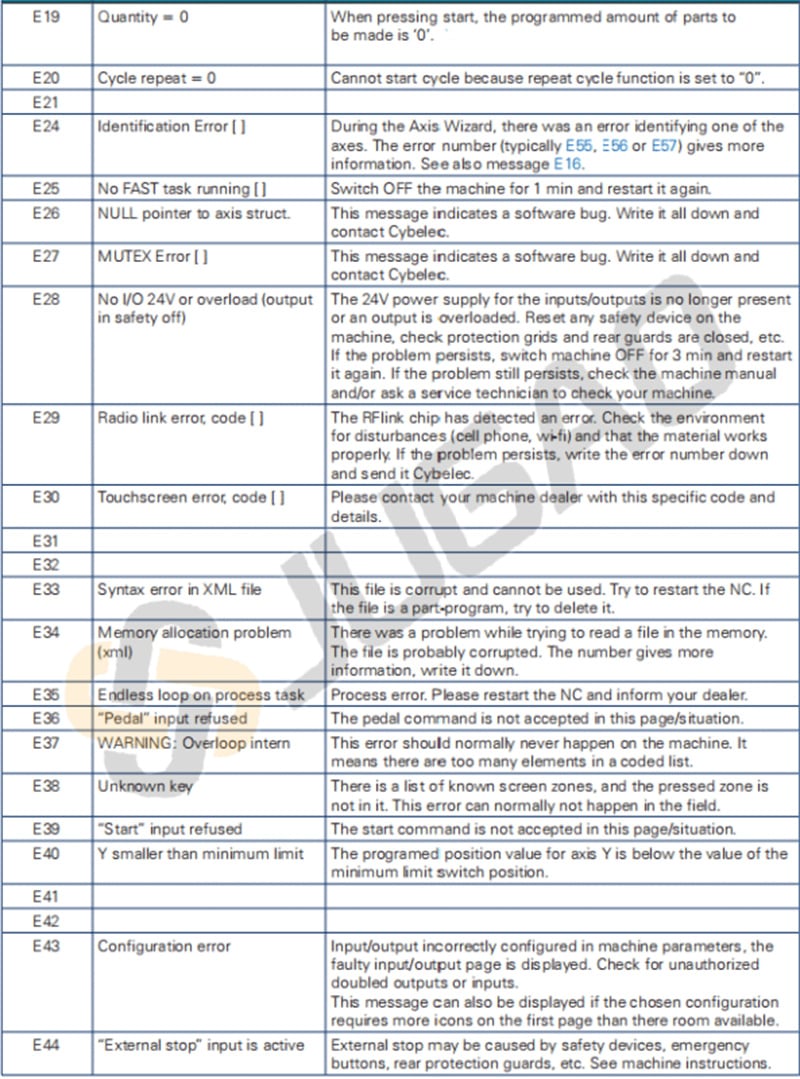
Conclusion
The CYBELEC CybTouch 6 C EasyBend fundamentally enhances and streamlines the bending workflow through its intuitive interface, precision control capabilities, and efficiency-focused features. By integrating this advanced system, metal fabrication facilities can achieve measurable improvements in productivity while maintaining exceptional accuracy and minimizing material waste.
To discover how the CybTouch 6 C EasyBend can address your specific operational requirements, we invite you to contact our technical specialists or explore the additional resources available through our official channels. Implementing this technology effectively can significantly elevate both your bending precision and overall manufacturing performance.

