





Significantly Improve Production Efficiency with ESA S530 Bending Automation
If you are looking for solutions to improve manufacturing efficiency, the ESA
S530 bending automation system is the tool you need. This advanced system
achieves full automation of the bending process, significantly reducing manual
intervention while ensuring a stable output of high-quality products. This
article will explain how the ESA S530 comprehensively improves production
efficiency through rapid material selection, precise bending adjustment, and
integrated process optimization, helping you easily achieve manufacturing
excellence.
Introduction
Introduction In modern manufacturing, efficiency and precision are paramount. The ESA S530 bending automation system revolutionizes traditional bending processes by automating tasks, reducing manual operations, and ensuring product consistency. By introducing the ESA S530 system, companies can significantly increase capacity, optimize production processes, and effectively reduce error rates. In today's market where automation is a key element of competitiveness, the ESA S530 is the core equipment that helps companies move steadily forward in the current market.
Program Execution in Automatic Mode
To maximize productivity with the ESA S530 Bending Automation, understanding Program Execution in Automatic Mode is essential. Once you’ve input a numeric program, executing it in automatic mode streamlines the bending process by reducing manual input and enhancing accuracy.
Press to access the automatic status.

The ESA S530 Bending Automation enhances productivity notably by optimizing program execution in automatic mode. Here’s how it streamlines the bending process and ensures consistent quality:
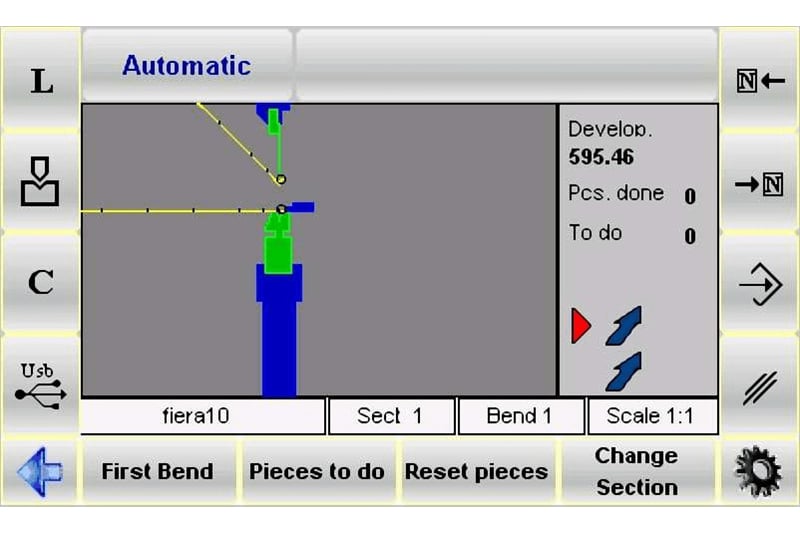
Graphic Automatic Mask: When a calculated graphic program is selected, you can activate the graphic mask by pressing the [Graphic] key. This feature displays three windows:
1. Main Window: Illustrates the upper and lower machine parts, the punch and die as entered in the program, the workpiece before and after bending, and the stop position.
2. Positioning Window: Guides you on how to position the workpiece for each bend, whether through overturning or rotating the metal plate from the previous bend.
3. Data Window: Shows current bend data and the workpiece counter.
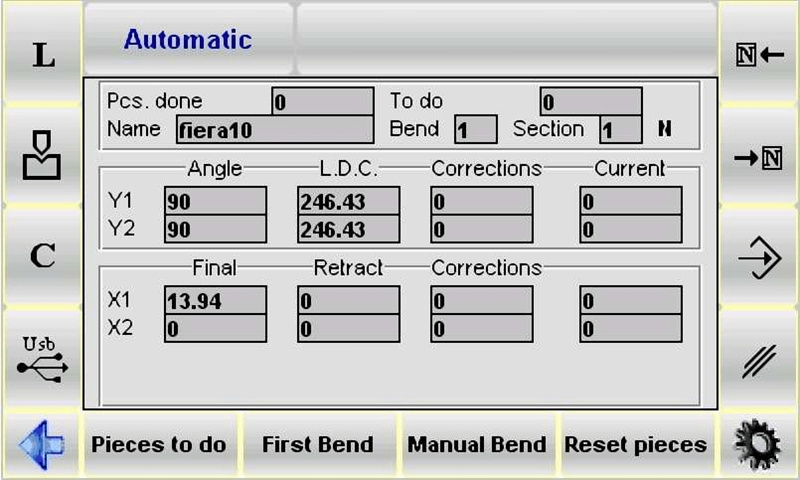
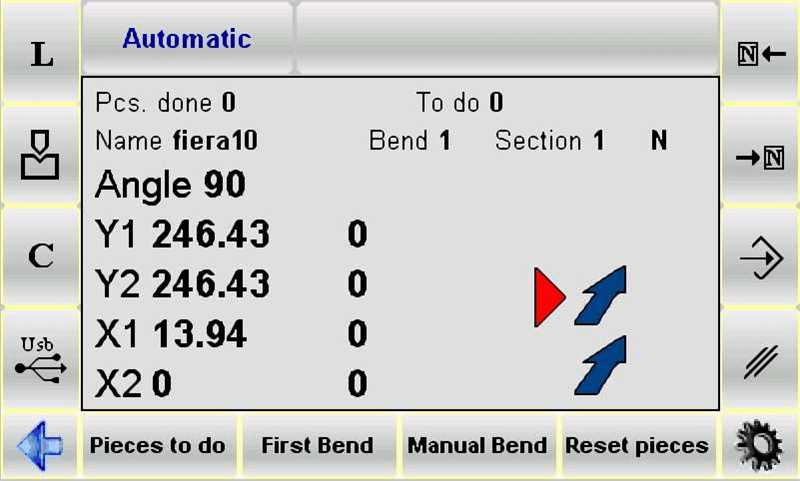
Numeric Automatic Mask: In automatic mode, this mask combines axis target data with numeric entry data. While you can’t modify program data in this state, the larger character display option allows for easier reading of axis targets. Toggle between larger and smaller character displays as needed for optimal viewing.
By automating these key steps with ESA S530, you minimize human intervention, leading to a smoother, error-free bending process and enhancing overall productivity in your manufacturing operations.
Automatic cycle execution
Start Automatic Cycle: Press a button to begin the automatic cycle. Locator axes position themselves automatically.
Perform Bend: Press the down pedal to lower the ram and execute the bend with precision.
Automatic Reset: After bending, the ram resets, and locator axes adjust for the next bend.
Repeat Cycle: After the last bend, the cycle restarts automatically from the first bend.
Execution of the sample workpiece
The ESA S530 Bending Automation boosts productivity by streamlining bending data correction. Using the SEMIAUTOMATIC mask, operators can adjust angles or lengths on the spot during a sample workpiece execution. This process accommodates metal plate variations and integrates corrections directly into the program, ensuring precise, consistent bends. This automation not only enhances accuracy but also accelerates production efficiency.
The procedure can be activated from the AUTOMATIC mask in the following way:
Press

Press to position the locator axes.

Press the down pedal to make the bend.
Measure the bend made in terms of bending length and angle.
If discrepancies are detected:
Access the correction data by pressing

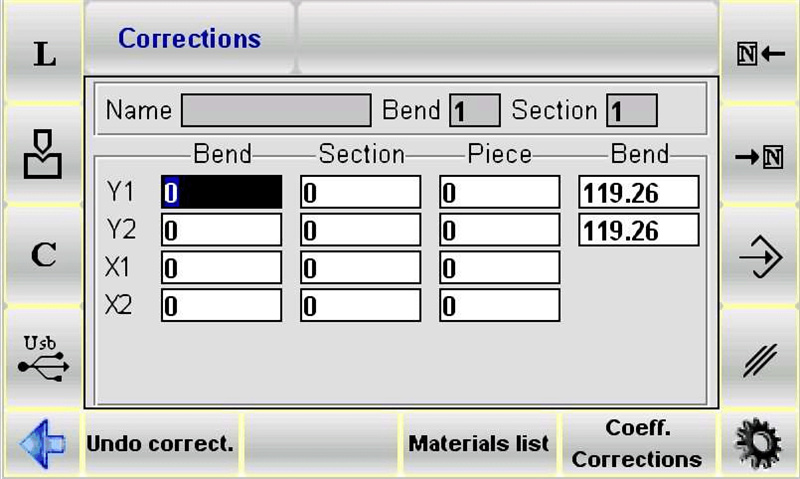
To apply a general correction across all steps (ideal when uniform angles are required), enter the correction data under the workpiece column.
For section-specific adjustments, input data under the section column. For individual bends, use the bend column.
Input the correction data to adjust and refine the bend.
By reducing the need for manual intervention and allowing for systematic corrections, ESA S530 Bending Automation maximizes efficiency and ensures consistent quality across all bending operations.
Correction data entry
The correction data to enter are in mm when it comes to the position of the locator axes and in degrees for the bending angle; the data entered are added to the value in the program.
Once the correction data have been entered:
Press

Use the system to adjust the position of locator axes, which may have been altered after corrections.
Repeat the bend.
Check whether the bend is correct:
If a bend is correct, apply the same procedure to all scheduled bends using navigation keys.
If not, adjust the current bend data as needed.
Once corrections for all bends are complete, initiate the automatic cycle from the selected bend by pressing the appropriate command.
How to annul the correction data
Press [Lose Correc.] to annul the modifications made to the corrections. The values present when the mask was accessed will be restored.
Materials Table
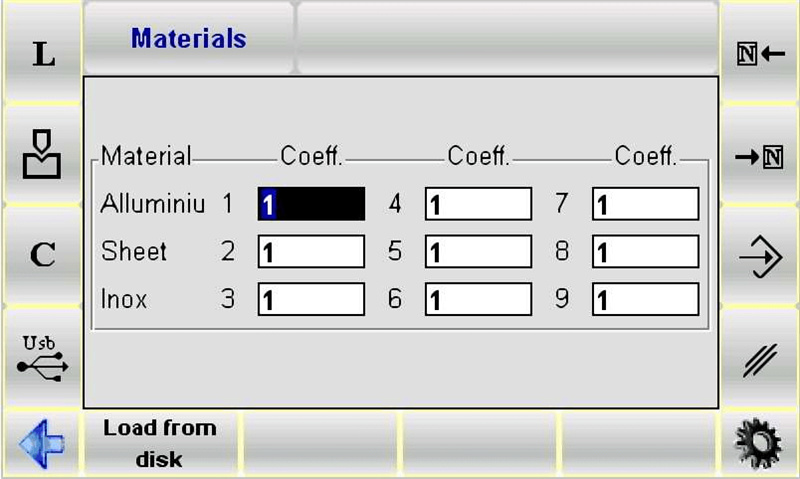
The Materials Table contains the correction coefficients of the stretch calculation, divided amongst the 9 available materials.
How to access the Materials Table mask
Comply with the following procedure to access the Materials Table mask:
Access the Corrections mask by pressing
Press the [Materials Table] key.
The mask illustrated in the figure appears:
How to use the Materials coefficient
To optimize ESA S530 Bending Automation, access the Materials Table to set correction coefficients. These adjust stretch calculations for bends, affecting new and existing programs. The default coefficient value is 1. Modifying it influences stretch (e.g., 2 doubles, 0.5 halves). Acceptable values range from 0 to 9, with two decimal precision. Adjusting these ensures accurate, efficient bending.
Disabling Stretch Calculation: In ESA S530 Bending Automation, set coefficients to 0 to disable stretch calculation, halting X calculations.
Saving Coefficients: Press the save key in ESA S530 to store entered coefficients.
Loading Coefficients: Use [Load from disk] in ESA S530 to load coefficients from a USB Key, or manage them with [Save ALL] and [Load ALL] in automatic mode.
Clinching/Coining Coefficient
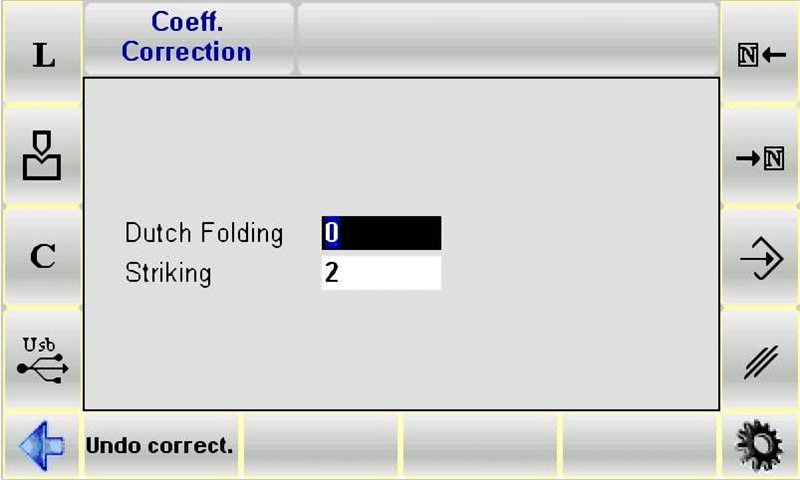
The Correction Coefficients mask contains the Clinching/Coining coefficient alone.
Accessing Correction Coefficients Mask
Comply with the following procedure to access the Correction Coefficients mask:
Access the Corrections mask by pressing
Press the [Corrections Coeff.] key.
The mask illustrated in the figure appears:
Using Clinching/Coining Coefficients
Access the Correction Coefficients mask and enter the parameters.
These parameters are used in the B.D.C. calculation for all bends of the Clinching/Coining type.
Saving Coefficients: Adjustments are automatically saved upon exiting the mask, ensuring your settings are retained effortlessly.
Reverting Changes: Press [Lose Correc.] to revert any changes and restore original values when needed.
Internal Radius Correction
Internal radius correction in the ESA S530 Bending Automation system allows operators to adjust the internal radius displayed in the machining data setup. This radius can be recalculated using different methods, affecting workpiece length and stretch calculations. For detailed application modes, refer to the machine parameters manual. This feature enhances the ESA S530’s precision and flexibility in bending processes.
DIN Formula Selection for Stretch Calculation
For accurate stretch calculations using the ESA S530 Bending Automation, operators can opt for the standard DIN formula. Simply enter ‘1’ for the generic stretch formula parameter to select this option. This ensures precision in your bending operations, supported by various internal radius application modes available within the machine’s parameters.
Program Checking
In the ESA S530 Bending Automation system, after making modifications, press the button to position the axes. The program checks for errors automatically. If errors are found, a message will appear, and the program will stay in STOP status in semiautomatic mode.
Autolearning Cycle
When standard bending targets aren’t applicable, such as with rounded punches, the ESA S530 Bending Automation system’s autolearning cycle can be used in the SEMIAUTOMATIC mode. This allows operators to manually determine the end of bend target without proceeding to the next step.
Methods for adjusting the end of bend target include:
If the target to reach is higher than the calculated end of bend target, the target can be found by using the pedal alone.
If the target to reach is lower than the calculated bend target, the operator must enable the Re-ascent to TDC with ascent enabling input, release the pedal at the end of bend target and use these two buttons, which allow the ram to move up or down by a tenth of a millimeter at a time.

The procedure can be activated from the SEMIAUTOMATIC mask in the following way:
Press

Press to position the locator axes.

Press the down pedal to make the bend;
Find the required end of bend point by means of the previously described procedure.
Press [AutoLear. Y].
Press the up pedal.
Repeat the procedure for all the bends in the program. Use the Or keys to move amongst the various bends.
When autolearning has been accomplished for all the bends:
Press and run through the program from the first bend.
Conclusion
The ESA S530 automated bending system significantly improves production efficiency. By automating programs, precisely selecting materials, and accurately applying crimping/imprinting coefficients, the system optimizes the bending process. Operators can utilize the material database and perform necessary inner fillet corrections to ensure superior bending performance and product quality. Furthermore, using appropriate DIN formulas for tensile calculations and conducting comprehensive program checks helps further reduce errors and maximize production efficiency.
If you wish to optimize your manufacturing process, we recommend implementing the ESA S530 automated bending system in production. For detailed technical support, further information, or any questions, please feel free to contact our team at JUGAO CNC MACHINE. You can also visit our official website for more complete documentation and related resources to continuously improve production efficiency.

