





DELEM DA-41T Manual Mode Enhances Bending Precision and Control
If you're curious about how the DELEM DA-41T's manual mode enhances bending performance, you've come to the right place. This article details how the DELEM DA-41T's manual mode provides greater precision and control for metalworking tasks. By deeply analyzing the advantages of this mode, I hope to offer valuable insights to operators, helping them fully realize the potential of their bending operations. Whether you're an experienced professional or a beginner just starting out with a bending machine, understanding the functionality of the DELEM DA-41T's manual mode can significantly improve the quality and efficiency of your work. This guide will introduce you to its key benefits, helping you confidently utilize this feature to optimize every bending task.
Switching to Manual Mode

By tapping the navigation button Manual, the control is switched to Manual mode.
This transition allows for programming and executing a single bend step, offering greater control over the bending process.
Manual Mode Parameters
The following describes the programmable parameters in manual mode (specific parameters depend on the machine configuration). To adjust the parameter position: long press the parameter tile until it is highlighted, drag it to the new position, and release to lock it.
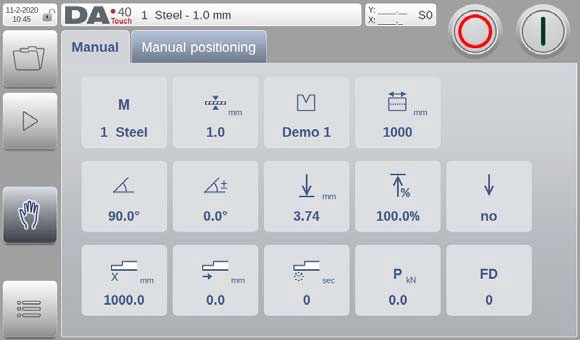
Material Number

Select from six material types, with properties programmable in Settings mode. Accurate material selection helps enhance precision during the bending process.
Thickness

Enter the sheet’s thickness to aid in calculating the necessary bending force, ensuring optimal results.
Product Width

This parameter is critical for calculating bending force and should be entered precisely to ensure effective bending.
Die ID

Select the appropriate die ID for your product, crucial for achieving the desired bend.
Angle

The desired angle value. This parameter is available when a tool is programmed.
Angle Correction

When angle programming is used, this correction is used to correct Y-axis values. A positive correction means a lower beam position.
Y-axis Bend Depth

When an angle is programmed, this value is calculated. A higher value means a lower beam position.
Y-axis opening time

The desired opening time after a bend, programmed as a percentage of the maximum opening time.
Y-axis high speed

To enable high travel speed for the beam during this bend.
X-axis position

The desired backgauge position.
X-axis retract

Backgauge retract distance.
X-axis delay time

Delay time in seconds for X-axis and FD axis after a step change.
Bending Force

The calculated bending force.
Function Output

Binary value for the programmable digital outputs. The number of available outputs depends on machine settings. The name also depends on machine settings, and is FD by default.
Executing a Single Bend
Once you have meticulously programmed all the necessary parameters in the DELEM DA-41T Manual Mode, you are ready to initiate the bending process.

To transition from programming to execution, locate the green start button situated in the upper right corner of the control panel. This button is your gateway to activating the bending operation.
By pressing the ‘Start’ button, the machine moves into action, executing the specified bend with precision. This seamless transition is a testament to the intuitive design of the DELEM DA-41T Manual Mode, which aims to simplify complex operations for the user. Keep in mind that having pre-configured all parameters ensures the machine can perform the bend step accurately and efficiently, aligned with your specifications.
As the machine operates, you may need to halt the process.

The convenience of the DELEM DA-41T Manual Mode is further highlighted by the easily accessible ‘Stop’ button. This button allows you to cease operations instantaneously if necessary, providing a crucial safety and control feature.
When you start the control, the screen interface will display pertinent operational data, providing real-time feedback on the bend execution.
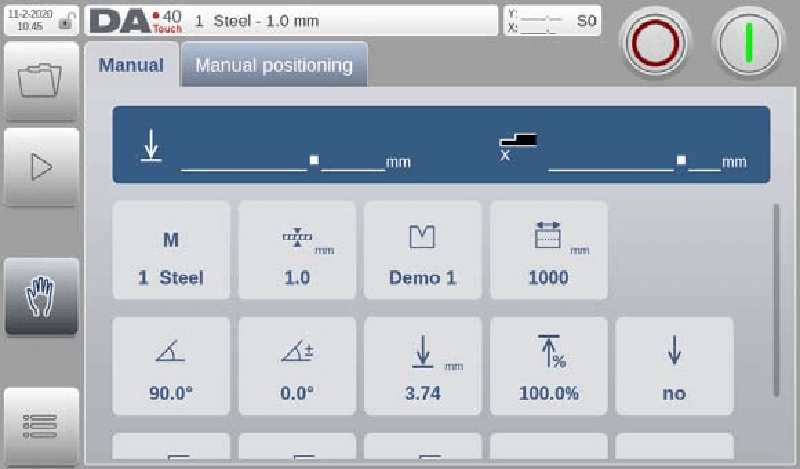
This display aids in monitoring the progress and accuracy of each step, ensuring you can make real-time adjustments if needed. By leveraging the robust features of the DELEM DA-41T Manual Mode, operators can enhance productivity, maintain accuracy, and ensure a higher quality of output in their bending operations.
Manual Positioning
The DELEM DA-41T's manual mode features a manual positioning function, allowing users to precisely control the axis position and ensure accuracy and efficiency in bending operations. This function continues the manual positioning logic from the automatic mode, facilitating smooth switching between different modes as needed.
Below the "Manual Positioning" page (which applies to both manual and automatic modes), there is a slider for axis position adjustment. Sliding this slider directly controls the axis's movement speed, while releasing it stops the axis, achieving precise positioning. Buttons at both ends of the slider allow for further fine-tuning of the axis position, enhancing operational precision.
This design ensures that operators can achieve the high-precision positioning necessary for the bending process. During the sliding process, the system provides real-time auditory feedback through beeping sounds, confirming the axis's movement. This intuitive and easy-to-use interactive feature further optimizes the positioning operation experience in the DELEM DA-41T's manual mode.
Conclusion
Employing the manual mode of the DELEM DA-41T offers significant advantages for bending processes, with its precise axis positioning control contributing to improved overall operational accuracy. This mode provides manual positioning operations, combined with an intuitive slider design and a real-time feedback system, allowing for fine-tuning and adjustment of the axis position, effectively improving bending quality. Mastering and utilizing this function can further enhance equipment operating efficiency and ensure stable production output.
If you wish to fully optimize bending machine processing results, in-depth application of the DELEM DA-41T manual mode will be a key step. For any questions or further support, please feel free to contact our technical team. We also recommend consulting our other relevant technical documents for more operational suggestions and professional analysis to help improve equipment performance.

