





What Causes Laser Cutting Dimension Error in CNC Machines
Laser Cutting Dimension Error is a frequent headache for manufacturers who count on CNC laser cutting machines for accurate production. If you see that your finished parts no longer match the sizes you planned, you are probably wondering what is behind these mistakes and how to put them right. In my experience, such errors can trace back to calibration problems, worn components, cutting settings that are off, heat distortion, or flaws in the program. Below I list the most common causes of laser cutting dimension errors and offer practical fixes that improve cutting accuracy, cut material waste, and keep production quality consistent.
Getting to Know Laser Cutting Dimension Error
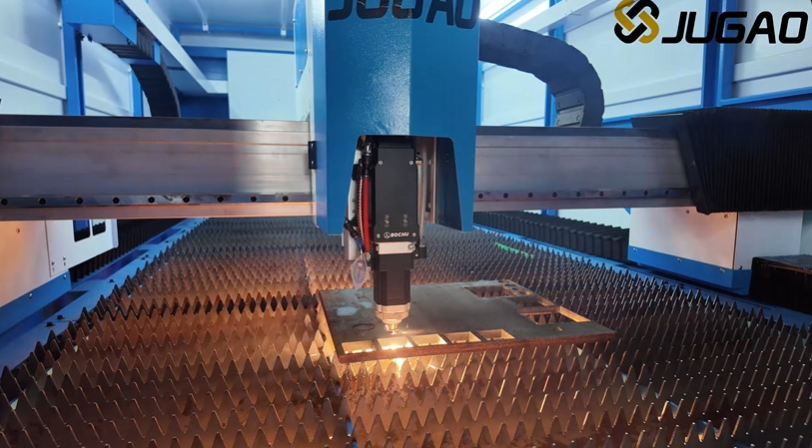
The Meaning of a Laser Cutting Dimension Error
A Laser Cutting Dimension Error appears when the actual size of a cut part does not agree with the values laid out in the CNC program. Even a small gap can bring assembly trouble, drag down product quality, and raise the cost of production.
The usual dimension errors are:
Parts that end up bigger than planned
Parts that end up smaller than planned
Hole diameters that wander
Positions that are slightly off
Contours whose dimensions are uneven
Working out where these errors begin is the first move toward fixing them.
Why Laser Cutting Dimension Errors Happen
Drive Parts That Are Worn
As time passes, components such as guide rails, ball screws, gears, and bearings wear out. The wear they pick up leads to backlash and mistakes in positioning.
The warning signs are:
Size errors that show up again and again
Cut pieces that are not uniform
Repeatability that is weak
Going over the motion parts regularly helps you keep positioning accurate.
Calibration That Is Off
When calibration is wrong, the CNC system can read the true position of the machine in a mistaken way.
The trouble often lies in:
Servo motors
Linear encoders
Axis scaling parameters
Home position settings
A tiny calibration slip can change the finished part size in a noticeable way.
Cutting Settings That Are Not Right
Laser power, cutting speed, focus position, and assist gas settings all decide the kerf width and how accurate the dimensions are.
A few examples:
Too much laser power makes the kerf wider
A poor focus leaves edges that are uneven
Wrong speed melts an excessive amount of material
Parameters that are tuned are vital for precise cutting.
Heat Expansion and Bending of the Material
The heat produced while cutting makes the material expand for a short period.
What affects heat distortion:
Material thickness
Material type
Cutting sequence
Part geometry
Large sheets and thin materials are the most at risk of size changes brought on by heat.
The Material Sits in the Wrong Spot
If the sheet metal shifts partway through cutting, the final sizes may not fall in line with the program values.
Likely reasons are:
Clamping that is too light
Worktables that are not flat
Sheet loading that is done incorrectly
Keeping the material firmly in place is essential for precise work.
Finding the Source of Laser Cutting Dimension Error
Step 1: Confirm the Calibration
I normally begin by making sure the calibration of the machine is correct.
Look into:
Axis travel accuracy
Encoder feedback
Servo positioning
Reference points
Use precision measuring gear to check that the machine movement follows the commands in the program.
Step 2: Examine the Mechanical Parts
Check every part that moves for signs of wear.
Give extra attention to:
Linear guide rails
Ball screws
Bearings
Rack and pinion systems
Excess play or wear can alter dimensional accuracy in a direct way.
Step 3: Review the Cutting Settings
Compare the cutting settings now in use with the values that are recommended.
Check:
Laser power
Cutting speed
Focus position
Gas pressure
Trial cuts can reveal parameter-linked problems in a short time.
Step 4: Measure the Kerf Width
The width of the kerf has a direct bearing on the final sizes.
To see whether the kerf stays steady:
Run a trial cut.
Take kerf readings at several spots.
Compare these against the programmed compensation.
Change the kerf compensation if you need to.
A consistent kerf width is the basis for accurate part sizes.
Step 5: Look at How Flat the Material Is
Sheets that are warped or uneven can make the focal position move while cutting.
Look for:
Bowing in the sheet
Bumps on the surface
Support that is not set up well
Flat material lets the cutting conditions stay the same.
Good Habits That Lower Laser Cutting Dimension Error
Carry Out Routine Maintenance
Preventive upkeep keeps the machine parts working within their normal limits.
Maintenance should include:
Greasing the guide rails
Checking the bearings
Watching ball screw wear
Cleaning the optics
A machine that is cared for gives more uniform results.
Refine the CNC Program
Mistakes in the program can lead to size changes you did not expect.
Go over:
Lead-in and lead-out settings
Kerf compensation values
Cutting sequence
Corner processing parameters
Getting the program right matters just as much as the state of the machine.
Manage the Cutting Environment
What surrounds the machine can affect how precisely it works.
Watch:
Ambient temperature
Humidity levels
Floor stability
Machine vibration
Operating conditions that stay stable make dimensions more consistent.
Handle the Material the Right Way
Loading and clamping the material properly lowers the chance that the sheet will shift.
Sensible habits include:
Securing the material evenly
Using support surfaces that are clean
Confirming sheet alignment before cutting
Good material handling keeps precision strong through the whole job.
Frequently Asked Questions
What usually lies behind Laser Cutting Dimension Error?
The most common reasons are calibration issues on the machine, motion parts that have worn down, cutting settings that are wrong, and kerf compensation values that are off.
Can guide rails that are worn change the accuracy of dimensions?
Yes. Worn guide rails bring in positioning errors and cut down repeatability, which leads to part sizes that are not consistent.
How often does a CNC laser cutting machine need calibration?
It depends on how much the machine is used, but I advise checking the calibration every few months and again after any major maintenance.
Does the thickness of the material affect dimensional accuracy?
Yes. Thicker materials often make wider kerfs and bigger heat effects, so they need different cutting settings and compensation.
Conclusion
A Laser Cutting Dimension Error can come from worn parts, calibration problems, cutting settings that are off, heat distortion, poor material positioning, or mistakes in the program. By going over the machine parts one by one, checking the calibration, tuning the cutting parameters, and keeping the working conditions steady, you can improve dimensional accuracy by a good amount. Regular maintenance, proper kerf compensation, and steady process control are the keys to high-precision laser cutting results. If you need more help with dimensional accuracy or want to tune your CNC laser cutting machine, contact the JUGAO technical team for professional support and guidance.

