





Simplifying Tool Programming with DELEM DA-53T
The DELEM DA-53T redefines tool programming by replacing complexity with an
intuitive, efficient process. This article details how its advanced interface
and intelligent system features streamline program creation, enabling operators
to achieve higher precision and productivity with less effort.
Designed for both CNC experts and those new to press brake controls, the following guide demonstrates how the DA-53T optimizes workflow, reduces programming time, and enhances the overall effectiveness of metalworking operations.
Introduction
The DELEM DA-53T control system redefines tool programming for press brake applications through its intuitive interface and sophisticated operational capabilities. Engineered for seamless integration across a wide range of press brake models, it delivers exceptional precision combined with remarkable ease of operation.
Tool programming forms the foundation of accurate press brake performance, guaranteeing exact execution for every bending sequence. The DELEM DA-53T transforms this crucial process by dramatically reducing setup requirements and enhancing production efficiency. Through its advanced technological framework, the system simplifies even the most complex programming challenges, establishing new standards for productivity and operational excellence in modern manufacturing environments.
Streamlined Punch Programming
Creating a New Punch
The DELEM DA-53T streamlines the setup of a new punch by offering an intuitive interface for easy tool management.
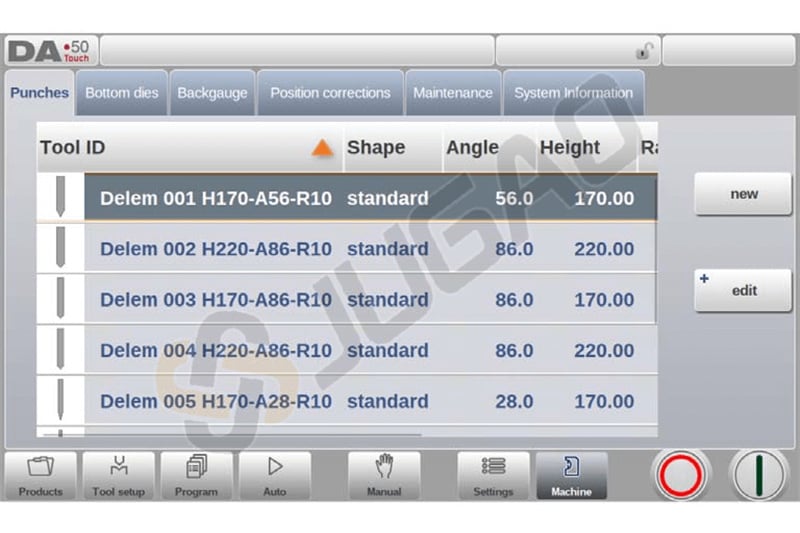
To add a punch, simply go to the library tab and tap “New”.
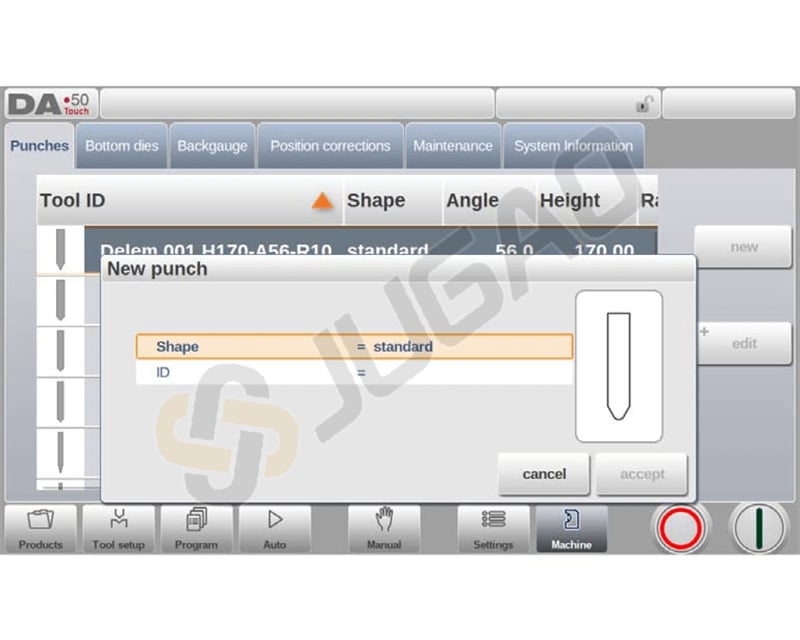
Program the punch by selecting a shape—such as Standard, Hem Bend, Air + Hem Bend, or Big Radius—and assign a unique ID, up to 25 alphanumeric characters.
After confirming these details, proceed to enter tool dimensions, which vary depending on the shape selected. This efficient process reduces setup time and enhances precision, making DELEM DA-53T an invaluable asset for press brake operations.
Standard Punch Configuration
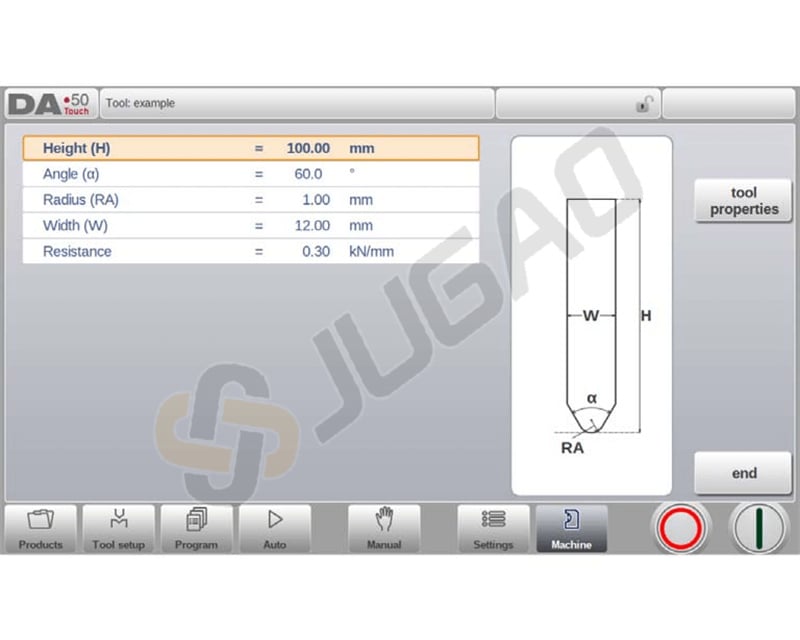
The DELEM DA-53T streamlines tool programming by providing an intuitive interface for standard punch setup, ensuring precise bending operations. Here’s how you can efficiently program your tools:
Height: Set tool height for accurate bend depth calculation.
Angle & Radius: Define punch tip angle and radius. Use as inner bend radius if it exceeds process results.
Width & Resistance: Input tool width and allowable force to ensure proper usage.
Orientation: Align the right side of the punch with the back gauge; ensure bottom point aligns with press brake center for precision.
Tool Properties: Adjust description (max 25 characters) for easy library identification.
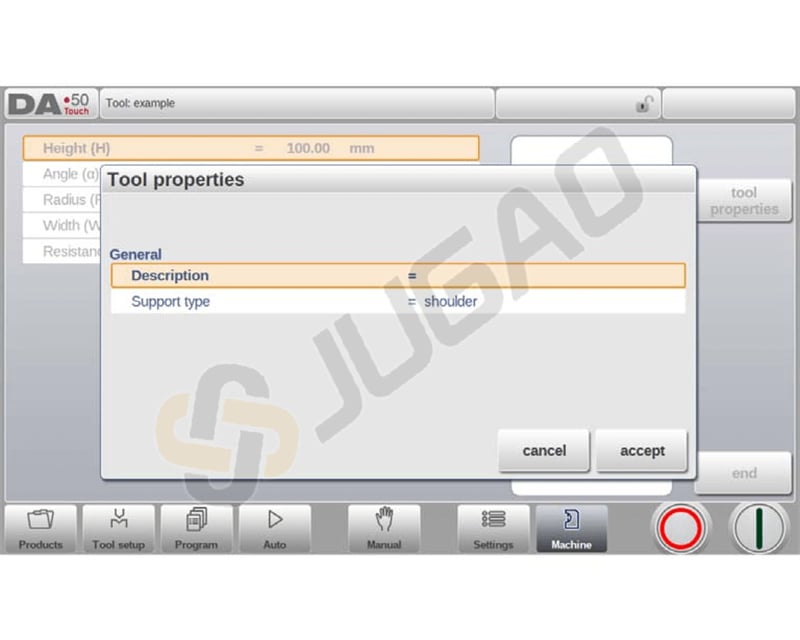
Support Type: Choose ‘head mounted’ or ‘shoulder mounted’ to correct Y-axis positioning.
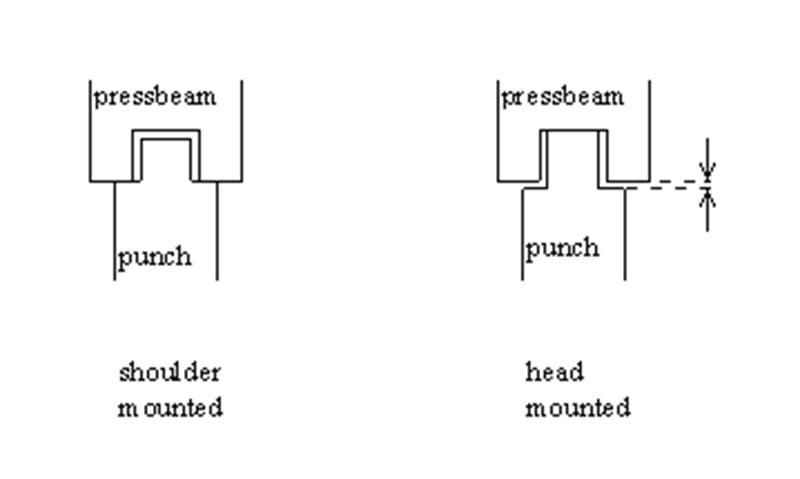
If ‘shoulder mounted’ is chosen, the Y-axis position is calculated from the standard tool height. This is the default setting.
If ‘head mounted’ is chosen, a correction is made for Y-axis computation.
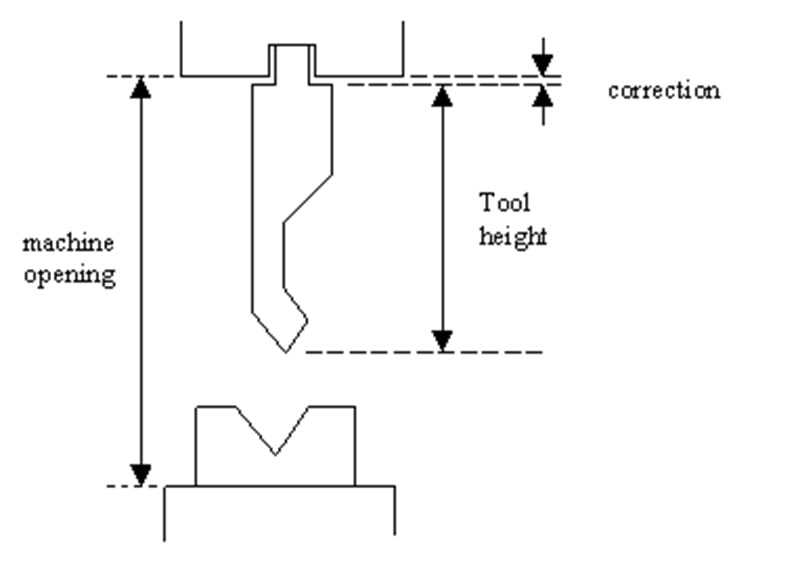
Edit Punch: Tap a tool in the library to access and modify its settings.
This efficient process in DELEM DA-53T simplifies tool setup, ensuring precise and effective bend operations.
Specialized Punches
Hem Bend Punch Programming
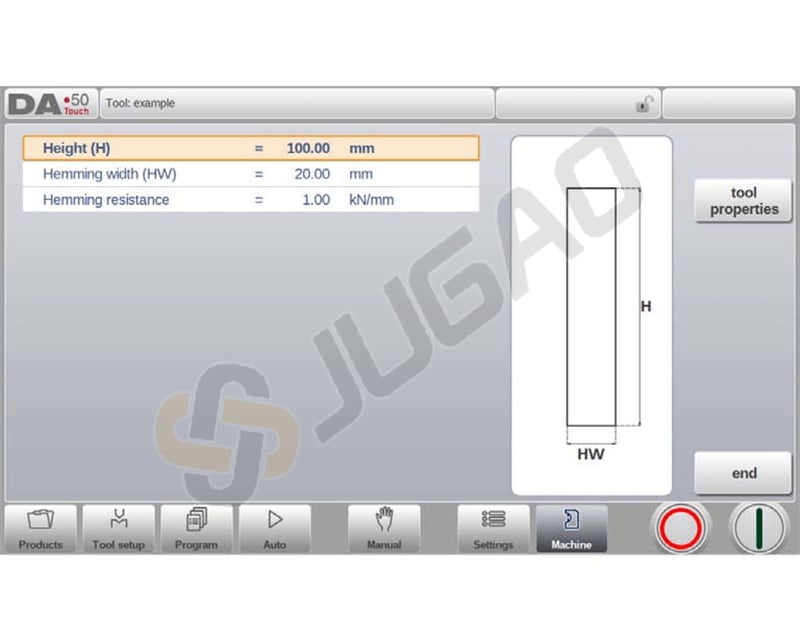
The DELEM DA-53T simplifies hem bend punch programming with clear input parameters:
1. Height: Input the total tool height for accurate bend depth calculation.
2. Hemming Width: Specify the tool width for precision in hemming.
3. Hemming Load Opening: Set the punch’s opening position, accounting for twice the sheet thickness for easy product insertion.
4. Hemming Resistance: Define the maximum force during hemming to ensure tool safety.
Air + Hem Bend Punch
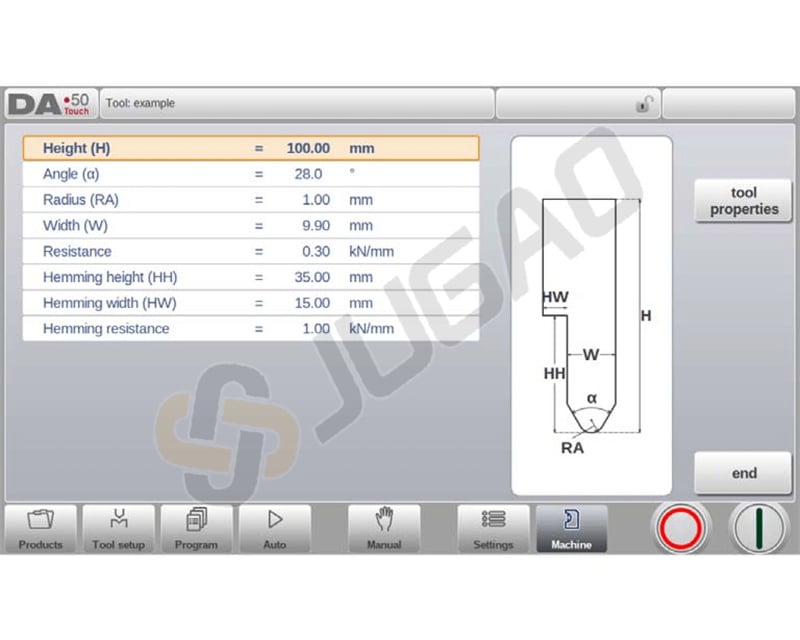
The DELEM DA-53T streamlines the programming of the Air + Hem Bend Punch with clear, precise steps:
1. Height: Set the tool’s total height for accurate bend depth calculation.
2. Angle: Specify the punch tip angle for precise bending.
3. Radius: Input the punch tip radius to determine the inner bend radius.
4. Width: Enter the tool width for the program.
5. Resistance: Define the tool’s maximum allowable force.
6. Hemming Height: Configure the downward punch height for hemming.
7. Hemming Width: Set the punch width for proper product placement.
8. Hemming Load Opening: Program the punch opening position, factoring in twice the sheet thickness.
9. Hemming Resistance: Indicate the maximum force during hemming.
These straightforward settings enhance tool programming, ensuring precision and safety in your operations.
Big Radius Punch
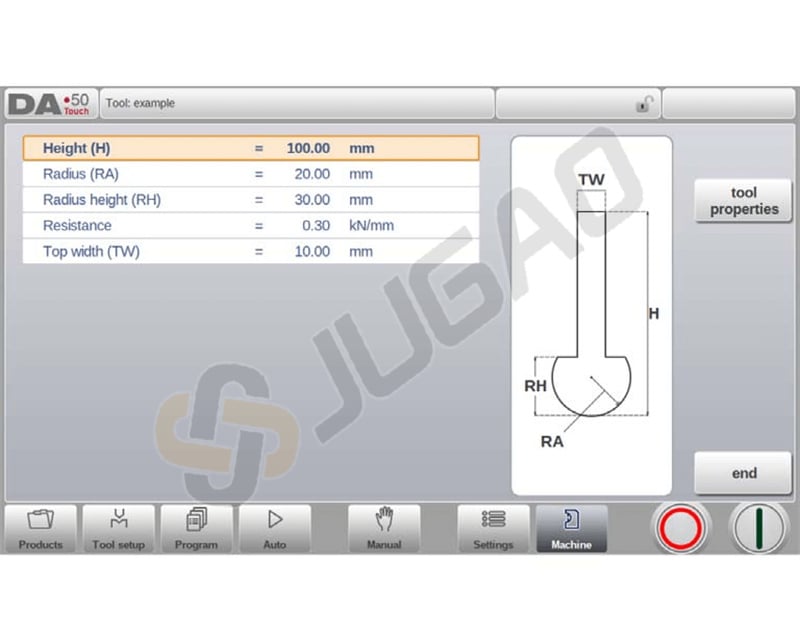
The DELEM DA-53T makes configuring big radius punches straightforward. Follow these concise steps:
1. Set Total Height: Enter the tool’s total height for accurate bend depth calculations.
2. Input Radius: Specify the punch tip radius to define the tool’s curvature.
3. Define Radius Height: Enter the height of the tool’s big radius part for precision in large curve operations.
4. Maximum Resistance: Assign the allowable force to ensure tool safety.
5. Specify Top Width: Input the top width for proper alignment and positioning.
These steps in the DELEM DA-53T interface ensure efficient and precise tool programming for big radius punches.
Efficient Die Setup
In this tab, the bottom dies used in the machine can be programmed. New dies can be added; existing dies can be edited, copied, renamed and deleted.
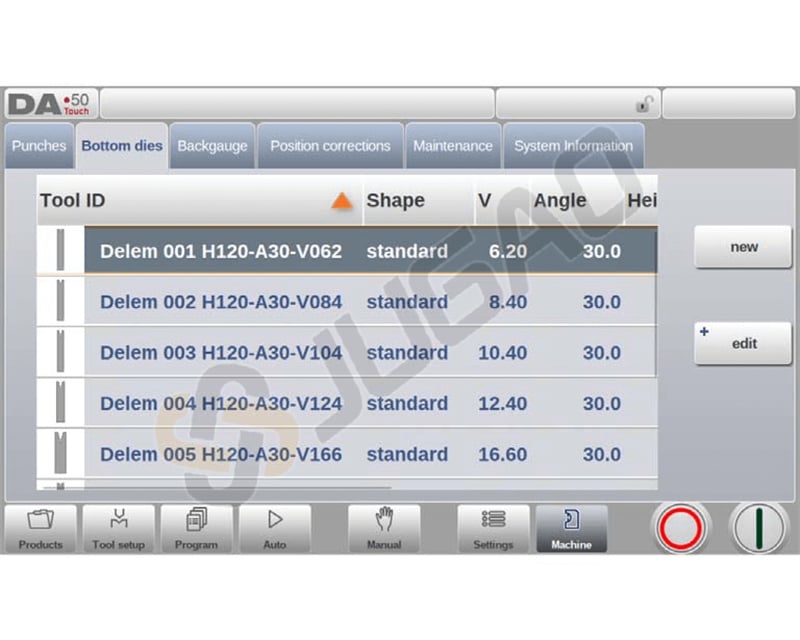
Creating a New Die
To create a new die, tap New in the library. The die profile can be created with help of the programming facilities of the control.
Here’s how to create a new die configuration:
1. Program Die Shape and ID
Select a basic die shape: Standard Die, Hem Bend Die, Inside Hem Bend Die, or Air + Hem Bend U Die based on the desired action (e.g., air bending or hemming).
Assign a unique ID (up to 25 alphanumeric characters) for easy identification.
2. Shape Configuration
Use the wizard to program shape details following the selected basic shape type.
3. Confirm and Configure Tool Data
Select “Accept” to finalize the initial setup.
Input tool dimensions and properties as prompted, which will vary according to the chosen shape.
This concise process enhances tool programming efficiency on the DELEM DA-53T platform, ensuring accuracy and ease of use.
Standard Die Setup
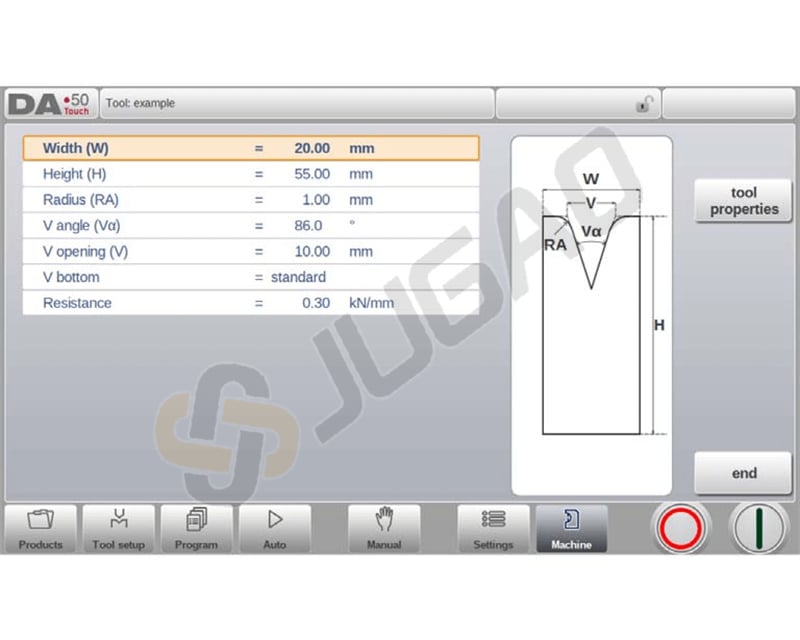
The DELEM DA-53T provides a simplified and structured approach to setting up tools with its intuitive interface. Follow these detailed steps for standard die setup:
1. Width: Enter the tool' s width.
2. Height: Input the total height for bend depth calculations.
3. Radius: Define the edge radius of the V-opening.
4. V Angle: Specify the angle of the die.
5. V Opening: Input the distance between V-opening crossing lines.
6. V Bottom: Choose the bottom type:
Standard: Sharp angle.
Round: Use ‘Inside radius’ for rounded.
Flat: Define with ‘Bottom width'.
7. Resistance: Set the tool’s maximum allowable force.
8. Orientation: Align the die’s right side as the back gauge, centering the V-opening on the press brake.
9. Tool Properties: Edit generic data and give a 25-character description.
10. Mute: Define the muting distance for speed change height.
11. Edit Die: Tap to modify an existing tool in the library using programming tools.
These steps ensure accurate input and setup, enhancing the precision of your press brake operations with the DELEM DA-53T.
Specialty Dies
Hem Bend Die
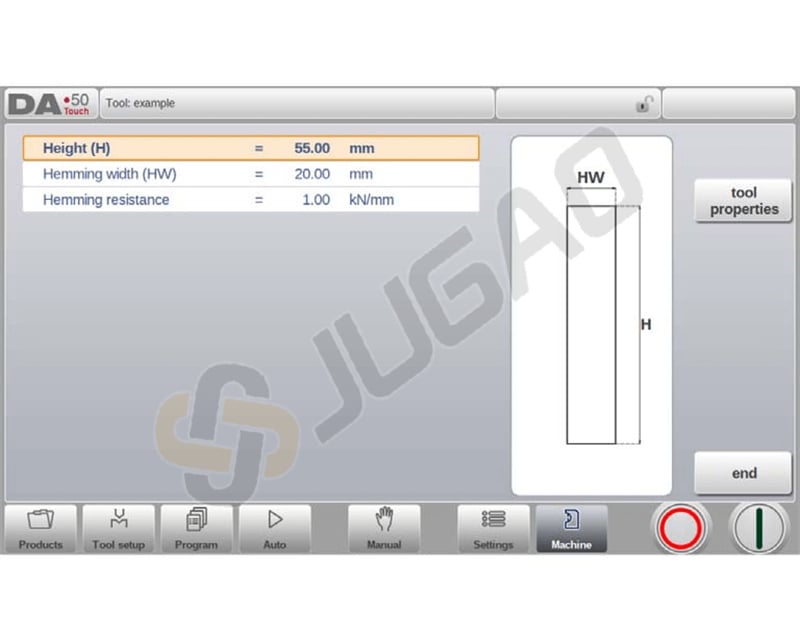
Height: The total height of the tool. Important: this height value will be used in the bend depth calculation.
Hemming width: The width of the tool to program.
Hemming resistance: Maximum allowable force on the tool during hemming.
Inside Hem Bend Die
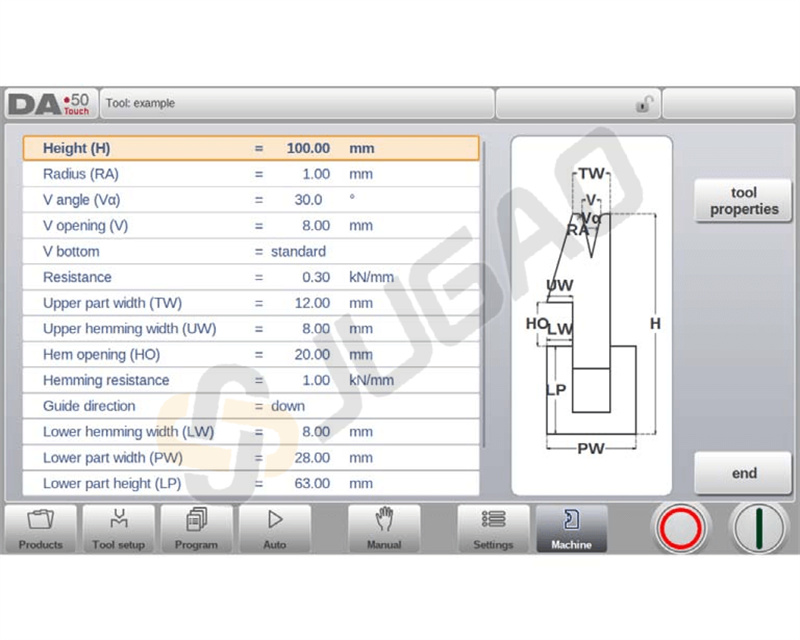
1. Input Tool Dimensions:
Height: Enter the total height for bend depth calculations.
Radius: Specify the edge radius of the V-opening.
V Angle: Set the angle of the die.
V Opening: Input the width of the V-opening.
2. Select V Bottom Type:
Standard: Choose for a sharp angle.
Round: Enter ‘Inside radius’ for a rounded bottom.
Flat: Specify ‘Bottom width’ for a flat bottom.
3. Set Resistance Levels:
Resistance: Define maximum tool force.
Hemming Resistance: Specify force for hemming operations.
4. Configure Die Widths:
Upper Part Width: Enter the upper segment’s width.
Upper Hemming Width: Specify the hemming segment width.
Lower Part Width: Define the lower segment’s width.
5. Establish Hemming Parameters:
Inside Hemming Die Type:
Spring Opened: For spring-assisted start.
Open & Locked: For locked high position.
Normally Closed: For low position activation.
Hem Opening: Input opening height for product placement.
6. Adjust Decompression:
Adapt Decompression:
Select ' no', ‘yes’, or ‘air bend’ to include hem opening in decompression distance.
These steps ensure DELEM DA-53T simplifies tool programming, enhancing operation accuracy and efficiency.
Air + Hem Bend U Die
The DELEM DA-53T simplifies tool programming for air and hem bend U die configurations through detailed steps:
1. Width: Enter the width of the tool.
2. Height: Specify the total height of the tool. Note that this value is used in the bend depth calculation.
3. Radius: Define the radius of the U-opening edges.
4. U Height: Set the height of the U-opening in the die.
5. U Opening: Enter the width of the U-opening in the die.
6. Resistance: Set the maximum allowable force on the tool to prevent damage.
7. Hemming Width: Specify the front width of the die for hem bending support.
8. Hemming Resistance: Define the maximum allowable force during hemming operations.
By following these steps, the DELEM DA-53T ensures precision and ease in tool configuration, optimizing both setup time and performance.
Conclusion
The DELEM DA-53T significantly streamlines tool programming through its intuitive interface and efficient update mechanisms, simplifying the entire workflow. By fully utilizing these capabilities, operators can achieve notable improvements in both press brake accuracy and operational efficiency.
To maximize your system's performance, we recommend maintaining regular software updates and comprehensive functional utilization. For specialized technical support or to learn more about optimizing your machine's potential, our expert team remains at your disposal. We also invite you to explore our extended technical library for additional guidance on enhancing your production processes with the DELEM DA-53T system.

