





Forbedre effektiviteten ved programmering med DELEM DA-52S-produkter
Når det gjelder optimalisering av metallbehandlingsprosesser, skiller DELEM DA-52S-produktprogrammering seg ut som en avgjørende komponent. Hvis du ønsker å forbedre produktiviteten og forenkle driftsprosessene med dette kraftige verktøyet, er du på riktig sted. I denne artikkelen vil jeg gå inn på hvordan DELEM DA-52S-produktprogrammering kan øke effektiviteten i arbeidsflyten din betydelig, og fremheve de viktigste funksjonene og fordelene som gjør den uunnværlig i moderne produksjon. Uansett om du søker å forbedre nøyaktigheten, redusere oppsettstidene eller øke produksjonsmengden, vil denne veiledningen gi deg verdifulle innsikter i hvordan du kan utnytte DELEM DA-52S til maksimal drifteffektivitet.
Programvalg
For å redigere eller opprette et program i DELEM DA-52S-systemet, følg disse trinnene:

Trykk på denne tasten for å aktivere automatisk modus og forberede systemet til programvalg.

Trykk på denne tasten for å åpne programbiblioteket. Dette viser skjermen for programbiblioteket.
Skjermen for programbiblioteket vises:
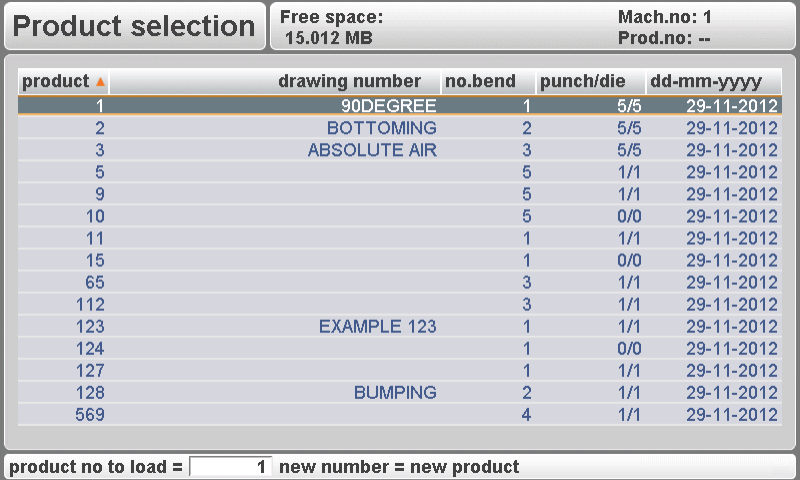
Bruk pil-tastene for å navigere gjennom listen over tilgjengelige programmer.

Trykk på «Enter»-tasten for å velge det markerte programmet.
Et program kan også velges ved å angi nummeret direkte.
For å opprette et nytt program:
Angi et nummer som ikke allerede er brukt. Ved inntasting vil kontrollen spørre deg om du vil opprette et nytt program.
For å slette et program:
Naviger til det spesifikke programmet ved hjelp av markørlinjen.

Trykk på 'slett'-tasten for å endre programnummeret til null.
Trykk på 'ENTER', og kontrollen vil spørre om du vil slette det valgte programmet. Bekreft ditt valg ved å velge ja (1), eller endre deg ved å velge nei (0).
Effektiv programvalg med DELEM DA-52S-produktprogrammering minimerer nedetid og reduserer risikoen for feil. Dette sikrer at operatører kan bytte sømløst mellom oppgaver, opprettholde en produktiv arbeidsflyt og forbedre den totale driftseffektiviteten.
Rediger program
Generelle egenskaper
Når et program er valgt eller opprettet, vises en skjerm som viser de generelle produktparameterne.
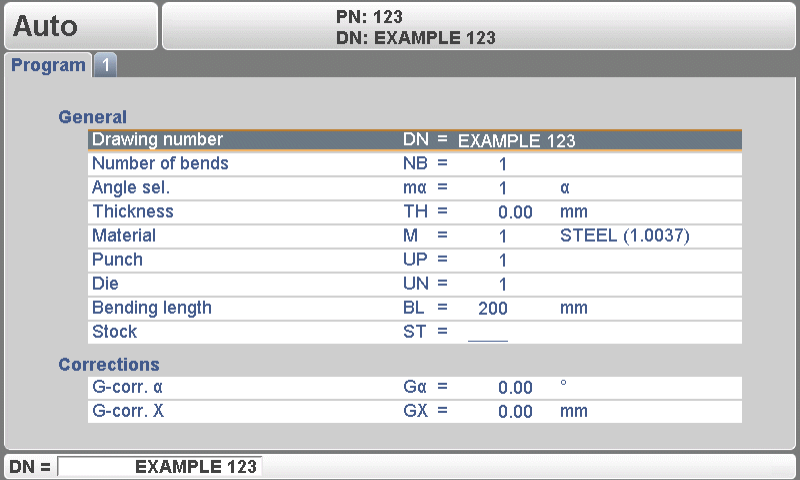
Disse parameterne er like for hver bøyning i programmet og gir en enhetlig oversikt over hoveddataene.
Bruk piltastene opp/ned for å flytte markøren til den ønskede parameteren.
Bruk piltastene venstre/høyre for å bla gjennom de ulike sidene i bøyeprogrammet.
Etter å ha trykket på enter-tasten vil den programmerte verdien bli plassert ved den tilsvarende parameteren.
Forklaring av parametere
DELEM DA-52S tilbyr en omfattende funksjon for forklaring av parametere, som hjelper brukere med å forstå hvordan hver innstilling påvirker utdataene.
Tegningsnummer:
Et navn eller en beskrivelse av programmet. Maksimal lengde er 20 tegn.
Antall bøyer:
Antallet bøyer i det gjeldende programmet.
Når denne verdien økes, kopieres de ekstra bøyene fra den siste bøyen.
Når denne verdien reduseres, slettes de overflødige bøyene.
Vinkelvalg:
Valg av programmeringsmodus for Y-aksen.
0 = absolutt: programmer den absolutte Y-aksisposisjonen for en bøyning.
1 = a: programmer bøyevinkelen. Den nødvendige Y-aksisposisjonen beregnes.
Avhengig av denne parameteren vises enten parameteren «vinkel» eller parameteren «bøyeposisjon» i et bøyetrinn.
Tykkelse: Tykkelsen på arket.
Material:
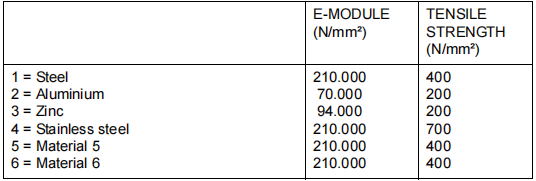
Valg av ett av de programmerte materialene, som brukes til å beregne bøyedybdene. Styreenheten inneholder 4 forhåndsprogrammerte materialer og 2 programmerbare materialer. Totalt kan 6 materialer programmeres på styreenheten. Se kapittelet om programmering av konstanter for hvordan du programmerer materialer.
Stans: Nummer på stansen i biblioteket.
Matrise: Nummer på matrisen i biblioteket.
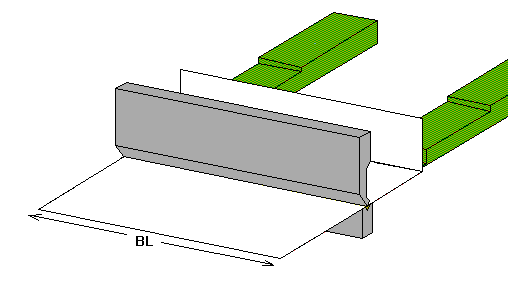
Bøylengde: Lengden på platen mellom verktøyene.
Når en bøyning programmeres, antas det at de programmerte verktøyene har den nødvendige lengden.
Lager: Antall produkter som skal lages med dette programmet.
G-korr α:
Generell korreksjon av vinkelen, gyldig for hver bøy i programmet. Verdien skal programmeres på samme måte som korreksjonen per bøy.
G-korr X:
Generell korreksjon av X-aksens posisjon, gyldig for hver bøy i programmet. Verdien skal programmeres på samme måte som korreksjonen per bøy.
Bøyeprogrammering
Introduksjon
Bøyeprogrammering er kernen i DELEM DA-52S’ funksjonalitet og gir brukerne enestående nøyaktighet og fleksibilitet. Parametrene for én bøye er fordelt over to skjermbilder. Bøyenummeret, produktnummeret og tegningsnummeret vises i øverste rad på skjermen.
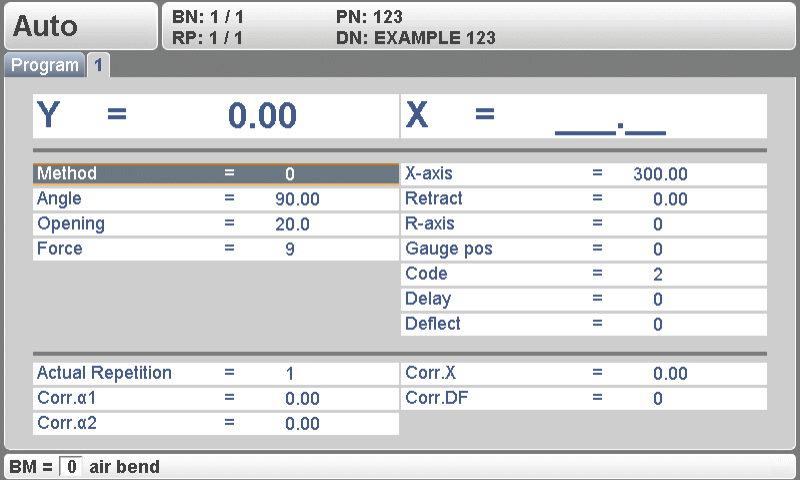

Bruk knappen «bytt visning» for å bytte til en annen side med bøypeparametre. Når denne knappen trykkes igjen, vises et skjermbilde med zoomede verdier.
Parametrene under linjen er korreksjoner. De er ikke nødvendige ved programmering av et produkt, men brukes til å justere maskinens oppførsel under produksjon.
Bøypeparametre – første side
Første side av bøye-parametrene gir en oversikt over primære kontroller.
1. Metode (BM)
Velg mellom luftbøyning og bunnbøyning.
Luftbøyning bruker Y-akse-beregninger for nøyaktige vinkler.
Bunnbøyning bygger på komprimering av platen, der posisjonen avhenger av tonnasje.
2. Vinkel (α)
Angir den ønskede bøyevinkelen.
Viktig i vinkelprogrammeringsmodus for luftbøyning.
3. Bøye-posisjon (Y)
Y-akse-posisjon definerer bøye-plasseringen.
Kritisk for absolutt programmering og ved bruk av bunnmetoder.
4. Åpning (DY)
Styrer avstanden mellom stempel og matrise etter bøyning.
Positive verdier reduserer håndteringstiden.
5. Gjentakelse (CY)
Angir antall gjentakelser for en bøyning.
Forbedrer prosesskonsistensen med opptil 99 gjentakelser.
6. X-akse (X)
Setter posisjonen til bakstopp.
Gir mulighet for inkrementell dimensjonskjeding.
7. Inntrer (DX)
l Angir avstand for tilbaketrekking av bakstopp.
l Sikrer nøyaktig materialehåndtering.
8. Hjelpeakse (R/Z/Aux)
Parametere for ekstra akser, som muliggjør komplekse operasjoner.
9. Kode (CX)
Definerer aktiveringspunktet for parametrene til neste bøyning.
Gir fleksibilitet i alternativene for trinnendring.
Bøyeparametere – Andre side
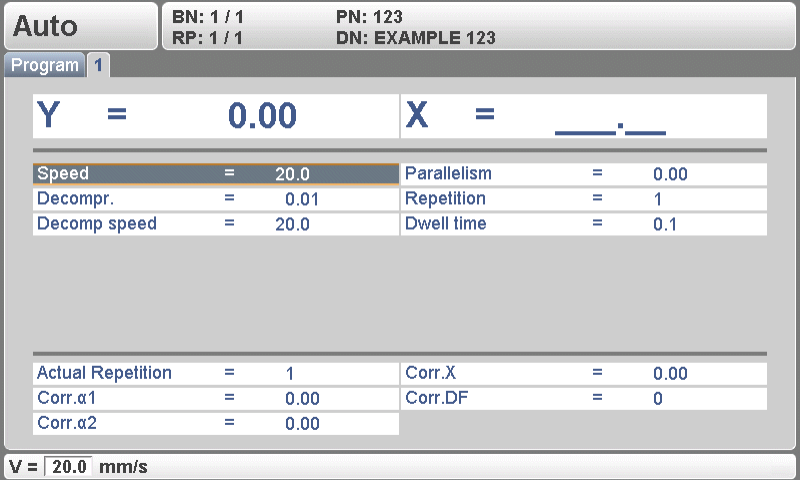
DELEM DA-52S-produktprogrammering gir ytterligere finjustering på den andre siden av bøyeparametrene, og tillater viktige detaljerte justeringer:
Kraft (P): Beregnes automatisk basert på materiale, tykkelse, bøylengde og matrise-V-åpning for å sikre optimal pressekraft.
Hastighet (V): Virker fra en standardverdi for å opprettholde produktkvalitet med justerbar pressehastighet.
Ventevarighet (T): Styrer hvor lenge stempelen holder posisjonen ved bøyepunktet for konsekvente resultater.
Dekompressjon (DC): Frigjør trykket etter bøyning for å beskytte både materiale og maskin.
Dekompressjonshastighet (BS): Justerbar for å angi hastigheten til dekompressjonsbevegelsen, noe som forbedrer håndtering av materialet.
Forsinkelsestid (TX): Programmerbar forsinkelse på 0–30 sekunder for nøyaktig sekvensstyring for å redusere syklustider.
Parallelitet (Y2): Justerer sylindrens parallelitet for å sikre presisjon og konsekvens i resultatene.
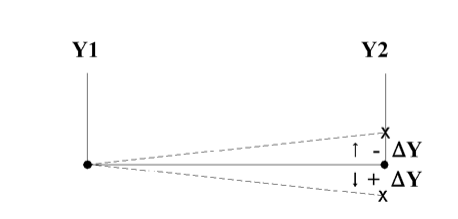
Disse detaljerte innstillingene i DELEM DA-52S-produktprogrammeringen forenkler drift, øker effektiviteten og sikrer høy kvalitet på resultatene.
Bøyeparametre – Tredje side
Denne siden er designet for spesialiserte oppgaver med store tegnstorrelser for «faktiske verdier», noe som gjør den ideell for operatører som jobber på avstand. Nøkkelverdier er lett synlige, slik at overvåking og styring av komplekse operasjoner kan utføres effektivt.
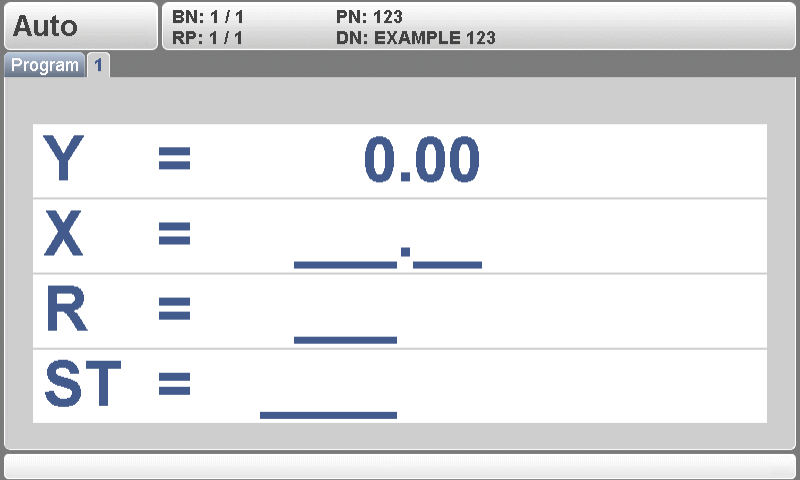
Brukerne kan raskt bytte til denne visningen for avanserte innstillinger eller gå tilbake til første side ved å trykke på knappen «bytt visning», noe som sikrer sømløs navigasjon.
Vis alle bøyninger
DELEM DA-52S-produktprogrammeringssystemet optimaliserer effektiviteten ved å gi en omfattende oversikt over alle programmerte bøyninger. Ved å bruke knappen «bytt visning» på siden for generelle egenskaper kan operatører få tilgang til alle bøyninger i én enkelt visning, noe som sikrer konsistens og tidlig oppdagelse av potensielle problemer.
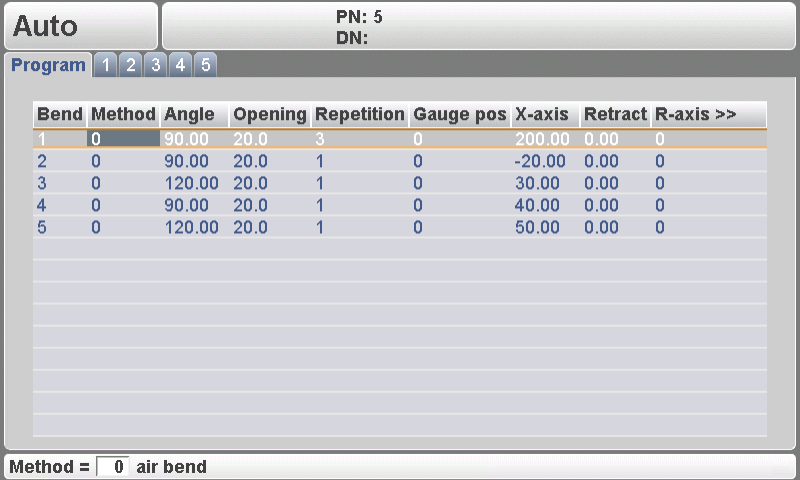
Denne funksjonen tillater direkte start av kontroll og rask navigering tilbake til egenskapssiden, noe som forenkler operasjoner og øker produktiviteten.
Bumping-programmering
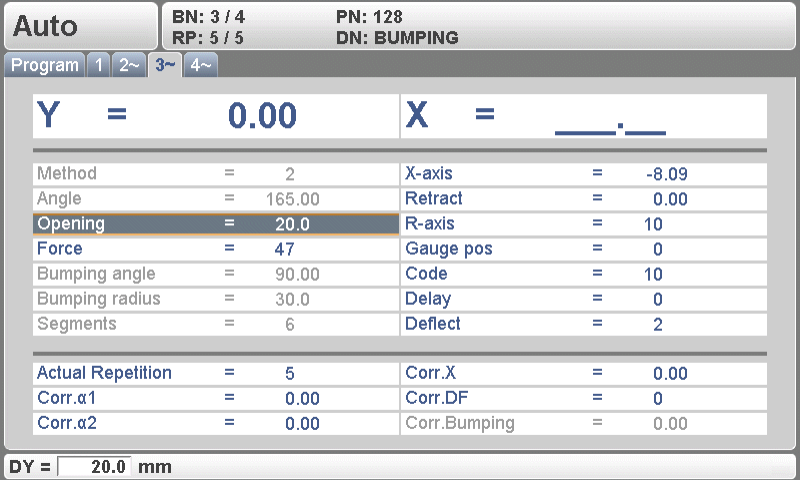
DELEM DA-52S-produktprogrammeringssystemet øker betydelig effektiviteten, spesielt ved behandling av kompliserte design som krever bumping. Dette oppnås gjennom spesialiserte bumping-programmeringsfunksjoner som sikrer presisjon og mangfoldighet i bremseoperasjoner.
For oppgaver som involverer bøying med stor radius tillater DELEM DA-52S enkel numerisk programmering. Operatøren har mulighet til å velge den passende bøymemetoden:
l 0 = Luftbøyning
l 1 = Bunnbøyning
l 2 = Bumping
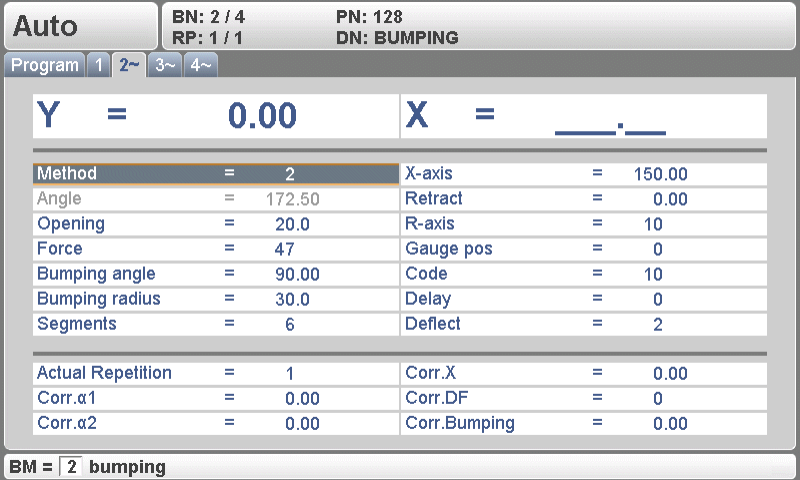
Når bøymemetoden «Bumping» velges, kan operatøren programmere følgende parametre:
Ønsket bumping-radius.
Total bumping-vinkel.
Antall segmenter i radien.
Styringsenheten beregner:
Antall nødvendige bøyninger
Vinklene til de enkelte bøyningene
Bakstopp-posisjonene til de enkelte bøyningene
Den første bøyningen har en absolutt bakstopp-posisjon; de øvrige bøyningene behandles som kjedebøyninger med relative bakstopp-posisjoner.
Konklusjon
Kort sagt kan mestring av DELEM DA-52S-produktprogrammering betydelig forbedre effektiviteten i driften din. Ved å forstå prosessen for programvalg, redigeringsmulighetene og detaljerte parametere for bøyeprogrammering kan du forenkle produksjonen og redusere innstillingsperiodene. En effektiv bruk av DA-52S fremmer smidigere arbeidsflyter og optimal maskinytelse, slik at produksjonsprosessene dine forblir konkurransekraftige og effektive.
For deg som ønsker å maksimere bruken av DELEM DA-52S anbefaler vi å gå grundigere inn på de spesifikke programmeringsveiledningene og utnytte alle tilgjengelige ressurser. Hvis du har flere spørsmål eller trenger mer personlig veiledning, nøl ikke med å kontakte vårt ekspertteam.

