





How the TP10S Controller Elevates Your Bending Machine’s Performance
Table of Contents
• Product Management via the TP10S Controller
• A Detailed Look at TP10S System Features
○ Product Management
○ Main Interface
○ Menu
• Conclusion
Uncover how the TP10S controller boosts your bending machine’s functionality and efficiency through advanced features like product management tools, flexible main interface settings, and comprehensive menu options.
When it comes to optimizing press brake machine operations, the TP10S controller proves to be a revolutionary solution. Boasting a user-centric design and cutting-edge functionalities, it enhances the flexibility, precision, and efficiency of bending tasks—making it an indispensable asset for manufacturers. Below, we explore the key aspects of the TP10S controller that take your bending machine’s performance to new heights.
Product Management via the TP10S Controller
The TP10S controller first enhances your bending machine through its robust product management capabilities. With a simple click on the “P” icon, operators can access the product management interface. Here, users have the flexibility to save, create, retrieve, or delete programs as required, streamlining the process of managing multiple projects and tasks. This feature ensures that your bending operations stay organized and efficient, reducing downtime and optimizing overall workflow.
A Detailed Look at TP10S System Features
The detailed visual breakdowns for each section serve as a valuable supplement to the system’s described functionalities. By presenting clear and insightful depictions of various features and options, these visual aids greatly improve users’ understanding of the system’s capabilities. They illustrate the interface and processes in an intuitive, easy-to-grasp way, helping users master complex procedures more smoothly. Additionally, these visuals boost operational efficiency by shortening the learning curve, lowering the risk of user error, and accelerating the speed at which users can navigate and utilize the system effectively.
Product Management
Clicking the “P” icon grants users access to the product management selection page. This interface enables users to perform a range of program-related functions, such as saving existing programs under new names, developing entirely new programs, retrieving previously stored programs, or removing programs that are no longer in use.
This feature provides a centralized hub for users to efficiently manage their projects and configurations, ensuring a streamlined workflow and easy access to essential data.
Main Interface
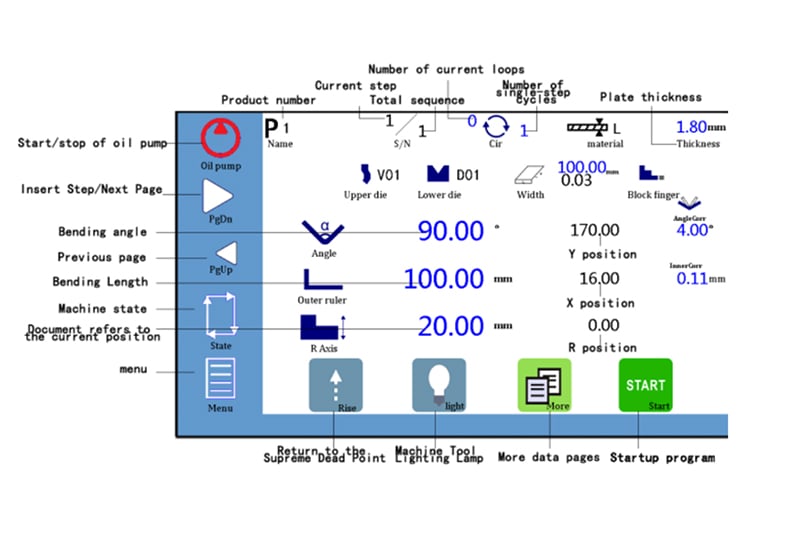
This section of the system allows users to customize various parameters related to bending operations.
Users can add or remove bending steps based on project requirements. They can also define the cycle count, select the sheet metal thickness, and choose the type of material being processed.
Furthermore, by clicking on the icons representing upper and lower molds, users can select the required molds for their process from the 30 default options provided by the system. The names and parameters of these molds are completely adjustable to meet specific project needs.
For angle compensation, users can input desired values via the angle compensation icon. After entering these values and clicking the angle icon, the system automatically displays the corresponding depth compensation values—helping to guarantee precision in bending operations.
By navigating to the “More” page, users can incorporate bending operations involving large arcs. This function allows for the input of specific parameters such as arc angle (a), arc radius (r), arc length (L), and the number of bends (n). Such features expand the system’s versatility in handling a wide array of bending requirements.
Menu
• Manual Movement Page: On this page, users can establish reference points for each axis or manually adjust each axis to the target positions. This functionality is crucial for making precise adjustments to the positioning of materials or components, and it also allows for modifications to other bending-related parameters as needed.
• Parameter Settings Page: This section equips users with the ability to configure valves, switch between different languages, and adjust the system’s processing modes. By clicking “Next Page,” users can access individual axis parameter settings, enabling tailored adjustments to speed, timing, limits, and other critical parameters. This level of customization ensures the system can be optimized for a diverse range of operational scenarios.
• Navigation Page: Designed to facilitate lead learning operations for the axes, this page guides users through the process of setting up and optimizing axis movements. This enhances both the accuracy and efficiency of the system’s performance during operations.
Conclusion
The TP10S controller reshapes the operational mode of bending machines by offering a comprehensive set of features that boost productivity, precision, and flexibility. Whether managing multiple bending projects or customizing settings for specialized operations, the TP10S controller is engineered to meet the diverse needs of modern manufacturing. Its advanced capabilities in product management, main interface functions, and extensive menu options make it an essential tool for any production environment—ensuring high-quality results and efficient processes.
By integrating the TP10S controller into your press brake machines, you not only enhance operational performance but also position your business at the forefront of technological innovation in the bending industry. Embrace the future of precision and efficiency with the TP10S controller, and experience a significant improvement in your operational capabilities.

