





प्रेस ब्रेक बैकगेज की स्थिति अशुद्ध क्यों होती है?
विषय-सूची
• प्रेस ब्रेक बैकगेज स्थिति अनिश्चितता के सामान्य यांत्रिक कारण
○ घिसे हुए बॉल स्क्रू और रैखिक गाइड्स
○ ढीले कपलिंग या विसंरेखित ड्राइव घटक
• बैकगेज की सटीकता को प्रभावित करने वाले विद्युत और सीएनसी सिस्टम कारक
○ सर्वो मोटर एन्कोडर प्रतिपुष्टि त्रुटियाँ
○ सीएनसी नियंत्रक में गलत पैरामीटर सेटिंग्स
• प्रेस ब्रेक बैकगेज सिस्टम को कैलिब्रेट करने की विधि
○ चरण 1: बैकगेज असेंबली का निरीक्षण और सफाई करें
○ चरण 2: यांत्रिक समानांतरता की जाँच करें
○ चरण 3: सीएनसी अक्ष कैलिब्रेशन करें
• बैकगॉज पोज़िशनिंग त्रुटियों को रोकने के लिए रखरखाव के अभ्यास
○ नियमित स्नेहन और सफाई
○ आवधिक शुद्धता परीक्षण
○ पर्यावरण नियंत्रण
• अक्सर पूछे जाने वाले प्रश्न (FAQs)
○ प्रेस ब्रेक बैकगॉज पोज़िशनिंग में अशुद्धि का सबसे आम कारण क्या है?
○ मुझे कैसे पता चलेगा कि मेरे बैकगॉज को पुनः कैलिब्रेट करने की आवश्यकता है?
○ क्या सीएनसी पैरामीटर त्रुटियाँ बैकगॉज पोज़िशनिंग अशुद्धि का कारण बन सकती हैं?
○ मैं बैकगेज की सटीकता की जाँच कितनी बार करनी चाहिए?
• निष्कर्ष
प्रेस ब्रेक बैकगेज की असटीक स्थिति अक्सर मोड़ने के ऑपरेशन में भागों की लंबाई में असंगतता और फ्लैंज के आकार में अस्थिरता के पीछे छुपा हुआ कारण होती है। व्यावहारिक कार्यशाला के अनुभव के आधार पर, ऐसी समस्याओं का मूल कारण आमतौर पर सीएनसी नियंत्रक स्वयं नहीं होता है। इसके बजाय, यह आमतौर पर यांत्रिक घिसावट, गलत कैलिब्रेशन या दैनिक रखरखाव में कमी से उत्पन्न होता है। इस लेख में बैकगेज स्थिति विचलन के सबसे आम स्रोतों का विश्लेषण किया गया है, एक चरण-दर-चरण ट्रबलशूटिंग गाइड प्रदान की गई है, और स्थिर तथा उच्च-सटीकता वाले मोड़ने के प्रदर्शन को बहाल करने के लिए व्यावहारिक क्षेत्र-आधारित समाधान साझा किए गए हैं।
प्रेस ब्रेक बैकगेज स्थिति असटीकता के सामान्य यांत्रिक कारण
बैकगेज प्रणाली उच्च-सटीकता वाले यांत्रिक संचरण भागों पर निर्भर करती है, और यांत्रिक विचलन की भी सबसे छोटी मात्रा भी अंतिम कार्य-टुकड़ों में मिलीमीटर स्तर की त्रुटियों का कारण बन सकती है।
घिसे हुए बॉल स्क्रू और रैखिक गाइड
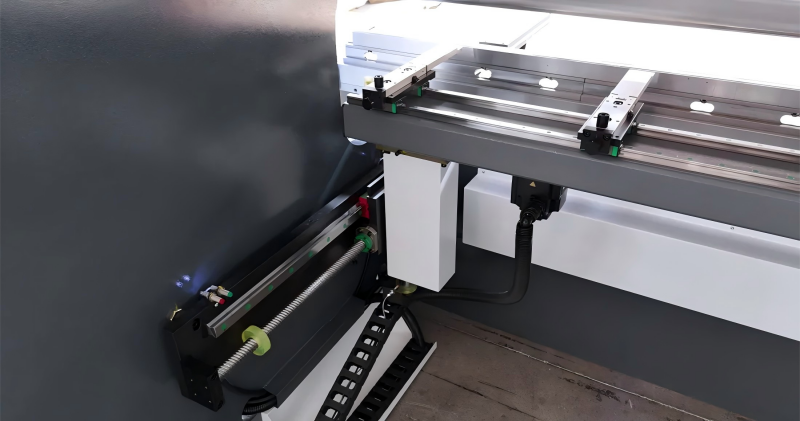
बॉल स्क्रू या रैखिक गाइड रेल पर घिसावट बैकगेज की सटीक स्थिति निर्धारण के प्रमुख कारणों में से एक है। लंबे समय तक उपयोग करने पर, धूल, धातु के छीलन और अपर्याप्त चिकनाई के कारण गति का घर्षण बढ़ जाता है और बैकलैश उत्पन्न होता है, जो सीधे स्थिति निर्धारण की सटीकता को कमजोर कर देता है।
निरीक्षण विधियाँ:
1. जॉग मोड में बैकगेज को हाथ से आगे-पीछे हिलाएँ।
2. गति के दौरान असामान्य शोर या असामान्य कंपन को सुनें।
3. बार-बार स्थिति निर्धारण की सटीकता का परीक्षण करने के लिए डिजिटल कैलिपर का उपयोग करें।
यदि बैकलैश अनुमत टॉलरेंस से अधिक है, तो बॉल स्क्रू को समायोजित करने या प्रतिस्थापित करने की आवश्यकता हो सकती है। नियमित सफाई और चिकनाई इन घटकों के सेवा जीवन को प्रभावी ढंग से बढ़ा सकती है।
ढीले कपलिंग या विसंरेखित ड्राइव घटक
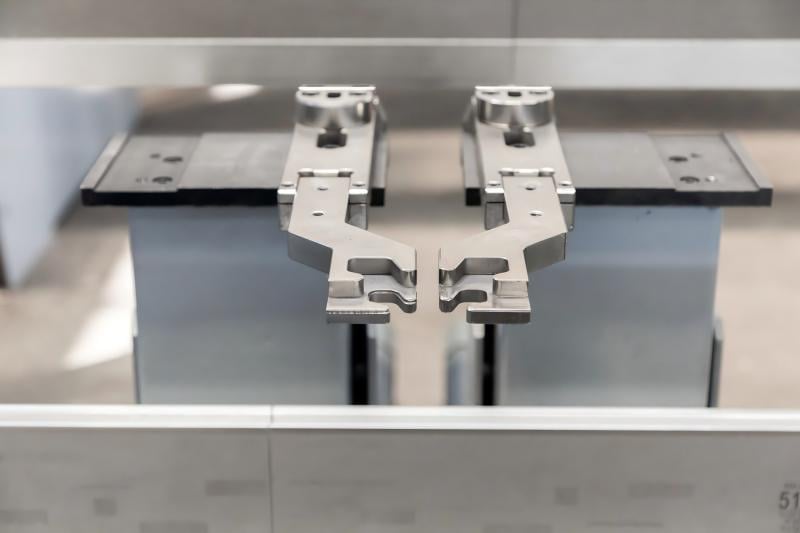
सर्वो मोटर शक्ति को कपलिंग के माध्यम से संचारित करती है ताकि बैकगेज को चलाया जा सके। ढीले कनेक्शन या खराब संरेखण के कारण स्थिति विस्थापन और आयामी सटीकता में अस्थिरता आ सकती है।
मुख्य निरीक्षण वस्तुएँ:
• मोटर माउंट के कसने वाले बोल्ट
• ट्रांसमिशन कपलिंग की कसाव
• मोटर और बॉल स्क्रू के बीच सह-अक्षीय संरेखण
संरेखण की भले ही थोड़ी सी भी विसंगति दोहराव वाली स्थिति निर्धारण विफलताओं को ट्रिगर कर सकती है।
बैकगेज सटीकता को प्रभावित करने वाले विद्युत और सीएनसी प्रणाली के कारक
आधुनिक सीएनसी प्रेस ब्रेक्स में बुद्धिमान नियंत्रकों द्वारा प्रबंधित सर्वो-चालित बैकगेज प्रणालियाँ अपनाई जाती हैं, और विद्युत असामान्यताएँ सीधे स्थिति निर्धारण की सटीकता को समाप्त कर देती हैं।
सर्वो मोटर एन्कोडर प्रतिक्रिया त्रुटियाँ
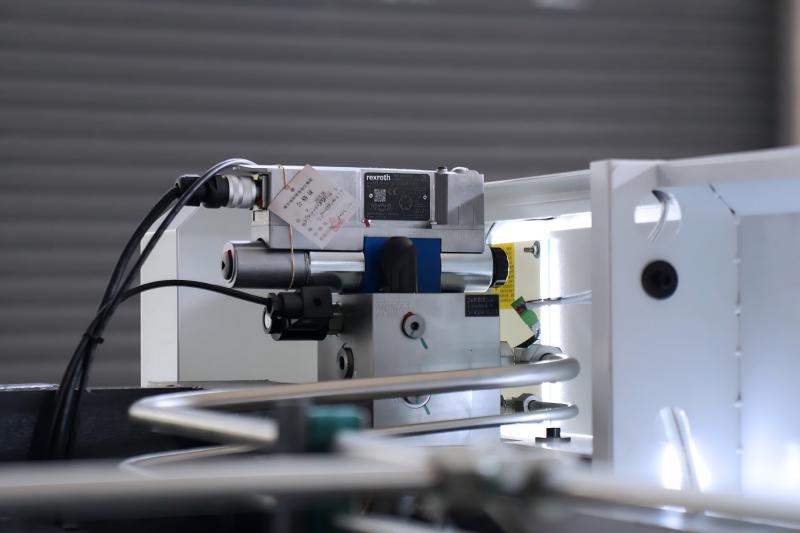
अस्थिर एन्कोडर संकेत सीएनसी प्रणाली को बैकगेज की वास्तविक समय स्थिति को सटीक रूप से पकड़ने से रोकते हैं, जो आमतौर पर इस प्रकार प्रकट होते हैं:
• अस्थिर दोहराव वाली स्थिति निर्धारण सटीकता
• अक्ष विचलन या अनुसरण-त्रुटि अलार्म
• कार्य-टुकड़े के आकार में अचानक उतार-चढ़ाव
समस्या निवारण के चरण:
एन्कोडर केबल और कनेक्टर्स की अखंडता तथा ग्राउंडिंग प्रणाली की विश्वसनीयता की जाँच करें। विद्युत चुम्बकीय हस्तक्षेप से बचने के लिए शील्डेड केबल्स की अखंडता सुनिश्चित करें।
सीएनसी नियंत्रक में गलत पैरामीटर सेटिंग्स
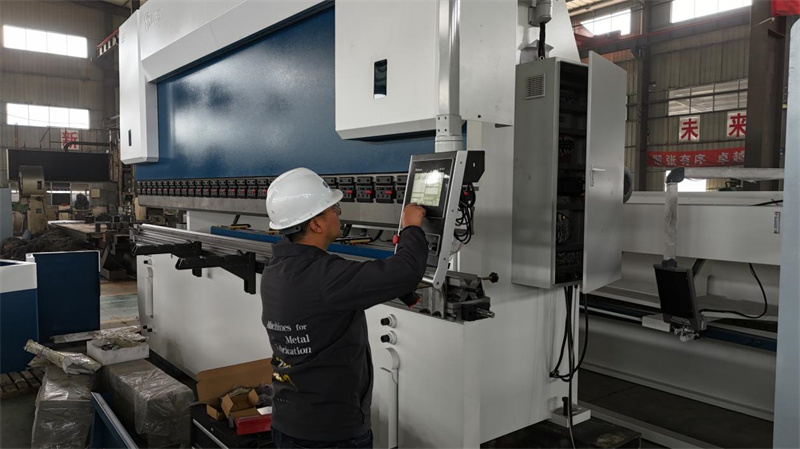
कुछ मामलों में, स्थिति त्रुटियाँ पूर्णतः सॉफ्टवेयर-संबंधित होती हैं। गलत पिच कॉम्पेंसेशन, स्केलिंग पैरामीटर या इलेक्ट्रॉनिक गियर अनुपात सेटिंग्स सीधे बैकगॉज गति की अशुद्धि का कारण बनती हैं।
अनुशंसित सत्यापन चरण:
1. नियंत्रक में बॉल स्क्रू पिच पैरामीटर की पुष्टि करें।
2. इलेक्ट्रॉनिक गियर अनुपात कॉन्फ़िगरेशन की जाँच करें।
3. अक्ष शून्य संदर्भ बिंदु को रीसेट और कैलिब्रेट करें।
बैकगॉज कैलिब्रेशन के दौरान, संदर्भ स्थिति को रीसेट करने से शुरू करें और कार्यक्रमित यात्रा दूरी की वास्तविक मापी गई मान के साथ तुलना करें।
प्रेस ब्रेक बैकगॉज सिस्टम कैलिब्रेशन कैसे करें
कैलिब्रेशन सामूहिक स्थिति त्रुटियों को दूर करने और सटीकता को पुनर्स्थापित करने का सबसे प्रभावी तरीका है।
चरण 1: बैकगॉज असेंबली का निरीक्षण और सफाई करें
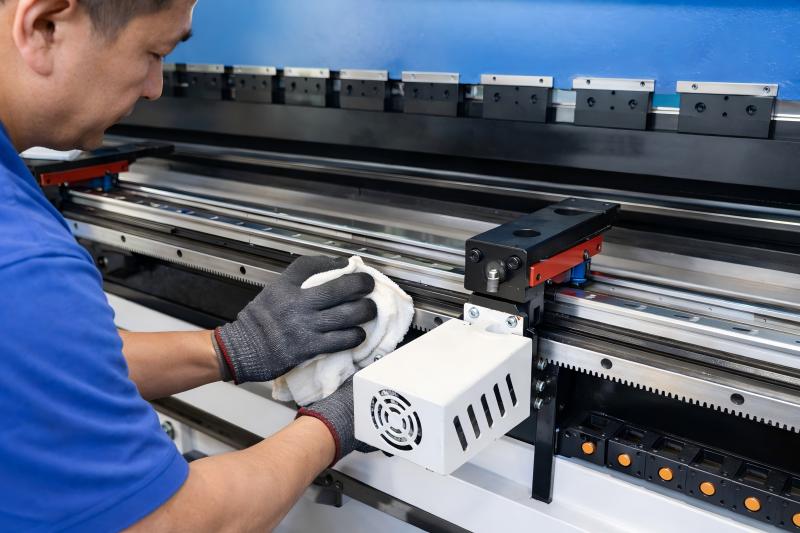
औपचारिक कैलिब्रेशन से पहले, मुख्य घटकों की व्यापक सफाई करें:
• रैखिक गाइड रेल
• बॉल स्क्रू
• बैकगेज फिंगर्स
• सेंसर डिटेक्शन सतहें
जमा हुआ धूल और कचरा असमान गति प्रतिरोध का कारण बनेगा और कैलिब्रेशन परिणामों को प्रभावित करेगा।
चरण 2: यांत्रिक समानांतरता की जाँच करें
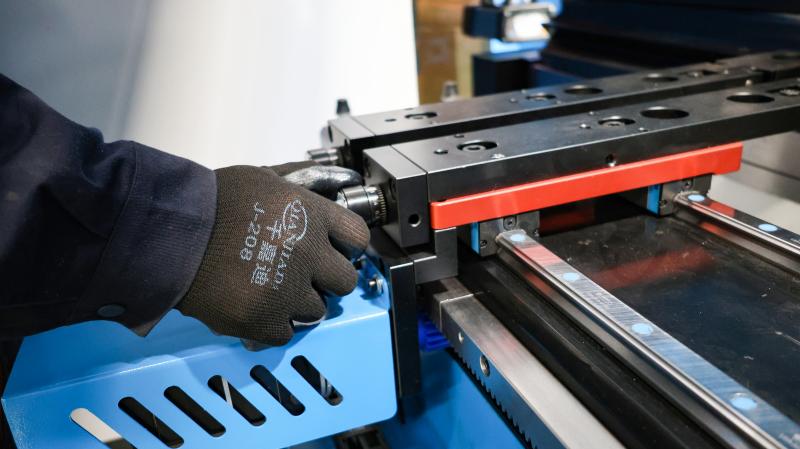
एक परिशुद्ध सीधी किनारा या डायल सूचक का उपयोग करके सत्यापित करें कि बैकगेज के बाएँ और दाएँ ओर समकालिक रूप से गति करते हैं। यदि कोई ओर पीछे रह जाती है, तो तुरंत समकालन समायोजन करें।
चरण 3: सीएनसी अक्ष कैलिब्रेशन करें
अधिकांश सीएनसी प्रणालियाँ मैनुअल अक्ष कैलिब्रेशन का समर्थन करती हैं:
1. बैकगॉज को एक निश्चित संदर्भ स्थिति पर ले जाएँ।
2. टूल केंद्र रेखा से वास्तविक दूरी को मापें।
3. सुधार मान को सीएनसी नियंत्रक में दर्ज करें।
कैलिब्रेशन के बाद, स्थिरता और सुसंगति की पुष्टि के लिए कई स्ट्रोक दूरियों पर बार-बार स्थिति परीक्षण चलाएँ।
बैकगॉज स्थिति त्रुटियों को रोकने के लिए रखरखाव प्रथाएँ
निवारक रखरखाव, विफलता के बाद की मरम्मत की तुलना में कहीं अधिक लागत-प्रभावी है। निरंतर देखभाल से अधिकांश बैकगॉज स्थिति संबंधित समस्याओं को टाला जा सकता है।
नियमित चिकनाई और सफाई
• उच्च आवृत्ति वाली कार्यरत मशीनों के लिए बैकगॉज रैखिक गाइडों की साप्ताहिक चिकनाई करें।
• भारी धातु के छीलन या धूल वाले कार्यशालाओं में धूल और मलबे की दैनिक सफाई करें।
आवधिक शुद्धता परीक्षण
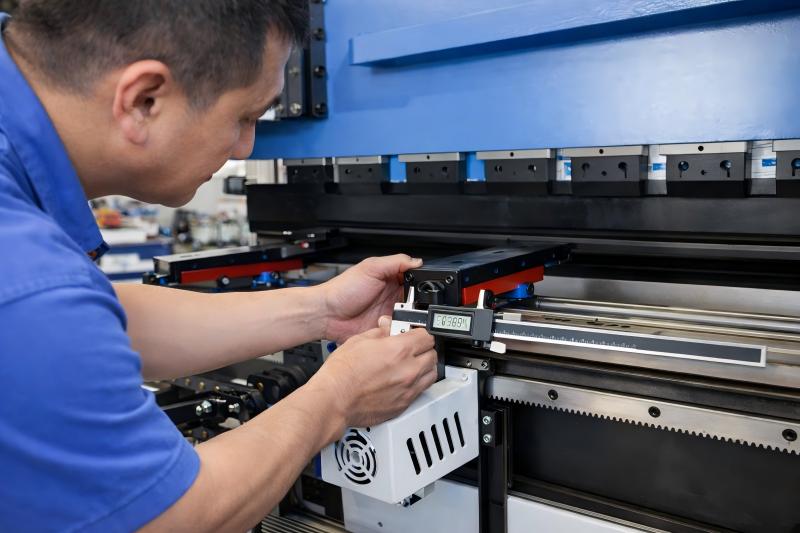
सटीकता परीक्षण मासिक रूप से करें:
1. बैकगॉज को बार-बार 100 मिमी की स्थिति पर जाने का निर्देश दें।
2. सटीक उपकरणों का उपयोग करके वास्तविक स्थिति को मापें।
3. विचलन मान की तुलना करें और उसे रिकॉर्ड करें।
यदि विचरण सहनशीलता सीमा से अधिक हो जाता है, तो तुरंत प्रणाली का निरीक्षण करें और समायोजित करें।
पर्यावरण नियंत्रण
तापमान परिवर्तन यांत्रिक भागों के ऊष्मीय प्रसार का कारण बनते हैं। उन कार्यशालाओं में, जहाँ तापमान में बड़े उतार-चढ़ाव होते हैं, उच्च-सटीकता वाले मोड़ने के कार्यों को करने से पहले मशीन को वार्म अप कर लेना चाहिए।
पूछे जाने वाले प्रश्न
प्रेस ब्रेक बैकगॉज स्थिति निर्धारण की अशुद्धि की सबसे आम वजह क्या है?
गोल बोल्ट (बॉल स्क्रू) का यांत्रिक घिसावट और अपर्याप्त स्नेहन सबसे आम कारण हैं, जिसके बाद कपलिंग का ढीलापन और एन्कोडर सिग्नल प्रतिक्रिया में दोष आते हैं।
मुझे कैसे पता चलेगा कि मेरे बैकगॉज को पुनः कैलिब्रेट करने की आवश्यकता है?
यदि बार-बार मोड़ने के कार्यों से स्थिर आकारिक विचलन उत्पन्न होते हैं, विशेष रूप से फ्लैंज की लंबाई में, तो बैकगॉज को पुनः कैलिब्रेट करना चाहिए।
क्या सीएनसी पैरामीटर त्रुटियाँ बैकगेज स्थिति अशुद्धि का कारण बन सकती हैं?
हाँ। सीएनसी नियंत्रक में गलत पिच कॉम्पेंसेशन, स्केलिंग पैरामीटर या संदर्भ बिंदु सेटिंग्स सीधे अक्ष स्थिति शुद्धता को प्रभावित करेंगे।
मैं बैकगेज शुद्धता की जाँच कितनी बार करूँ?
निरंतर संचालन वाले उत्पादन वातावरण के लिए मासिक शुद्धता जाँच की सिफारिश की जाती है। किसी भी मशीन टक्कर या अतिभार घटना के तुरंत बाद तुरंत निरीक्षण की आवश्यकता होती है।
निष्कर्ष
अशुद्ध प्रेस ब्रेक बैकगेज स्थिति दुर्लभता से ही आकस्मिक होती है। यह आमतौर पर यांत्रिक घिसावट, ढीले संचरण भागों, विद्युत संकेत प्रतिपोषण दोषों या अनुचित कैलिब्रेशन के कारण होती है। एक संरचित निरीक्षण प्रक्रिया का पालन करके—यांत्रिक संचरण घटकों की जाँच करना, सर्वो एन्कोडर संकेतों की पुष्टि करना और सीएनसी अक्षों का पुनः कैलिब्रेशन करना—आप स्थिति शुद्धता को शीघ्रता से पुनः प्राप्त कर सकते हैं।
नियमित चिकनाई, आवधिक सटीकता परीक्षण और उचित कैलिब्रेशन जैसी दैनिक प्रथाएँ कच्चे माल के अपशिष्ट और पुनर्कार्य (रीवर्क) की लागत को काफी कम कर सकती हैं। यदि आपको लगातार स्थिति त्रुटियाँ दिखाई दें या आपको व्यावसायिक तकनीकी सहायता की आवश्यकता हो, तो दीर्घकालिक बेंडिंग स्थिरता और उत्पादन दक्षता सुनिश्चित करने के लिए एक विशेषज्ञ सेवा टीम से संपर्क करें।

