





راهنمای پیکربندی ابزار DELEM DA-53T چیست؟
فهرست مطالب
• نحوه پیکربندی ابزارهای DELEM DA-53T
○ مرحله ۱: دسترسی به تنظیمات ابزار
○ مرحله ۲: انتخاب پانچ و قالب
○ مرحله ۳: تأیید تغییرات ابزار
• مشکلات رایج در پیکربندی ابزار DELEM DA-53T
○ انتخاب نادرست ابزار
○ خطاهای کالیبراسیون
• نکاتی برای پیکربندی بهینه ابزار DELEM DA-53T
○ بررسیهای دورهای
○ بازبینی مدارک
• سؤالات متداول (FAQ)
○ چگونه باید پانچ و ماتریس مناسب را در پیکربندی ابزار DELEM DA-53T انتخاب کنم؟
○ در صورت بروز خطا در فرآیند پیکربندی ابزار DELEM DA-53T باید چه کاری انجام دهم؟
○ چه زمانی باید پیکربندی ابزار DELEM DA-53T دستگاه ت brakes پرس خود را بازبینی کنم؟
• نتیجهگیری
در زمینه پیکربندی ابزار دستگاه ت brakes پرس، درک کامل از پیکربندی ابزار DELEM DA-53T برای بهینهسازی فرآیندهای فلزکاری ضروری است. چه شما کاربر جدیدی هستید که به دنبال راهنمای اولیه تنظیمات هستید و چه کاربر باسابقهای که به دنبال بهبود مهارتهای عملیاتی خود است، این راهنما بینشهای عملی و ارزشمندی را ارائه میدهد تا بتوانید کارایی و دقت عملیاتی خود را افزایش دهید.
نحوه پیکربندی ابزارهای DELEM DA-53T
مرحله 1: دسترسی به تنظیمات ابزار
برای ویرایش یا تنظیم مجدد پیکربندی ابزار، ابتدا محصول هدف را از کتابخانه محصولات انتخاب کنید و سپس به رابط تنظیم ابزار دسترسی پیدا کنید. این رابط شامل پیکربندی فعلی ماشین است که اطلاعات دقیقی درباره تنظیمات قالب برش (Punch) و قالب زیرین (Die) ارائه میدهد.
مرحله ۲: انتخاب قالب برش و قالب زیرین
پس از ورود به صفحه تنظیم ابزار، میتوانید ابزارها را حسب نیاز انتخاب و جایگزین کنید. ابزارهای بالایی (قالب برش) و پایینی (قالب زیرین) از کتابخانه جامع ابزار قابل انتخاب هستند. کافی است روی «انتخاب قالب برش» یا «انتخاب قالب زیرین» ضربه بزنید تا ابزارها را مطابق نیازهای خاص پیکربندی خود تنظیم کنید.
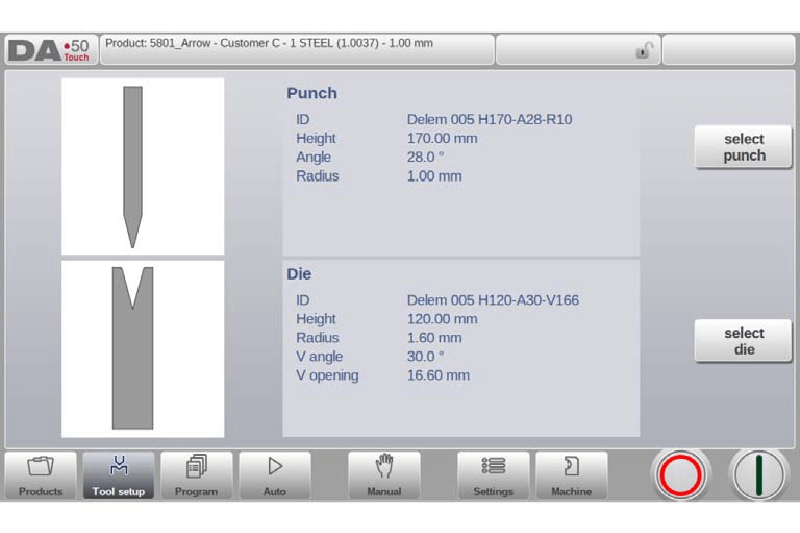
انتخاب ابزارهای مناسب برای تضمین کیفیت و دقت هر عملیات خمکاری حیاتی است. هنگام انتخاب ابزارها، باید عواملی مانند نوع ماده مورد پردازش، ضخامت آن و زاویه خمکاری مورد نیاز را در نظر گرفت. توجه دقیق به این جزئیات نه تنها تضمین میکند که دستگاه به بهترین شکل کار کند، بلکه همچنین ضایدات ماده را به حداقل میرساند. علاوه بر این، ارزیابی سازگری بین پانچ انتخابشده، ماتریس و این متغیرهای کلیدی به افزایش عمر مفید ابزارها کمک میکند و از آسیبهای غیرضروری جلوگیری مینماید.
مرحله 3: تأیید تغییرات ابزار
پس از انتخاب پانچ و ماتریس موردنظر، تغییرات پیکربندی را بهدقت روی صفحه بررسی کنید تا مطمئن شوید که کاملاً با مشخصات محصول شما مطابقت دارند—این نکته کلیدی است برای حفظ دقت عملیات.
بهشدت توصیه میشود که قبل از شروع تولید در مقیاس کامل، یک آزمون با استفاده از قطعه نمونه انجام شود تا دقت تنظیمات دوباره بررسی گردد. این مرحله برای شناسایی عدم هممحوریهای احتمالی یا خطاهای راهاندازی بسیار حیاتی است. با رفع هرگونه مشکل در حین آزمون، میتوانید اصلاحات فوری انجام دهید و در نهایت زمان و منابع خود را در بلندمدت ذخیره کنید.
مشکلات رایج در پیکربندی ابزار DELEM DA-53T
انتخاب نادرست ابزار
یکی از مشکلات متداول، انتخاب نادرست قالب یا ماتریس است که میتواند منجر به عملیات خمزنی نادقیق شود. بنابراین، ضروری است که قبل از ادامه فرآیند تولید، تمام انتخابهای ابزار دوباره بررسی و تأیید شوند.
از توابع جستجو و فیلتر در کتابخانه ابزار بهطور کامل استفاده کنید تا بتوانید به سرعت و دقت، ابزارهای سازگار با پروژه خود را پیدا کنید. روند بهینهسازی انتخاب ابزار به این شکل نه تنها کارایی را افزایش میدهد، بلکه خطر خطاهای انسانی را نیز کاهش میدهد. به عنوان یک روش بهتر، مرحلهای در چکلیست قبل از تولید در نظر بگیرید که در آن مشخصات ابزارها را با نیازمندیهای خاص کار مقایسه کنید.
خطاهای کالیبراسیون
پس از تکمیل تنظیمات ابزار، ضروری است که اطمینان حاصل کنید دستگاه بهدرستی کالیبره شده است تا از خطاهای تولید جلوگیری شود. کالیبراسیون مناسب پایهای برای حفظ دقت و قابلیت اطمینان هر عملیات خمکاری است.
علاوه بر کالیبراسیون منظم، زمانبندی برای بازرسیهای تعمیر و نگهداری ماهانه تنظیم کنید. این بازرسیها باید شامل بررسی تراز ابزارها، معاینه وضعیت دستههای ابزار و انجام تنظیمات جزئی در صورت لزوم باشد. اجرای یک رویکرد سیستماتیک در تعمیر و نگهداری نه تنها عمر مفید دستگاه را افزایش میدهد، بلکه کیفیت تولید را به طور مداوم در طول زمان تضمین میکند.
نکاتی برای پیکربندی بهینه ابزار DELEM DA-53T
بررسیهای روتین
ابزارهای موجود در کتابخانه را به طور منظم از نظر علائم فرسودگی و خوردگی بررسی کنید تا از اختلالات غیرمنتظره در حین فرآیندهای پیکربندی و تولید جلوگیری شود.
در نظر داشته باشید که یک دفترچه سیستماتیک دیجیتالی برای پیگیری استفاده از ابزارها، فعالیتهای تعمیر و نگهداری و هرگونه مشکل شناساییشده ایجاد کنید. این دفترچه به عنوان یک منبع متمرکز برای تمام اعضای تیم عمل میکند، بینش ارزشمندی در مورد عملکرد دستگاه فراهم میکند و امکان شناسایی و حل مسائل بالقوه را به صورت پیشگیرانه قبل از تشدید فراهم میآورد.
بررسی مدارک
زمان بگذارید تا مستندات رسمی DELEM DA-53T را مطالعه کنید و خود را با آخرین پیکربندیهای ابزار و بهروزرسانیهای سیستم آشنا کنید.
در جریان بهروزرسانیها و ارتقاءهای نرمافزاری منتشر شده توسط سازنده قرار داشته باشید. بهروزرسانی منظم نرمافزار سیستم شما تضمین میکند که به آخرین ویژگیها و بهینهسازیهای عملکرد دسترسی داشته باشید، که میتواند به طور قابل توجهی کارایی و دقت عملیات شما را افزایش دهد.
سوالات متداول (FAQ)
چگونه باید پانچ و ماتریس مناسب را در پیکربندی ابزار DELEM DA-53T انتخاب کنم؟
برای انتخاب پانچ و ماتریس مناسب، به منوی تنظیم ابزار در رابط کاربری DELEM DA-53T بروید. از اینجا میتوانید کتابخانه ابزارها را مرور کرده و پانچ و ماتریسی را انتخاب کنید که با نیازهای پروژه شما مطابقت داشته باشد، مانند نوع ماده و زاویه خم مورد نظر.
اگر در حین فرآیند پیکربندی ابزار DELEM DA-53T با خطاهایی مواجه شوم، چه باید انجام دهم؟
اگر خطاهایی در طول پیکربندی ابزار رخ دهند، ابتدا بررسی کنید که تمام ابزارها به درستی نصب و همخط شده باشند. در مرحله بعد، تائید کنید که پانچ و ماتریس انتخاب شده با مشخصات فنی مورد نیاز پروژه شما مطابقت دارند. اگر خطاهایی همچنان ادامه دارند، به مستندات DELEM DA-53T مراجعه کنید یا جهت کمک بیشتر با پشتیبانی فنی تماس بگیرید.
چه زمانی باید پیکربندی ابزار DELEM DA-53T دستگاه خمکاری من را بررسی کنم؟
توصیه میشود هر بار که پروژهها را تغییر میدهید، پیکربندی ابزار DELEM DA-53T را بررسی و در صورت نیاز بهروزرسانی کنید. بررسیهای منظم به حفظ دقت ابزار و کارایی عملیاتی کمک میکنند، بهویژه هنگام کار با مواد یا نیازمندیهای خمکاری متفاوت.
نتیجهگیری
در مجموع، تنظیم ابزار DELEM DA-53T نقش کلیدی در بهینهسازی عملکرد دستگاه خمزنی شما ایفا میکند. با انتخاب دقیق سنبه و ماتریس مناسب از کتابخانه ابزار، بررسی کامل پیکربندی و انجام منظم کالیبراسیون و بازرسیهای نگهداری، میتوان دقت و کارآیی عملیات فلزکاری را تضمین نمود. رعایت این دستورالعملها برای به حداقل رساندن خطر خطاهای احتمالی و کاهش زمان توقف تولید ضروری است.
برای راهنمایی شخصیتر یا پاسخ به سؤالات خاص مربوط به پیکربندی ابزار شما، تیم متخصصان ما همیشه آماده کمک به شما است. در صورت نیاز به حمایت بیشتر یا درخواست اسناد اضافی درباره سیستم DELEM DA-53T، لطفاً با ما تماس بگیرید. همچنین میتوانید وبسایت ما را برای دسترسی به منابع فراوانی که به منظور کمک به شما در به حداکثر رساندن پتانسیل تجهیزاتتان طراحی شدهاند، بررسی کنید. انجام این مراحل نه تنها عمر خدماتی دستگاه شما را افزایش خواهد داد، بلکه به طور قابل توجهی نیز کارایی کلی تولید شما را بهبود میبخشد.

