





Wie man das Einfrieren des CNC-Systems der JUGAO-Abkantpresse behebt
Inhaltsverzeichnis
1. Was verursacht das Einfrieren des JUGAO-Abkantpresse-CNC-Systems?
2. Schritt-für-Schritt-Fehlersuche beim Einfrieren des JUGAO-Abkantpresse-CNC-Systems
○ Schritt 1: CNC-Steuerung sicher neu starten
○ Schritt 2: Speicher und Programmkapazität des CNC-Systems prüfen
○ Schritt 3: Elektrikschrank und Kühlsystem inspizieren
○ Schritt 4: Kommunikation zwischen CNC und Servoantrieben bestätigen
○ Schritt 5: Stabilität der Stromversorgung testen
3. Tägliche Präventionstipps gegen das Einfrieren des JUGAO-Abkantpresse-CNC-Systems
○ Regelmäßige CNC-Software-Updates
○ Geplante Wartung elektrischer Ausrüstung
○ Standardisierte CNC-Programmverwaltung
4. Häufig gestellte Fragen
○ Warum friert mein JUGAO-Abkantpresse-CNC-System während des Abkantens ein?
○ Kann ein einfacher Maschinenneustart das Einfrieren des CNC-Systems beheben?
○ Wie kann ich das Einfrieren des CNC-Systems an meiner JUGAO-Abkantpresse vermeiden?
○ Führt Überhitzung zum Einfrieren der CNC-Steuerung?
5. Fazit
Wenn das CNC-System einer JUGAO-Abkantpresse während der Produktion einfriert, stoppt die Abkantarbeitsfolge sofort und beeinträchtigt die gesamte Werkstatteffizienz. Dieses Problem tritt häufig in hochfrequent genutzten Fertigungswerkstätten auf, in denen Abkantpressen kontinuierlich im Einsatz sind. Ein eingefrorenes CNC-Steuergerät wird typischerweise durch Softwarefehler, Hardware-Kommunikationsstörungen, Speicherüberlastung oder instabile Stromversorgung ausgelöst. Die gute Nachricht ist, dass die meisten Einfrierprobleme mithilfe einer standardisierten, schrittweisen Fehlersuchmethode identifiziert und behoben werden können. In dieser Anleitung werden die typischen Ursachen dieses Problems ausführlich erläutert und praktische, sichere Lösungen vorgestellt, um das CNC-System schnell wieder in den Normalbetrieb zu bringen.
Was verursacht das Einfrieren des JUGAO-Abkantpresse-CNC-Systems?
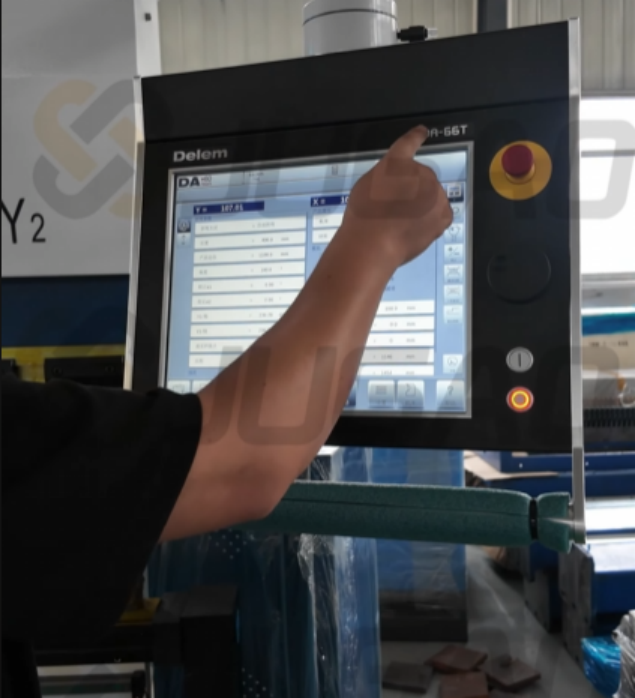
Bevor der Fehler behoben wird, ist es entscheidend, die Ursache zu identifizieren. Ein Einfrieren des CNC-Systems bei JUGAO-Abkantpressen tritt nahezu niemals ohne zugrundeliegende Ursachen auf.
Die wichtigsten auslösenden Faktoren sind:
• Überlastung des CNC-Speichers durch zu große Biegeprogramme
• Vorübergehende Softwarefehler im CNC-Regler
• Elektrische Störungen oder schwankende Eingangsspannung
• Unterbrochene Kommunikationsverbindungen zwischen Regler und Servosystem
• Zu hohe Temperatur im elektrischen Schaltschrank
Die Klärung dieser Ursachen hilft, blinde Neustarts zu vermeiden und gezielte Fehlersuche sicherzustellen.
Schritt-für-Schritt-Fehlersuche beim Einfrieren des JUGAO-Abkantpresse-CNC-Systems
Bei einem eingefrorenen CNC-System an JUGAO-Abkantpressen folge ich einem strukturierten Fehlersuchablauf, um Sicherheit und Effizienz zu gewährleisten.
Schritt 1: CNC-Steuerung sicher neu starten
Die erste und einfachste Maßnahme besteht darin, einen regulierten Neustart des CNC-Systems durchzuführen.
1. Beenden Sie sofort alle Maschinenoperationen.
2. Schalten Sie die CNC-Steuerung über das Bedienfeld aus.
3. Warten Sie 30 bis 60 Sekunden, bevor Sie die Anlage erneut einschalten.
4. Starten Sie die Steuerung neu und prüfen Sie, ob das System normal reagiert.
Ein Neustart kann vorübergehende Speicherüberlastungen und geringfügige Softwarekonflikte beheben, die zu Einfrieren führen. Tritt das Problem häufig wieder auf, ist eine weitere, detaillierte Inspektion erforderlich.
Schritt 2: Speicher und Programmkapazität des CNC-Systems prüfen
Zu große Biegeprogramme oder eine hohe Anzahl gespeicherter Dateien können die Steuerung leicht überlasten.
Wichtige Prüfpunkte:
• Anzahl der gespeicherten Programme
• Überflüssige, nicht verwendete Biegedateien
• Nutzungsgrad des CNC-Speichers
Falls der Speicher nahezu voll ist, löschen Sie unnötige Programme und sichern Sie wichtige Dateien auf externen Speichermedien. Eine Reduzierung der Systemlast verhindert wiederholtes Einfrieren wirksam.
Schritt 3: Elektrikschrank und Kühlsystem inspizieren
Eine Überhitzung im elektrischen Schaltschrank ist eine der häufigsten Ursachen für das Einfrieren von CNC-Maschinen.
Überprüfen Sie diese Komponenten:
• Kühlgebläse
• Luftfiltergitter
• Lüftungsdüsen
Staubansammlung behindert den Luftstrom und führt zur Überhitzung von CNC-Prozessoren und Servotreibern. Durch die Reinigung des Schaltschranks und die Verbesserung der Lüftung kann der Systembetrieb stabilisiert und das Einfrieren des Systems vermieden werden.
Schritt 4: Kommunikation zwischen CNC und Servoantrieben bestätigen
Moderne JUGAO-CNC-Abkantpressen sind auf eine stabile Signalübertragung zwischen Steuerung, Servotreibern und Sensoren angewiesen.
Eine Unterbrechung der Signalübertragung führt unmittelbar zum Einfrieren des Systems.
Überprüfen Sie diese Teile:
• Kommunikationskabel für Servotriebe
• Anschlussbuchsen für Encoder
• Verkabelung des Hinteranschlagmotors
• Fieldbus- oder EtherCAT-Anschlussleitungen
Lose Stecker oder beschädigte Kabel stören die Signalübertragung und lösen Einfrierungen aus. Das erneute Anschließen und Festziehen dieser Kabel stellt in der Regel wieder die Systemstabilität her.
Schritt 5: Stabilität der Stromversorgung testen
Eine instabile Spannung ist ein versteckter Auslöser für das Einfrieren von CNC-Steuerungen.
Messen und überprüfen Sie Folgendes:
• Stabile Eingangsspannung
• Zuverlässige Erdungsverbindung
• Keine offensichtliche elektrische Störung
Die Installation von Spannungsstabilisatoren oder Überspannungsschutzgeräten reduziert das Risiko von Einfrierungen in Fabriken mit instabilen Stromnetzen erheblich.
Tägliche Präventionstipps gegen das Einfrieren des JUGAO-Abkantpresse-CNC-Systems
Vorbeugung ist wirksamer als Reparatur. Langjährige Erfahrung zeigt, dass einfache tägliche Wartungsmaßnahmen die Ausfallrate von CNC-Systemen drastisch senken können.
Regelmäßige CNC-Software-Updates
Das Aktualisieren der CNC-Software gewährleistet die Kompatibilität mit der Hardware und behebt bekannte Systemfehler. Installieren Sie stets Firmware-Updates des Steuerherstellers gemäß den offiziellen Anweisungen.
Geplante Wartung elektrischer Ausrüstung
Die Routineinspektion umfasst:
• Anziehen elektrischer Anschlüsse
• Reinigen von Schaltschränken
• Überprüfen der Erdungssysteme
• Überprüfen des Status der Servoantriebe
Diese Schritte gewährleisten eine stabile elektrische Leistung und verhindern das Einfrieren des CNC-Systems.
Standardisierte CNC-Programmverwaltung
Ein effektives Programmmanagement ist ebenso wichtig.
Empfohlene Vorgehensweisen:
• Löschen Sie regelmäßig nicht verwendete Biegeprogramme
• Sichern Sie wichtige Daten in regelmäßigen Abständen
• Ordnen Sie Programmdateien strukturiert an
Dies verringert die Speicherlast und verbessert die Systemreaktionsgeschwindigkeit.
Häufig gestellte Fragen
Warum friert mein JUGAO-Abkantpresse-CNC-System während des Abkantens ein?
Häufige Ursachen sind Softwarefehler, Speicherüberlastung, fehlgeschlagene Kommunikation mit Servoantrieben, Überhitzung des Schaltschranks sowie eine instabile Stromversorgung.
Kann ein einfacher Maschinenneustart das Einfrieren des CNC-Systems beheben?
In den meisten Fällen ja. Ein Neustart beseitigt vorübergehende Speicherfehler und setzt die Steuerung zurück. Häufige Einfrierungen deuten jedoch auf tiefere elektrische oder Softwareprobleme hin.
Wie kann ich das Einfrieren des CNC-Systems an meiner JUGAO-Abkantpresse vermeiden?
Regelmäßige Wartung des Schaltschranks, eine stabile Stromversorgung, standardisierte Programmverwaltung sowie regelmäßige Software-Updates können das Risiko von Einfrierungen deutlich senken.
Führt Überhitzung zum Einfrieren der CNC-Steuerung?
Ja. Eine unzureichende Lüftung oder Staubansammlung im Schaltschrank führt zu Überhitzung, was zu einer Fehlfunktion oder einem Einfrieren der Steuerung führen kann.
Fazit
Einfrieren des CNC-Systems an JUGAO-Abkantpressen stört die Produktion und führt zu ungeplanten Ausfallzeiten; die meisten Störungen können jedoch durch systematische Fehlersuche behoben werden. Durch Überprüfung der CNC-Steuerung, Inspektion elektrischer Komponenten, Prüfung der Kommunikationskabel sowie Sicherstellung einer stabilen Stromversorgung kann die Maschine in der Regel schnell wieder den Normalbetrieb aufnehmen.
Wichtiger noch: Vorbeugende Maßnahmen wie regelmäßige Wartung, standardisierte Programmverwaltung und wiederkehrende elektrische Inspektionen können die Wahrscheinlichkeit zukünftiger Einfrier-Vorgänge erheblich senken. Falls das CNC-System Ihrer JUGAO-Abkantpresse weiterhin kontinuierlich fehlerhaft arbeitet, wird empfohlen, den professionellen After-Sales-Service zur weiteren Diagnose zu kontaktieren.

