





Experten-Tipps zum Programmmanagement mit dem CYBELEC CybTouch 12
Inhaltsverzeichnis
• Einführung
• Ein Programm speichern
• Ein Programm erstellen
• Ein Programm laden
• Ein Programm löschen
• Programme durchsuchen
• Häufig gestellte Fragen (FAQ)
○ Wie erreicht man eine effiziente Programmorganisation mit dem CYBELEC CybTouch 12-Programmmanagement?
○ Was sind die wichtigsten bewährten Verfahren für die Programmsicherung im CYBELEC CybTouch 12?
○ Wie lässt sich die betriebliche Leistungsfähigkeit mithilfe des CYBELEC CybTouch 12-Programmmanagements steigern?
• Fazit
Die Beherrschung des CYBELEC-CybTouch-12-Programm-Managements ist unverzichtbar für alle, die CNC-Programme besonders effizient verwalten möchten. Dieser Leitfaden geht auf praktische und umsetzbare Tipps für ein nahtloses Programm-Management auf der CybTouch-12-Plattform ein. Egal, ob Sie Ihren täglichen Workflow optimieren, die Präzision Ihrer Fertigungsprozesse steigern, bestehende Fertigungsabläufe verbessern oder neue operative Verfahren einführen möchten – dieser Artikel vermittelt Ihnen das notwendige Wissen, um das volle Potenzial der Programm-Verwaltungsfunktionen des Systems auszuschöpfen.
Einführung
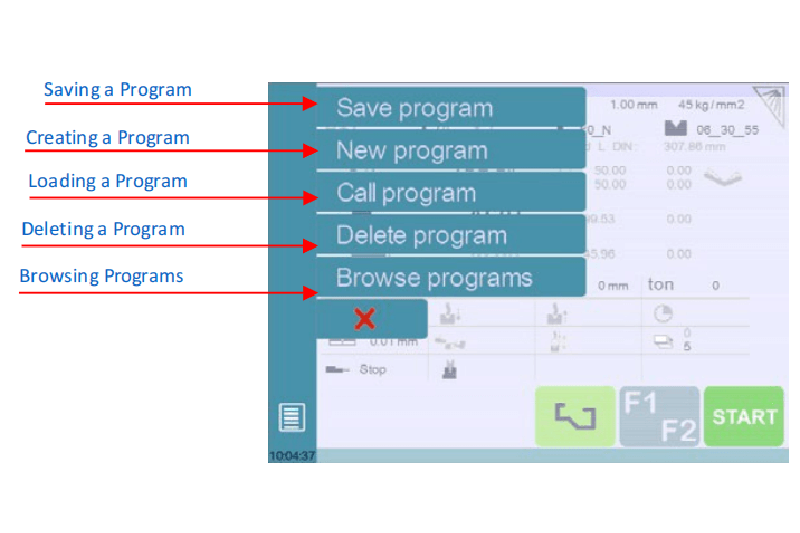
Aufgrund der zyklischen Natur der Komponentenfertigung ist ein effizientes Programm-Handling eine zentrale Anforderung des CYBELEC CybTouch 12 Programm-Managements. Programme müssen sicher gespeichert und jederzeit leicht zugänglich sein, um einen reibungslosen Tagesbetrieb zu gewährleisten. Ein herausragendes Merkmal des CybTouch-Systems ist, dass der Programmname in der oberen linken Ecke aller Betriebsoberflächen prominent angezeigt wird. Ein einfacher Tap auf diesen Namen gewährt sofortigen Zugriff auf das Programm-Verwaltungs-Menü und ermöglicht so jederzeit problemloses Programm-Management.
Programm speichern
Das Speichern von Programmen für die zukünftige Verwendung ist ein grundlegender Schritt, um das CYBELEC CybTouch 12 Programm-Management optimal zu nutzen. Befolgen Sie diesen optimierten Vier-Schritte-Prozess, um eine effiziente Programmspeicherung sicherzustellen:
1. Tippen Sie auf den aktuellen Programmnamen (z. B. „Part1“) in der Benutzeroberfläche.
2. Wählen Sie im eingeblendeten Menü die Option „Programm speichern“.
3. Geben Sie bei Bedarf einen individuellen Namen für das Programm ein.
4. Das Programm wird daraufhin dauerhaft im CybTouch-System unter dem neuen Namen gespeichert.
Die Einhaltung dieser Schritte optimiert die Produktionsabläufe und maximiert die Nutzung der Programmverwaltungsfunktionen des CYBELEC CybTouch 12.
Erstellen eines Programms
Die Einrichtung eines neuen Programms auf dem CYBELEC CybTouch 12 ist intuitiv und unkompliziert; folgen Sie einfach diesem schrittweisen Vorgehen für eine schnelle Implementierung:
1. Tippen Sie im Hauptinterface auf den Bereich mit dem Programmnamen.
2. Wählen Sie die Option „Neues Programm“, um die Programmerstellung zu starten.
3. Ein gelbes Popup-Fenster erscheint und fordert Sie auf, den Programmtyp auszuwählen:
○ Wählen Sie „Grafisch“, um ein neues Programm im TouchProfile-Modus zu starten.
○ Wählen Sie „Numerisch“, um ein neues Programm im Numerischen Modus zu öffnen.
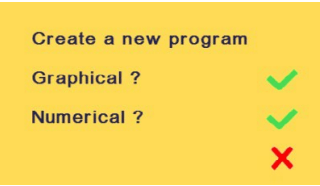
Dieser benutzerzentrierte Arbeitsablauf der CYBELEC CybTouch 12-Programmverwaltung ermöglicht die effiziente Erstellung individueller Programme, die exakt Ihren spezifischen Produktions- und Betriebsanforderungen entsprechen.
Einladen eines Programms
Das Abrufen und Laden vorhandener Programme ist im CYBELEC-CybTouch-12-Programmmanagement ein nahtloser Prozess; die vereinfachten Schritte sind unten aufgeführt:
1. Tippen Sie im Interface auf den Programmnamenbereich.
2. Wählen Sie die Funktion „Programm aufrufen“ aus dem Menü.
3. Durchsuchen Sie die Programmliste und wählen Sie das gewünschte Programm aus.
4. Das ausgewählte Programm wird in den Arbeitsspeicher des Systems geladen und ist sofort einsatzbereit.
Die Integration dieser Schritte in Ihre tägliche CYBELEC-CybTouch-12-Programmverwaltung gewährleistet einen reibungslosen und unterbrechungsfreien Produktionsablauf und steigert die Gesamteffizienz der CNC-Programmierung erheblich.
Ein Programm löschen
Das Entfernen überflüssiger oder nicht mehr genutzter Programme ist eine wesentliche Fähigkeit für ein effizientes CNC-Systemmanagement mit CYBELEC CybTouch 12; der Vorgang ist einfach und übersichtlich gestaltet:
1. Tippen Sie im Hauptinterface auf den Bereich mit dem Programmnamen.
2. Wählen Sie die Option „Programm löschen“ aus dem verfügbaren Menü.
3. Suchen Sie das zu löschende Programm in der Liste und wählen Sie es aus.
4. Tippen Sie auf die Bestätigungsschaltfläche, um die Löschung abzuschließen.
Durch diesen Vorgang wird Ihre Programmbibliothek bereinigt und die Programmierumgebung des CybTouch-12-Systems übersichtlich, frei von überflüssigen Elementen und betrieblich effizient gehalten.
Programme durchsuchen
Die Programmpflege-Funktion CYBELEC CybTouch 12 bietet eine praktische Funktion zum Durchsuchen von Programmen, die die visuelle Navigation – insbesondere bei grafikbasierten Komponentenprogrammen – verbessert. Um Ihre Effizienz beim Durchsuchen und Auswählen von Programmen zu optimieren, befolgen Sie bitte die folgenden Schritte:
1. Tippen Sie auf die auf der Benutzeroberfläche angezeigte Programmnummer (z. B. P21).
2. Wählen Sie im Dropdown-Menü die Option „Programme durchsuchen“.
3. Verwenden Sie die Pfeilsymbole auf der Benutzeroberfläche, um durch die gesamte Programmbibliothek zu navigieren.
4. Bestätigen Sie das gewünschte Programm durch Antippen des Durchsuch-Symbols.
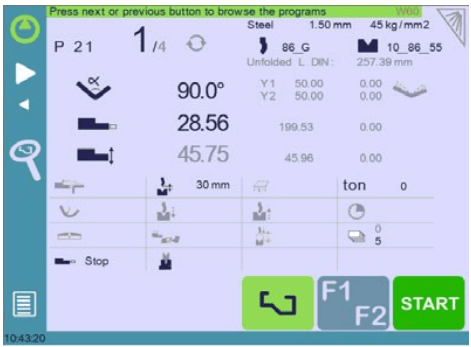
Es ist wichtig zu beachten, dass die Durchblätterfunktion so lange aktiv bleibt, wie das Durchblättersymbol auf dem Bildschirm sichtbar ist. Ein Tippen auf einen beliebigen Bereich außerhalb der Navigationspfeile beendet die Durchblätterfunktion automatisch. Die Beherrschung dieser Funktion ermöglicht es Ihnen, das CYBELEC CybTouch 12-Programmmanagement in vollem Umfang zu nutzen und damit Produktions- sowie Betriebsabläufe weiter zu optimieren.
Frequently Asked Questions (FAQ)
Wie erreichen Sie eine effiziente Programmorganisation mit dem CYBELEC CybTouch 12-Programmmanagement?
Für eine optimale Programmorganisation sollten alle Programme nach Projekttyp oder nach den bei der Produktion verwendeten Rohmaterialien kategorisiert werden. Nutzen Sie die integrierten Verwaltungswerkzeuge des CYBELEC CybTouch 12 vollständig aus, um Programme systematisch zu kennzeichnen und zu sortieren. Dadurch wird nicht nur die Suche nach Programmen und deren Ausführung beschleunigt, sondern auch das Risiko von Bedienfehlern während der Produktion minimiert.
Was sind die wichtigsten Best Practices für die Programmsicherung im CYBELEC CybTouch 12?
Regelmäßige Programmsicherungen sind entscheidend, um die Integrität der Produktionsdaten zu gewährleisten. Nutzen Sie die integrierte Exportfunktion des Systems, um Programmkopien auf externen Speichergeräten oder sicheren Cloud-Speicherplattformen zu speichern. Dadurch ist sichergestellt, dass alle Programme im Falle von Systemausfällen, Software-Updates oder unerwartetem Datenverlust schnell wiederhergestellt werden können – Ihre Kernproduktionsdaten bleiben jederzeit geschützt.
Wie lässt sich die betriebliche Leistungsfähigkeit über das CYBELEC CybTouch-12-Programmmanagement steigern?
Steigern Sie die Systemleistung durch regelmäßige Überprüfungen und Feinabstimmungen aller Programmeinstellungen. Stellen Sie sicher, dass jeder Parameter vollständig mit den Spezifikationen der zu verarbeitenden Materialien sowie den besonderen Anforderungen jedes Projekts übereinstimmt. Nutzen Sie zudem die Programmsimulationsfunktion innerhalb von CYBELEC CybTouch 12, um Produktionsergebnisse bereits im Voraus vorherzusagen und erforderliche Parameteranpassungen vor Beginn der eigentlichen Bearbeitung vorzunehmen.
Fazit
Zusammenfassend ist ein kompetentes Programmmanagement auf dem CYBELEC-CybTouch-12-System die Grundlage für eine effiziente Optimierung der CNC-Fertigungsprozesse. Durch die Umsetzung der in dieser Anleitung beschriebenen praktischen Tipps – beispielsweise die logische Organisation der Programmdateien, die vollständige Nutzung der fortschrittlichen Programmverwaltungsfunktionen des Systems sowie regelmäßige Datensicherungen – können Sie die Produktivität der Fertigung deutlich steigern und eine konsistente, störungsfreie Systemleistung sicherstellen.
Für weitere professionelle Unterstützung oder detaillierte Betriebsanleitungen zögern Sie bitte nicht, unser technisches Support-Team zu kontaktieren. Sie können außerdem unsere weiteren offiziellen Dokumentationen durchsehen, um tiefergehende Einblicke in die Optimierung der Maschinenleistung und die Steigerung der gesamten betrieblichen Effizienz in Ihrer Produktionsstätte zu erhalten.

