





Bežné problémy v procese zvárania robotmi
Zvárací účinok robotov je ovplyvnený mnohými faktormi. Mnoho zákazníkov narazí na rôzne problémy, kým sa nezvládnu používať zváracie roboty odborne. Tieto problémy sú zvyčajne spôsobené nesprávnym obsluhovaním alebo nevhodnými nastaveniami robota a dajú sa vyriešiť vhodnými úpravami. Nižšie preberieme niektoré bežné problémy vyskytujúce sa pri používaní zváracích robotov a ich riešenia.
I. Neúspešné zapálenie oblúka počas zvárania
1. Oblúk ešte nezapálil

Príčina: Program neobsahuje príslušný príkaz na zapálenie oblúka pred vykonaním príkazu na ukončenie oblúka.
Riešenie: Skontrolujte, či nebol pridaný ďalší príkaz na ukončenie oblúka alebo ďalší príkaz na spustenie oblúka.
2. Zlyhanie spustenia oblúka, chyba detekcie signálu

Metóda riešenia problémov:
1) Skontrolujte nastavenie času prerušenia zvárania na stránke parametrov. Všeobecne je vhodné nastaviť čas na 5000 ms.
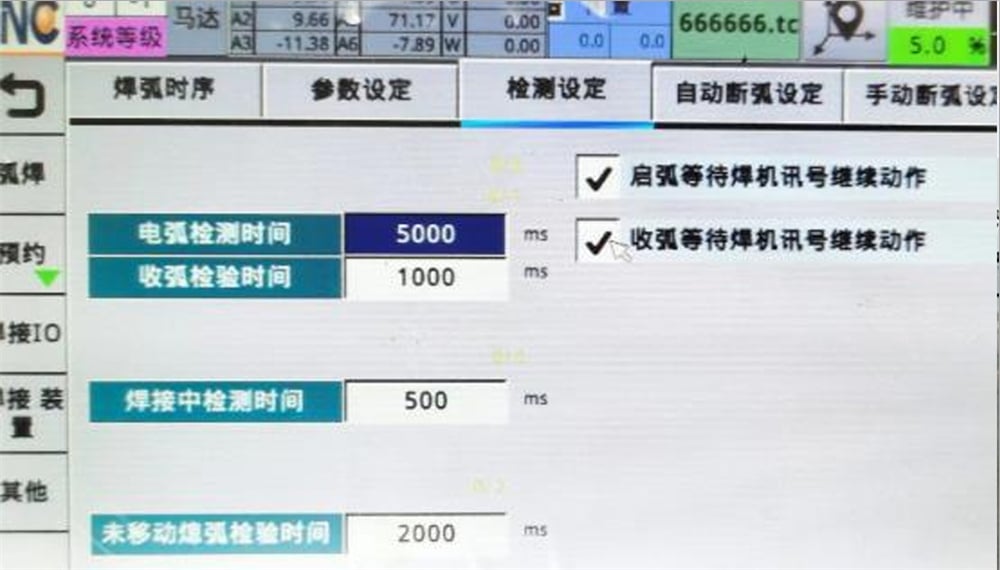
2) Skontrolujte, či sa signál zo zváracieho stroja úspešne prenáša do systému.
3) Skontrolujte, či je obrobok uzemnený.
3. Vznik oblúka a pretrhnutie zváracieho drôtu
Príčiny:
1) Nesúlad prúdu a napätia
Riešenie: Musíme nastaviť vhodný prúd a napätie podľa skutočnej hrúbky obrobku a zváracieho stroja.
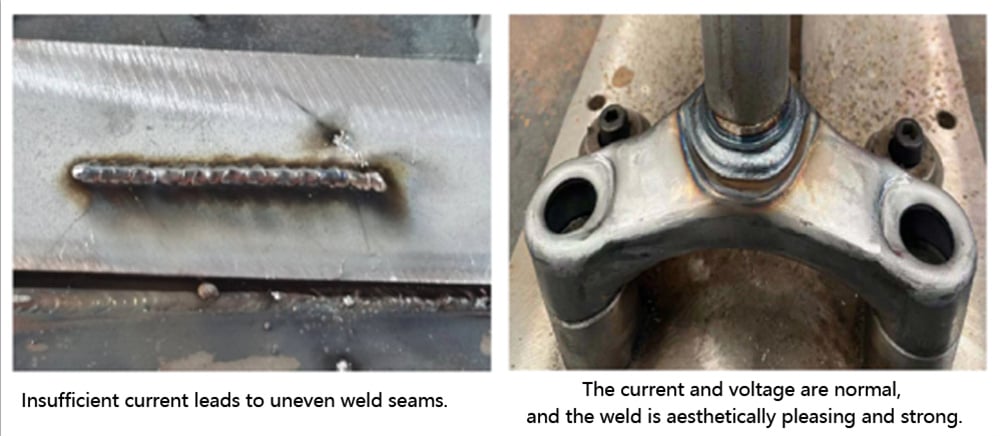
2) Dĺžka zváracieho drôtu je príliš veľká.
Riešenie: Všeobecne by mala dĺžka vysunutia zváracieho drôtu predstavovať 10 až 15-násobok priemeru zváracieho drôtu. Vyberte vhodnú dĺžku zváracieho drôtu podľa jeho priemeru.
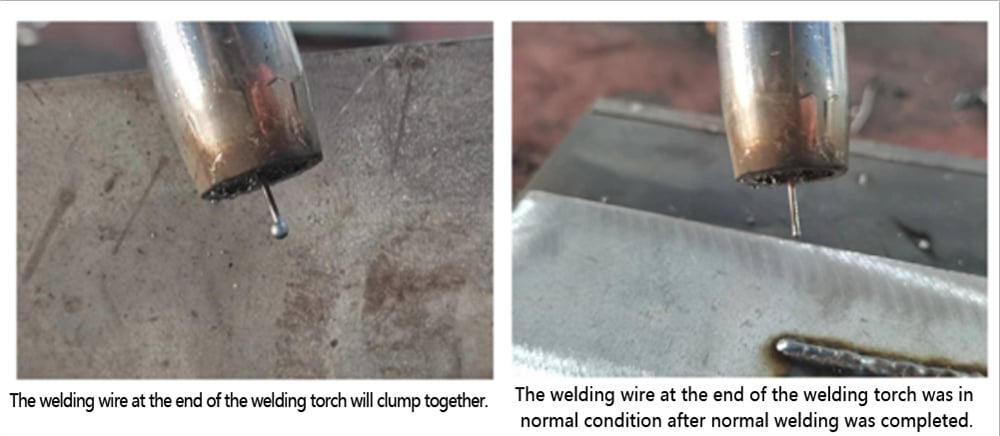
4. Automatické zhasnutie oblúka nastáva po zapálení oblúka.

Riešenie problémov: Skontrolujte, či je nastavený nesprávny časový parameter, a skontrolujte, či sa zvárací hořák pohol.
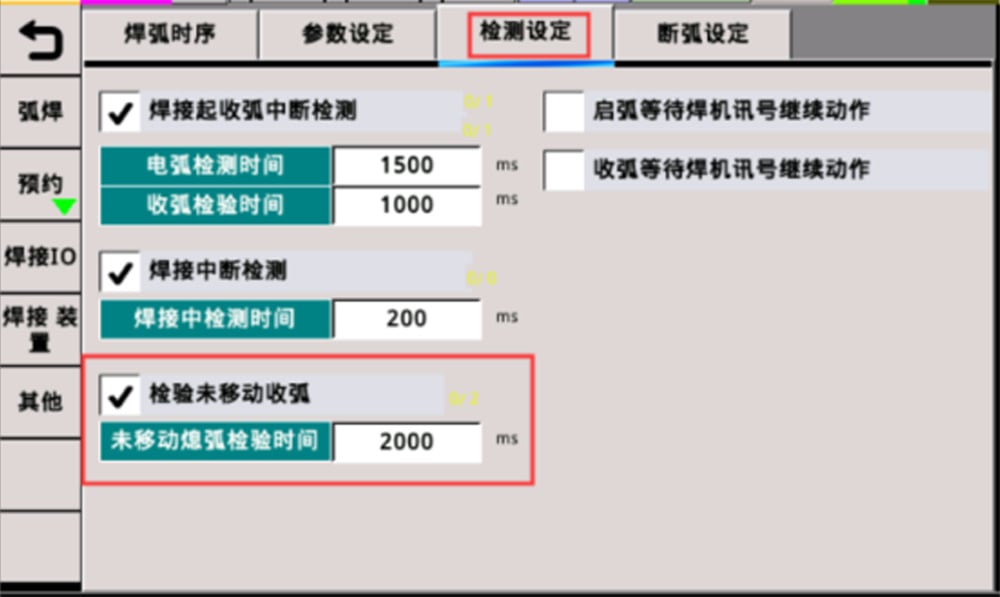
II. Prerušenie oblúka počas zvárania.
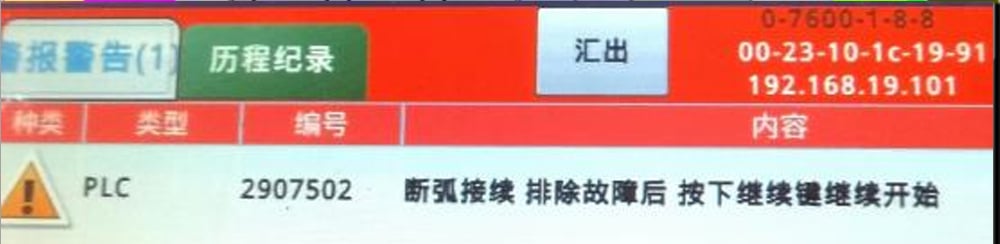
Príčiny:
1. Zvárací drôt sa nedotýka obrobku, čo spôsobuje výstrahu o prerušení oblúka.
Riešenie: Znovu nastavte polohu zváracieho drôtu a obrobku tak, aby počas zvárania došlo k úplnému kontaktu. (Avšak drôt by nemal byť príliš blízko obrobku, pretože to môže spôsobiť prepaľovanie.)
2. Nesprávna zváracia dráha spôsobuje zrážku zváracieho hořáka a jeho automatické zdvihnutie.
Riešenie: Znova nastavte zváraciu dráhu.
3. Zlý kontakt medzi kladnou a zápornou elektródou zváracieho stroja.
Riešenie: Skontrolujte zapojenie kladnej a zápornej elektródy.
III. Príčiny zlyhania ukončenia oblúka po zváraní:
1. Zlyhanie ukončenia oblúka kvôli chybe detekcie signálu.
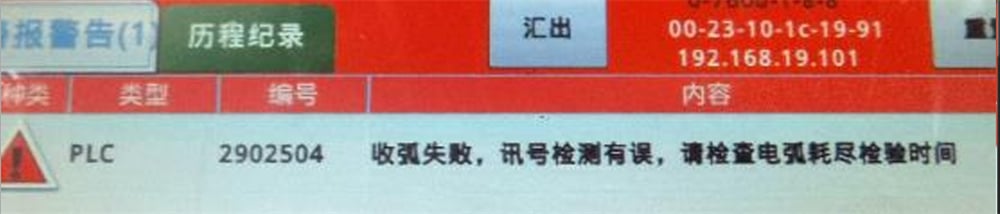
Príčina: Zvárací stroj nezískal signál od robota, čo spôsobilo zlyhanie ukončenia oblúka robotom.
Vyriešenie problémov:
(1) Skontrolujte, či sú nastavovacie parametre rozumné.
(2) Skontrolujte vstupno-výstupné signály a či je signál vstupného bodu (I-bod) pre ukončenie oblúka abnormálny. Ak signál I-bodu stále ukazuje stav zapnuté...
(3) Skontrolujte, či v obvode nedošlo k skratu a či nie je uzemňovací kábel pripojený abnormálne.
2. Po zapnutí oblúka nebol nastavený príkaz na ukončenie oblúka.

Príčina: Keď sa tento poplach zobrazí na učiacej sa ponuke (teach pendant), skontrolujte, či nebol zabudnutý príkaz na ukončenie oblúka.
Riešenie: Do programu pridajte príkaz na ukončenie oblúka bezprostredne po príkaze na zapnutie oblúka.
Tento článok predovšetkým predstavuje problémy súvisiace so zapínaním oblúka, ukončovaním oblúka a prerušovaním oblúka počas zváracieho procesu zváracích robotov. Používatelia môžu pri výskyte takýchto problémov použiť uvedené riešenia. Ak sa problém nedá vyriešiť, obráťte sa prosím na technický personál spoločnosti JUGAO.
Zvárací robot je automatizovaný robot, ktorý integruje viaceré zváracie funkcie, ako sú zváranie chráneným plynom, argonové oblúkové zváranie, plazmové režanie a laserové zváranie. Vyznačuje sa vysokou flexibilitou, veľkou prispôsobivosťou, vysokou zváracou účinnosťou a stabilnou kvalitou zvárania a môže sa široko využívať v rôznych oblastiach, napríklad v strojárskej výrobe, automobilovom priemysle, presnej elektronike a ťažbe uhlia.

