





Az ESA S875 félig automatikus kalibrációs műveleti útmutatója
Ha gyors és pontos módszert keres egy-egy hajlítási művelet közbeni, azonnali beállítások végrehajtására, akkor az ESA S875 féligautomatikus korrekciók funkciója elengedhetetlen ismerete. Amikor a gyártás során szögelhajlások vagy hátsó vezérelt pozícionálási hibák lépnek fel, a kezelők gyakran szükségét érzik egy hatékony korrekciós módszer alkalmazásának anélkül, hogy újra végig kellett volna járniuk a teljes Beállítások menüt. Ez a funkció lehetővé teszi a Y1, Y2, X és R tengelyértékek közvetlen módosítását a féligautomatikus maszk segítségével, miközben a gép ÁLLÁS üzemmódban van. Ebben a cikkben elmagyarázom, hogyan működik az ESA S875 féligautomatikus korrekciók funkció, hogyan lehet egyetlen hajlítási műveletre vagy több, azonos szöget tartalmazó hajlítási műveletre is alkalmazni a korrekciókat, valamint hogyan segíti ez a funkció a stabil és egyenletes hajlítási eredmények elérését.
Bevezetés
Az ESA S875 féligautomatikus korrekciós funkció lehetővé teszi az operátorok számára, hogy közvetlenül a féligautomatikus maszkból módosítsák a hajlítási paramétereket, így nem szükséges visszatérniük a Beállítások felületre. Ez a funkció a gyártási beállítások leegyszerűsítésére és a próbahajlítások közötti leállási idő minimalizálására lett kialakítva, és lehetővé teszi a gyors kompenzációt a szögelhajlások vagy a hátsó mérőszalag pontatlanságai esetén – mindezt a munkafelületen maradva.
Amikor a gép állapota ÁLL, a féligautomatikus maszk szerkeszthetővé válik, ami a féligautomatikus korrekciók használatának kulcsfeltétele. Ez a felület valós idejű hozzáférést biztosít az tengelyértékek korrekciójához, így pontos beállítások végezhetők, amelyek közvetlenül javítják a hajlítás pontosságát.
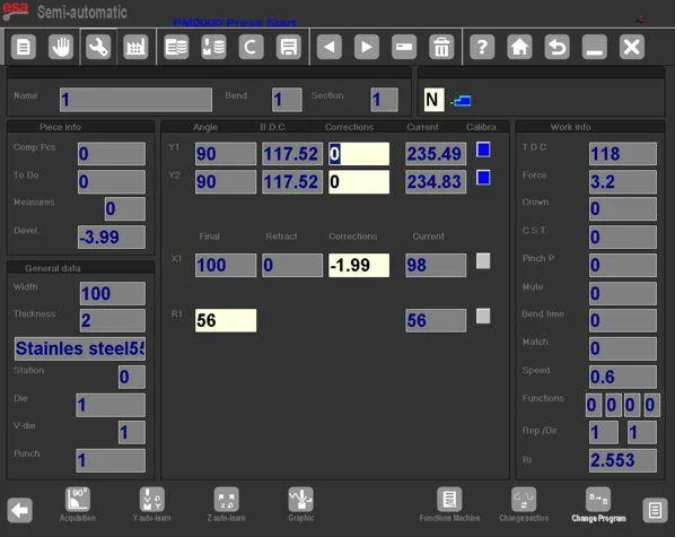
Szerkeszthető paraméterek az ESA S875 féligautomatikus korrekciókban
Az ESA S875 féligautomatikus korrekciós maszkon belül az operátor közvetlenül szerkesztheti a következőket:
Y1 tengely korrekciója
Y2 tengely korrekciója
X tengely korrekciója
R tengely magasságkorrekciója
Ezeket az értékeket a teljes Beállítások felület megnyitása nélkül is beállíthatja. A félig automatikus korrekciók ezért leegyszerűsítik a korrekciós munkafolyamatot, és csökkentik a felesleges navigációs lépéseket.
Amikor a gépet START engedélyezett állásba kapcsolják, a félig automatikus korrekciók továbbra is láthatók, de csak olvasható módba kerülnek. Ez biztosítja a biztonságot, és megakadályozza a szándékolatlan módosításokat, amíg a gép üzemel. Szerkesztésre csak akkor van lehetőség, ha a rendszer visszatér STOP üzemmódba.
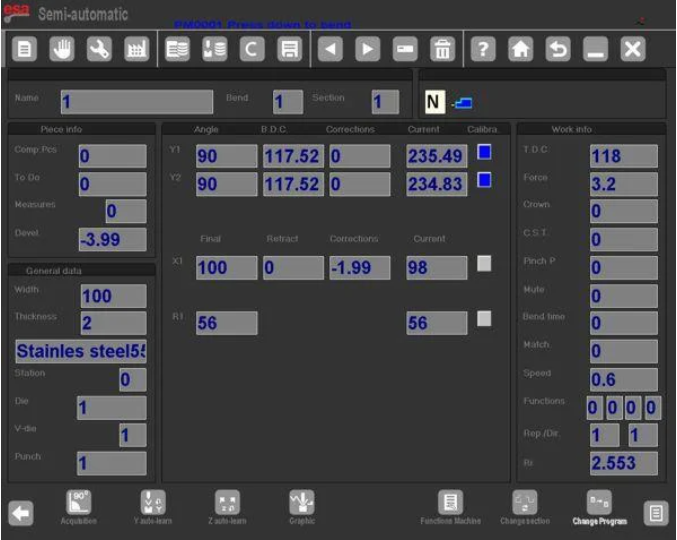
Félig automatikus korrekciók alkalmazása az aktuális hajlításra
Amikor egy korrekciót bevittünk az ESA S875 félig automatikus korrekciók felületén, az azonnal alkalmazódik az aktuális hajlításra. A rendszer azonnal frissíti a munkaértéket.
Miután egy paramétert megváltoztattak:
A szerkesztett érték fordított színkombinációban jelenik meg
A kezelő vizuális megerősítést kap
A módosítás alapértelmezés szerint kizárólag az aktív hajlításra vonatkozik
Ez a tervezés biztosítja a világosságot és az irányítást a gyártási beállítás során. A féligautomatikus korrekciók lehetővé teszik az operátornak, hogy lépésről lépésre tesztelje a módosításokat, mielőtt azokat szélesebb körű hajlításokra alkalmazná.
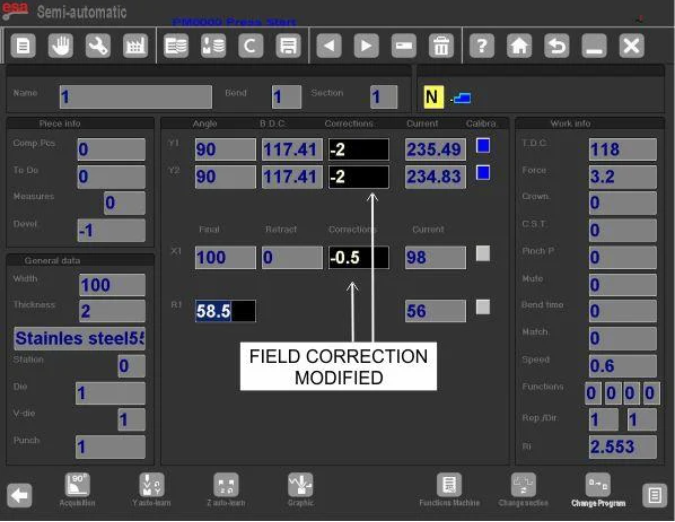
Alkalmazás ugyanarra a szakaszra ugyanazzal a szöggel
Ha több hajlítás ugyanazon a szakaszon ugyanazzal a szöggel rendelkezik, a korrekció kiterjeszthető:
1. Adja meg a szükséges korrekciót
2. Nyomja meg a gombot a másodlagos menü megnyitásához
3. Válassza ki a [Ugyanazon szakasz, ugyanaz a szög] lehetőséget
Ez a funkció a féligautomatikus korrekciókat az aktív hajlítással megegyező szöghöz tartozó összes hajlításra alkalmazza az aktuális szakaszon.
Alkalmazás az egész alkatrészen ugyanazzal a szöggel
A ESA S875 féligautomatikus korrekcióinak az egész munkadarabon ugyanazzal a szöggel rendelkező összes hajlításra történő kiterjesztéséhez:
4. Adja meg a korrekciót
5. A másodlagos menü elérése
6. Válassza ki a [Conf.Pr. Same.Ang] lehetőséget
Ez biztosítja az azonos szögek egységes korrekcióját az egész programon keresztül. Az ESA S875 féligautomatikus korrekciók rugalmassága ideális ismétlődő gyártási folyamatokhoz több azonos hajlítás esetén.
Belső sugár féligautomatikus korrekciókban
A hajlítás belső sugara megjeleníthető a Beállítások maszkban, és mindig a vezérlő számítja ki. A számítási módszer lehet:
Grafikus
Számítógépes
A kiválasztott módszert az általános paraméterek határozzák meg.
Az ESA S875 féligautomatikus korrekciókban a belső sugár módosítása csak akkor befolyásolja a nyúlás számítását, ha a program numerikus. Ha a program grafikusan készül, a belső sugár módosítása nem eredményez automatikus újraszámítást a nyúlással kapcsolatban.
Ezért, amikor az ESA S875 féligautomatikus korrekciókat numerikus programokban alkalmazzák, a kezelőknek ellenőrizniük kell a belső sugár beállításainak hatását a kifejtett hossz értékekre.
Működési útmutató a féligautomatikus korrekciókhoz
A stabilis teljesítmény érdekében az ESA S875 féligautomatikus korrekciók használatakor:
Szerkesztés csak a gép STOP állapotában végezhető
Kis, fokozatos korrekciók alkalmazása
A módosítások megerősítése fordított színű jelzők segítségével
A korrekciók óvatos kiterjesztése szakaszokra vagy egész darabokra
Az alapvető sugárbeállítások ellenőrzése numerikus programokban
Az ESA S875 féligautomatikus korrekció funkciója a gyártási pontosság optimalizálására lett kialakítva, miközben fenntartja a kezelő irányítását. A közvetlen tengelykorrekció lehetővé tételével a munkaterületi maszk belsejében az ESA S875 féligautomatikus korrekciók növelik a hatékonyságot, csökkentik a korrekciós ciklusok számát, és biztosítják a könyökölés minőségének egyenletességét.
A féligautomatikus korrekciók megfelelő megértése és strukturált alkalmazása támogatja a pontos szögvezérlést, a pontos hátsómérő pozicionálást, valamint a stabil ismételhetőséget a gyártási sorozatokon keresztül.
Összegzés
Az ESA S875 féligautomatikus korrekciós funkciója közvetlen és hatékony módszert kínál az Y1, Y2, X és R tengelyértékek beállítására közvetlenül a féligautomatikus maszkból, miközben a gép ÁLLÁS üzemmódban van. A korrekciók rugalmasan alkalmazhatók egyetlen hajlításra, egy teljes szakaszra (amely ugyanazt a szöget osztja meg), vagy az egész munkadarabra, így biztosítva a hajlítási szögek konzisztenciáját és növelve az általános gyártási hatékonyságot. Stabil és pontos hajlítási eredmények eléréséhez elengedhetetlen megérteni, mikor engedélyezettek a módosítások, hogyan kell megfelelően kiterjeszteni a korrekciókat, valamint hogyan befolyásolják a belső sugár beállításai a nyúlási számításokat.
Ha további műszaki útmutatásra van szüksége az ESA S875 programozásával, paraméterbeállításaival vagy hibaelhárításával kapcsolatban, kérjük, lépjen kapcsolatba műszaki csapatunkkal szakmai támogatásért. A részletesebb konfigurációs utasításokért továbbá tanulmányozza a gép paraméterkézikönyvét.

