





عملکردهای صفحهٔ اصلی CYBELEC CybTouch 6 C
فهرست مطالب
۱. صفحهٔ عددی خمکردن
۱.۱ توابع موجود در صفحهٔ عددی خمکردن
۲. صفحهٔ بیشتر
۲.۱ توابع موجود در صفحهٔ بیشتر
۳. تابع کپی به همه
4. سؤالات متداول (FAQ)
5. نتیجهگیری
صفحهٔ اصلی CYBELEC CybTouch 6 C Basic بهعنوان رابط عملیاتی اصلی برای ماشینآلات CNC عمل میکند و کنترلی شهودی و کارآمد را برای فرآیندهای خمکاری در ساخت فلزات فراهم میسازد. آیا قصد نوسازی تجهیزات خود را دارید، مهارتهای خود در بهرهبرداری از ماشینآلات CNC را تقویت میکنید یا به دنبال بهینهسازی جریانهای کاری روزانهٔ تولید هستید؟ در هر صورت، تسلط بر عملکردهای این صفحهٔ پایهای کلیدی برای استخراج حداکثر ظرفیت عملکردی ماشینآلات شماست. این راهنما تمامی عملکردهای ضروری صفحهٔ اصلی CYBELEC CybTouch 6 C Basic را بهطور جامع تشریح میکند و توضیح میدهد که هر ویژگی چگونه فرآیندهای خمکاری را سادهتر کرده و دقت و کارایی ماشینکاری را ارتقا میبخشد.
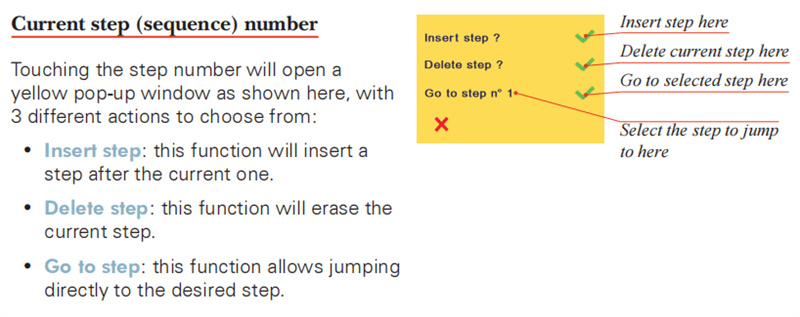
۱. صفحهٔ عددی خمکردن
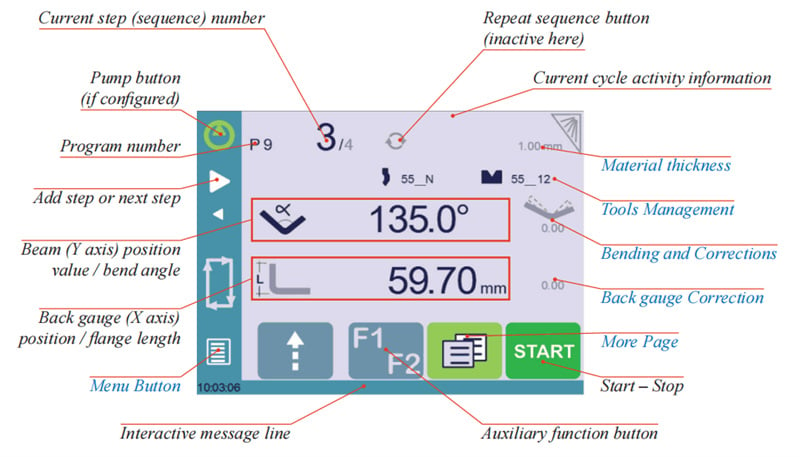
صفحه عددی خمکردن (Bend Num Page) اصلیترین رابط کاری صفحه اصلی CYBELEC CybTouch 6 C Basic Page است و بهعنوان هاب مرکزی برای اجرای تمامی عملیات خمکردن عمل میکند. این صفحه نقطه شروع تقریباً تمامی دستورالعملهای عملیاتی ماشین است و همچنین دروازهٔ ناوبری به سایر ماژولهای عملکردی سیستم CYBELEC CybTouch 6 C محسوب میشود؛ بنابراین جزءای ضروری برای عملیات روزانه ماشینکاری میباشد.
۱.۱ توابع موجود در صفحهٔ عددی خمکردن
این صفحه بهگونهای طراحی شده است که امکان ورود مستقیم و کارآمد پارامترهای عملیات خمکردن را فراهم آورد، بهطوریکه اپراتوران قادرند دادههای اصلی خمکردن را در زمان واقعی تنظیم، اصلاح و تأیید کنند. تمامی راهاندازیهای اولیه عملیات خمکردن و کالیبراسیون پارامترها در این رابط انجام میشود و این امر پایهای برای فرآیندهای ماشینکاری بعدی دقیق و بدون وقفه فراهم میسازد.
۲. صفحهٔ بیشتر
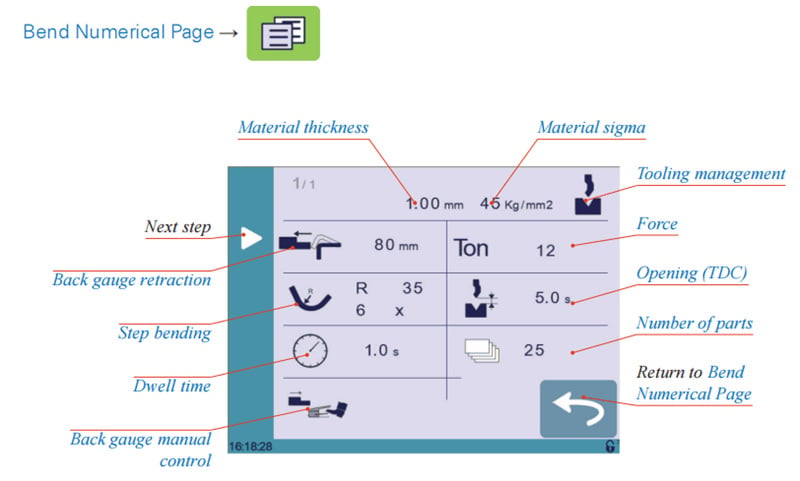
صفحهٔ بیشتر یک ماژول عملکردی گستردهتر از صفحهٔ پایهٔ CYBELEC CybTouch 6 C است که با ارائهٔ طیف گستردهای از نمایشهای پارامترهای مربوط به قطعه و گزینههای تنظیمات قابل سفارشیسازی، صفحهٔ عددی خمکاری را تکمیل میکند. عملکردهای خاص موجود در این صفحه بهصورت پویا بر اساس پیکربندی دستگاه و نوع عملیات خمکاری انجامشده تنظیم میشوند و از اینرو حمایتهای عملیاتی هدفمند و انعطافپذیری را برای سناریوهای مختلف ماشینکاری فراهم میکنند.
۲.۱ توابع موجود در صفحهٔ بیشتر
صفحهٔ بیشتر مجموعهای کامل از عملکردهای عملیاتی گسترده را ادغام کرده است که هر یک بهمنظور بهینهسازی پیوندهای خاصی از فرآیند خمکاری طراحی شدهاند؛ عملکردهای کلیدی آن عبارتند از:
•

مدیریت ابزار: هنگامی که این قابلیت غیرفعال شود (بهصورت خاکستری درآید)، آیکونهای پانچ و ماتریس در صفحهٔ عددی خمکاری بهطور خودکار غیرفعال میشوند و از انجام تصادفی تنظیمات نادرست پارامترهای ابزار در فرآیندهای خاص جلوگیری میکنند. •

بازگشت دستگاه اندازهگیری عقب: این عملکرد از طریق آیکون اختصاصیای کنترل میشود و به اپراتوران اجازه میدهد تا در صورت نیاز، بازگشت دستگاه اندازهگیری عقب را فعال یا غیرفعال کنند. مقدار پارامتر دنباله برای بازگشت میتواند بهصورت مستقل برای هر مرحله از برنامه تنظیم شود تا با نیازهای بازگشت در فرآیندهای خمزنی مختلف سازگار باشد. •

تنظیم نیرو: این عملکرد از اپراتور میخواهد نیروی دقیق خمزنی مورد نیاز برای قطعه کار را وارد کند. نیروی بهینه خمزنی بر اساس تجربه اپراتور و آزمایشهای عملی خمزنی تعیین میشود تا اثر خمزنی نیازهای فرآیند را برآورده کند و در عین حال از آسیب به قطعه کار یا ابزارها جلوگیری شود. •

باز شدن (TDC): هنگام فعالسازی، این پارامتر فاصله حرکت رو به بالای تیر را از مرکز پایینی مرده (BDC) تعیین میکند تا فضای کافی برای خارجسازی ایمن قطعه کار خمشده فراهم شود. هنگام غیرفعالسازی، تیر بهطور پیشفرض به موقعیت حداکثری کلید محدودکننده برمیگردد. •
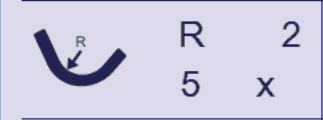
خمکاری مرحلهای: برای ماشینکاری خمهای با شعاع بزرگ، اپراتوران میتوانند فرآیند را با تنظیم مقدار شعاع هدف و تعداد مراحل خمکاری در این صفحه برنامهریزی کنند. نکتهٔ مهم عملیاتی: طول قطعه باید از نصف بازشدگی V قالب بیشتر باشد تا منطقیبودن و دقت فرآیند خمکاری مرحلهای تضمین شود. •
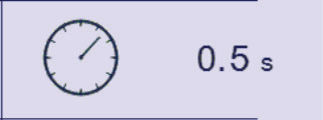
زمان توقف: این قابلیت مدتزمانی را که پانچ در نقطهٔ مردهٔ پایینی (BDC) باقی میماند قبل از حرکت به سمت بالا تعیین میکند. اگر این قابلیت غیرفعال باشد، دستگاه بهطور خودکار از پارامتر زمان توقف پیشفرضی که از پیش در سیستم پیکربندی شده است، استفاده میکند. •

تعداد قطعات: اپراتوران میتوانند در این صفحه کل تعداد قطعات تولیدی را وارد کنند. سیستم پس از تکمیل هر قطعه، شمارندهٔ تولید را بهطور خودکار بهروزرسانی میکند و هنگام رسیدن به تعداد هدف تولید، یک پنجرهٔ پاپآپ زرد اپراتور را مطلع میسازد تا کنترل تعداد تولید تسهیل شود. •
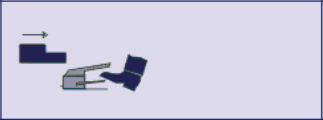
کنترل دستی گیج عقب: فعالسازی این تنظیم، کنترل دستی بر حرکت گیج عقب را فراهم میکند؛ بهطوریکه تمام عملیات حرکتی توسط اپراتور از طریق دستگاههای کنترل خارجی مانند سوئیچ پا یا دکمه شروع آغاز میشوند و انعطافپذیری تنظیم گیج عقب را برای نیازهای خاص ماشینکاری بهبود میبخشد. •
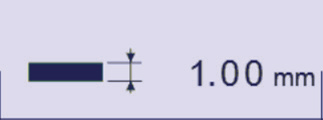
ضخامت مواد: این یکی از پارامترهای اصلی قطعه است که باید در این صفحه وارد شود؛ سیستم از این مقدار برای محاسبه دقیق عمق خمشدن متناظر با ابزار انتخابشده استفاده میکند که برای تضمین دقت ابعاد خمشدن قطعه کار حیاتی است. •

سیگمای ماده: این فیلد برای وارد کردن مقدار سیگمای ماده استفاده میشود و بهعنوان مرجع اطلاعاتی برای اپراتورها عمل میکند و همچنین بهعنوان یک پارامتر رسمی قطعه ذخیره میشود تا قابلیت ردیابی و بهینهسازی فرآیند خمکاری تأمین گردد.
۳. تابع کپی به همه
عملکرد «کپی به همه» یک ویژگی عملیاتی با کارایی بالا در صفحه اصلی CYBELEC CybTouch 6 C Basic است که برای سادهسازی کارهای تکراری تنظیم پارامتر طراحی شده است. این قابلیت در صفحهکلید عددی فیلدهای ورودی پارامترهای مربوطه (مانند نیرو، خمکردن، اصلاحات و غیره) جاسازی شده و به اپراتوران اجازه میدهد با یک کلیک مقدار پیشتعریفشدهٔ یک پارامتر را به تمام مراحل برنامهٔ خمکردن فعلی منتقل کنند.
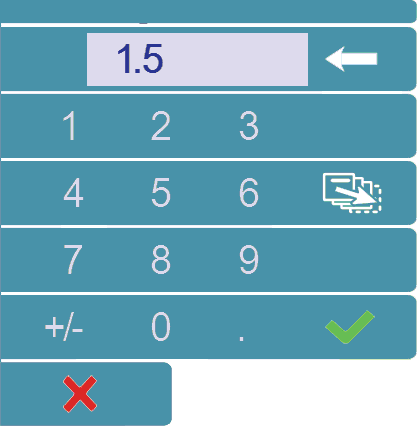
با حذف نیاز به ورود دستی تکراری یک پارامتر مشابه در مراحل متعدد برنامه، این ویژگی نهتنها زمان و تلاش لازم برای راهاندازی برنامه را بهطور چشمگیری کاهش میدهد، بلکه هماهنگی پارامترها را در تمام مراحل فرآیند نیز تضمین میکند و بهطور مؤثری خطاهای ماشینکاری ناشی از ورودیهای دستی نامتجانس را جلوگیری میکند. این ویژگی یکی از عناصر کلیدی بهبود کارایی تولید انبوه و راهاندازی برنامههای پیچیدهٔ خمکردن است و کارایی عملیاتی و دقت ماشینکاری را در کارهای فلزکاری افزایش میدهد.
4. سؤالات متداول (FAQ)
چگونه میتوانم به صفحه عددی خمزن در صفحه اصلی CYBELEC CybTouch 6 C Basic دسترسی پیدا کنم؟
دسترسی به صفحه عددی خمزن بسیار ساده است: از طریق منوی اصلی سیستم حرکت کنید و گزینه «Bend Num» را انتخاب نمایید. این صفحه رابطی اختصاصی فراهم میکند که امکان ورود کارآمد پارامترهای عددی لازم برای عملیات خمزنی و تنظیم بلادرنگ آنها را فراهم میسازد و بهعنوان هسته اصلی عملیاتی برای ماشینکاری روزانه عمل میکند.
چگونه میتوانم از تابع «کپی به همه» در صفحه اصلی CYBELEC CybTouch 6 C Basic استفاده کنم؟
تابع «کپی به همه» برای تکثیر سریع یکسانسازی تنظیمات پارامترها در تمام مراحل برنامه جاری به کار میرود. ابتدا مقدار مورد نظر پارامتر را در فیلد ورودی مربوطه (مانند نیروی خمزنی یا مقدار اصلاحی) وارد کنید، سپس گزینه «Copy to All» را در صفحهکلید عددی آن فیلد انتخاب نمایید. سیستم بهصورت خودکار مقدار تعیینشده را در تمام مراحل برنامه اعمال میکند که این امر جریان کار را تسهیل کرده و از یکنواختی پارامترها در سراسر فرآیند خمزنی اطمینان حاصل میکند.
آیا روشی برای بازنشانی تنظیمات صفحه اصلی CYBELEC CybTouch 6 C Basic در صورت نیاز وجود دارد؟
بله. اگر نیاز به بازگرداندن تنظیمات صفحه به حالت پیشفرض سیستم دارید، وارد منوی تنظیمات/پیکربندی ماشین شده و گزینه اختصاصی «بازنشانی» را پیدا کنید. نکته مهم: پیش از انجام عملیات بازنشانی، مطمئن شوید تمام پارامترهای فرآیندی مهم، دادههای برنامه و تنظیمات سفارشی را ذخیره کردهاید؛ زیرا عملیات بازنشانی تمام پیکربندیهای تعریفشده توسط کاربر را پاک میکند و تمام تنظیمات را به حالت پیشفرض کارخانه بازمیگرداند.
5. نتیجهگیری
صفحه اصلی CYBELEC CybTouch 6 C Basic یک رابط عملیاتی بسیار کاربردی و کاربرپسند است که ماژولهای اصلی و قابلیتهای گسترشیافتهٔ آن، یک سیستم عملیاتی کامل برای ماشینکاری خمکاری CNC را تشکیل میدهند. صفحه عددی خمکاری (Bend Numerical Page) امکانات ضروری تنظیم پارامترها و آغاز عملیات خمکاری را فراهم میکند، در حالی که صفحه «بیشتر» (More Page) قابلیتهای گسترشیافتهٔ هدفمند و تنظیمات قابل شخصیسازی را برای سناریوهای مختلف ماشینکاری ارائه میدهد؛ همچنین قابلیت «کپی به همه» (Copy to All Function) کارایی تنظیم برنامه و مدیریت پارامترها را بهینهسازی میکند.
با درک کامل و استفادهٔ ماهرانه از تمامی قابلیتهای این صفحه اصلی، اپراتورها میتوانند جریانهای کاری خمکاری را بهطور چشمگیری سادهسازی کنند، کارهای دستی تکراری را کاهش دهند و ثبات و دقت پارامترهای ماشینکاری را تضمین نمایند؛ در نهایت، این امر منجر به بیشینهسازی کارایی عملیاتی و دقت ماشینهای خمکاری CNC میشود.
برای کمک بیشتر در مورد عملکرد عملکردی، بهینهسازی فرآیندهای شخصیسازیشده یا پشتیبانی از نگهداری تجهیزات، با تیم فنی حرفهای ما تماس بگیرید. علاوه بر این، حتماً به سایر اسناد رسمی ما مراجعه کنید تا اطلاعات عمیقتری درباره بهینهسازی عملکرد دستگاه CYBELEC CybTouch 6 C شما و فعالسازی قابلیتهای پیشرفتهتر ماشینکاری بهدست آورید.

