





Návod na konfiguráciu programových konštánt DELEM DA-52S
Ak ide o konfiguráciu programových konštánt DELEM DA-52S, je zásadné pochopiť základné nastavenia, aby sa zabezpečil optimálny výkon zlomového lisu. Ak hľadáte efektívny spôsob nastavenia týchto parametrov, ste na správnom mieste. V tomto návode vás krok za krokom prevediem procesom konfigurácie týchto kľúčových nastavení a pomôžem vám maximalizovať účinnosť a presnosť vašich ohýbacích operácií. Bez ohľadu na to, či ste skúsený obsluhovateľ alebo začínajúci užívateľ, ktorý si chce zdokonaliť svoje zručnosti, tento článok vám poskytne všetky potrebné znalosti na dôverné nastavenie systému DELEM DA-52S tak, aby vyhovoval vašim špecifickým požiadavkám. Postupovaním podľa uvedených krokov môžete zabezpečiť, že vaše práce s kovmi budú vykonávané s presnosťou a konzistenciou.
Úvod
DELEM DA-52S je výkonný CNC riadiaci systém, ktorý ponúka pokročilé funkcie na optimalizáciu prevádzky zlomového lisu. Správne pochopenie a konfigurácia jeho programových konštánt je kľúčové pre dosiahnutie vyššej presnosti, účinnosti a celkovej produktivity.

Stlačte tento kláves pre vstup do programových konštánt.
Programové konštanty sú rozdelené na niekoľko stránok. Tieto sú popísané v nasledujúcich častiach.
VŠEOBECNÉ
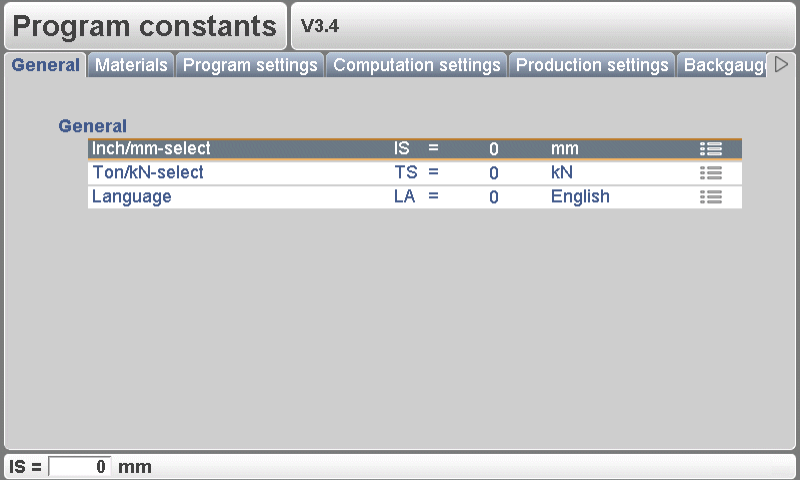
Ak chcete plne využiť programové konštanty DELEM DA-52S, je nevyhnutné pochopiť množstvo nastavení, ktoré ovplyvňujú jeho prevádzku. Tieto konštanty určujú všeobecné správanie stroja, prevádzkové limity a konfigurácie používateľského rozhrania. Nižšie je zjednodušený návod, ako tieto parametre prechádzať a nastavovať:
Použite šípkové klávesy vľavo/vpravo na prehliadanie jednotlivých stránok s parametrami. Na výber jednotlivých parametrov použite šípkové klávesy hore/dole. Pre niektoré parametre sa hodnota dá upraviť pomocou klávesu „konštanty“, ktorý je označený špecifickým symbolom.
Kľúčové programové konštanty
Výber jednotiek inch/mm (IS):
Vyberte si preferovanú jednotku merania.
1 pre rozmery v palcoch
0 pre rozmery v milimetroch
Výber jednotiek ton/kN (TS):
Určte jednotku pre zobrazenie údajov o sile.
1 pre tony
0 pre kN
Jazyk (LA):
Nastavte si uprednostňovaný jazyk používateľského rozhrania. Ovládací systém DELEM DA-52S podporuje viacero jazykov, vrátane:
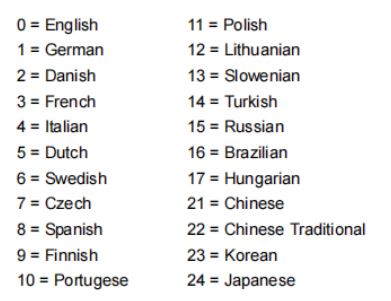
Upravte tieto nastavenia podľa svojich prevádzkových potrieb, aby ste zabezpečili hladký a presný obrábací proces.
Materiály
Nastavenia materiálu sú kľúčové pre zabezpečenie presných ohýbacích operácií vášho ovládacieho systému DELEM DA-52S. Správna konfigurácia vyžaduje zadanie správneho typu materiálu, jeho hrúbky a pevnosti v ťahu, aby systém mohol presne vypočítať potrebné ohýbacie parametre.
Krok 1: Prístup k nastaveniam materiálu
Na začiatok prejdite do ponuky nastavení materiálu na vašom ovládacom systéme DELEM DA-52S. Tu môžete upraviť existujúce materiály, programovať nové alebo odstrániť materiály, ktoré už nie sú potrebné. Na ovládacom paneli je možné naraz programovať najviac šesť materiálov.
Krok 2: Úprava vlastností materiálu
V tomto okne môžete upraviť a zadať vlastnosti materiálu, ktoré sú nevyhnutné pre presné ohýbací operácie:
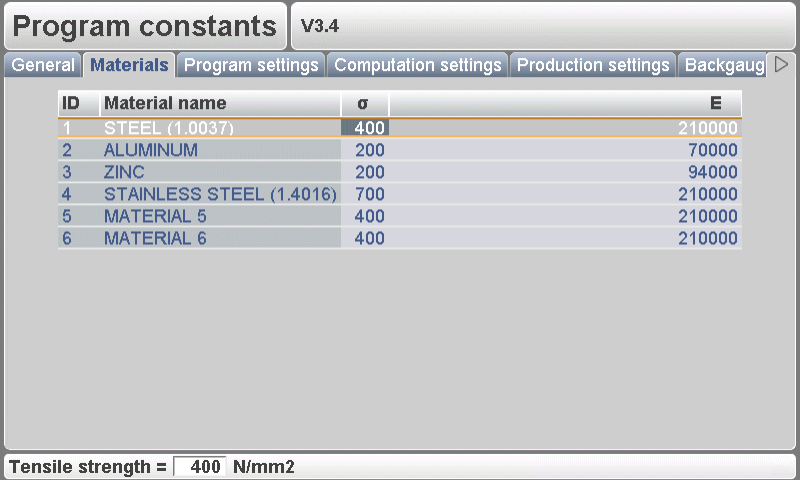
Názov materiálu: Každý materiál musí mať jedinečný názov (max. 25 znakov), ktorý začína písmenom. To umožňuje jednoduchú identifikáciu počas programovania.
Medzná pevnosť v ťahu: Zadajte medznú pevnosť v ťahu daného materiálu. Toto je kľúčové pre to, aby systém DELEM DA-52S aplikoval počas ohýbacích operácií správnu silu.
Modul pružnosti E: Modul pružnosti E každého materiálu je tiež potrebné špecifikovať, aby sa zabezpečil presný výpočet ohýbacích parametrov.
Materiály sú na začiatku zoznamované podľa ich čísla ID. Ak chcete upraviť existujúci materiál, vyberte príslušný riadok, zmeňte hodnoty vlastností podľa potreby a potvrďte každý záznam stlačením klávesu ENTER.
Ak chcete materiál odstrániť, umiestnite kurzor na riadok s materiálom a stlačte funkčný kláves „odstrániť materiál“ (S6). Ak chcete pridať nový materiál, presuňte kurzor do prázdneho pola a začnite programovať konkrétne hodnoty pre tento materiál.
Nastavenia programu
Nastavenia programu v konštantách programu DELEM DA-52S definujú správanie zohínacej lisovacej strojovej jednotky počas programovania a výroby a pomáhajú operátorom zvýšiť presnosť, konzistenciu a efektivitu.
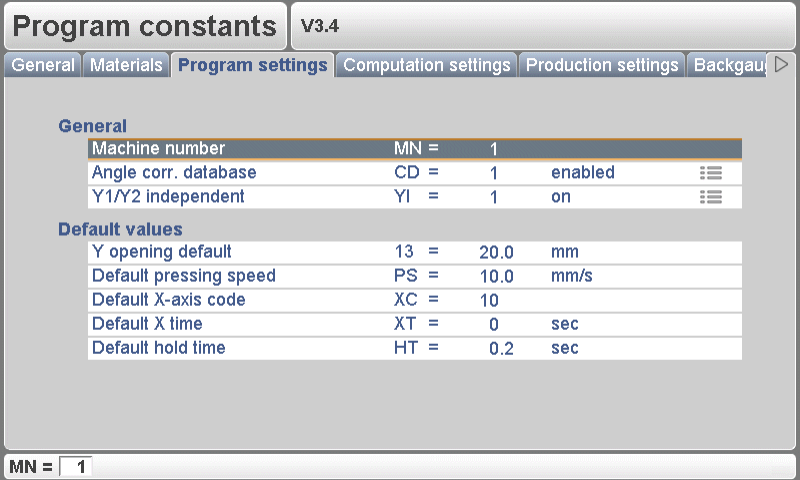
Číslo stroja (MN)
Priradenie jedinečného čísla stroja je nevyhnutné, ak v rovnakom zariadení pracuje viacero zohínacích lisov. Toto číslo sa ukladá do každého programu ohýbania aj do názvov súborov nástrojov, čím sa zabezpečuje správne priradenie stroja.
Kľúčové funkcie:
Jednoznačne identifikuje každý stroj
Overuje číslo stroja pri načítaní programov z USB
Vyžaduje potvrdenie v prípade nezhody čísel
Zmena čísla stroja aktualizuje všetky názvy súborov nástrojov a vyžaduje novú zálohu nástrojov
Databáza korekcií uhla (CD)
Toto prepínače umožňuje alebo zakazuje používanie zdieľanej databázy korekcií uhla. Ak je aktívne, korekcie zadané počas výroby sa ukladajú na budúce použitie a automaticky sa navrhujú pre podobné ohyby.
Ovládač porovnáva tieto vlastnosti ohybu:
Materiál
Hrúbka
Otvorenie diely
polomer zakrivenia
Polomer piestika
Uholník
Návrhy na korekciu alebo interpolácie sa vyskytujú, keď:
Aktívny uhol je do 10° od dvoch známych ohybov
Korekcie týchto ohybov sa líšia najviac o 5°
Prednastavené hodnoty programu
Aby sa zjednodušilo vytváranie nových programov pre ohýbanie, je možné prednastaviť niekoľko východiskových parametrov:
Prednastavená hodnota otvorenia osi Y – počiatočná hodnota otvorenia osi Y
Prednastavený kód osi X (XC) – prednastavený kód zmeny kroku (výrobná hodnota: 2)
Prednastavený čas osi X (XT) – počkacia doba pred zmenou kroku
Predvolený čas udržiavania (HT) – doba strávená v ohybovej polohe
S týmito optimalizovanými programovými konštantami DELEM DA-52S môžu operátori udržiavať stálu kvalitu ohybu a zároveň znížiť opakujúce sa úsilie pri nastavovaní.
Nastavenia výpočtu
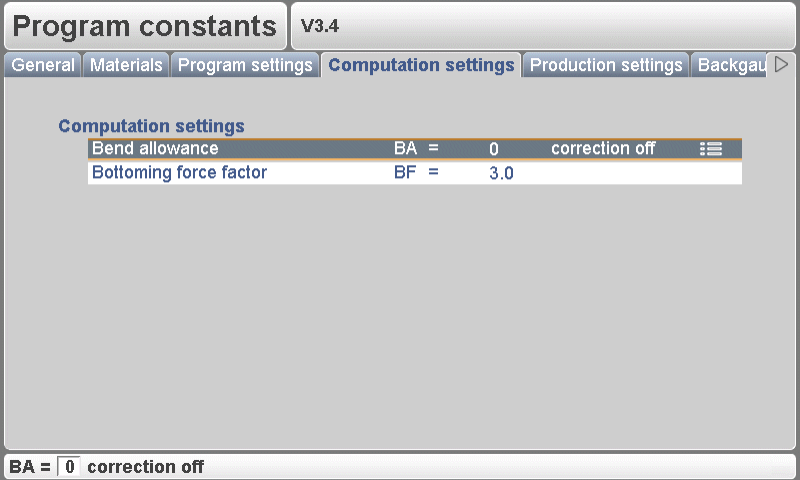
Presnosť pri zložitých ohybových operáciách závisí od efektívnych nastavení výpočtov vášho systému DELEM DA-52S. Kalibrácia algoritmov a pravidelná aktualizácia softvéru sú kľúčové.
Krok 1: Kalibrácia výpočtových algoritmov
Maximalizujte rýchlosť a presnosť kalibráciou vašich výpočtových algoritmov. Zamerajte sa na nastavenie povolenia ohybu (BA):
l 0 = Oprava vypnutá
l 1 = Oprava zapnutá
Toto nastavenie určuje, či sa majú počas fázy programovania uplatniť opravy pre povolenie ohybu. Opravy uplatnené počas programovania sa vypočítajú a uložia a dajú sa upraviť v režime výroby.
Krok 2: Aktualizácia softvérových algoritmov
Pravidelne aktualizujte softvér, aby ste zlepšili výkon a presnosť algoritmu. Venujte pozornosť faktoru sile dolného dorazu (BF), ktorý sa používa na nastavenie tlaku pri vzduchovom ohybe, aby sa dosiahla požadovaná sila razenia.
Použitie týchto nastavení zabezpečuje, že váš systém DELEM DA-52S bude fungovať s výnimočnou účinnosťou a presnosťou. Ak potrebujete ďalšiu pomoc, prejdite si našu dokumentáciu alebo kontaktujte náš podporný tím.
Nastavenia výroby
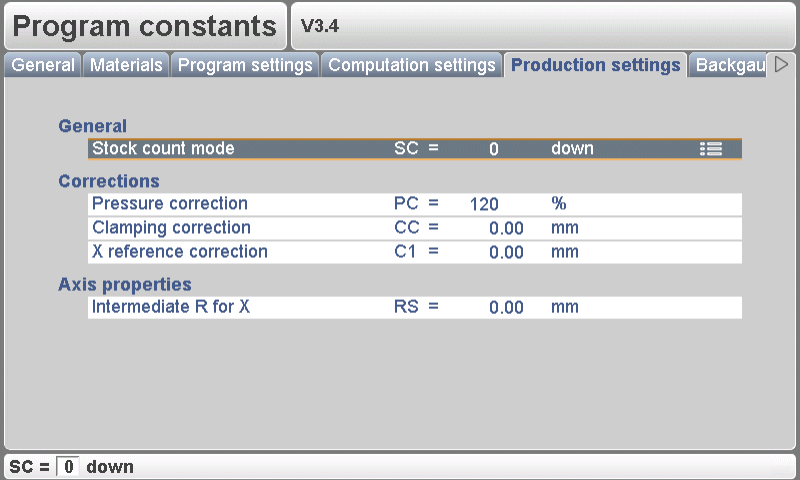
Výrobné nastavenia v systéme DELEM DA-52S sú kľúčové pre efektívne riadenie výroby polotovarov na zohínacích strojoch. Správna konfigurácia optimalizuje výkon aj kvalitu.
Krok 1: Nastavenie výrobných premenných
Nastavte presné výrobné premenné, ako je veľkosť dávky a rýchlosť, aby ste dosiahli optimálnu účinnosť. Použite režim počítania zásoby (SC) na počítanie výrobkov smerom nahor alebo nadol počas výroby. Počítanie smerom nadol zastaví stroj pri nulovej hodnote po dosiahnutí predvolenej kvóty, zatiaľ čo počítanie smerom nahor poskytuje priebežné informácie o pokročívaní výroby. Upravte korekciu tlaku (PC) na riadenie tlaku ventilov a zabezpečenie konzistentnosti.
Použite korekciu upínania (CC) na úpravu polohy upínania lúča, čím dosiahnete pevné uchytenie posunutím miesta stlačenia; kladné hodnoty ho posúvajú hlbšie, záporné hodnoty ho zdvíhajú.
Krok 2: Monitorovanie kvality výstupu
Pravidelne kontrolujte kvalitu výroby a vykonajte potrebné úpravy. Medzistupeň R pre pohyb v smere osi X (RS) zabraňuje kolíziám úpravou osi R počas pohybu osi X v bezpečnej zóne, čím sa zabezpečuje hladký chod.
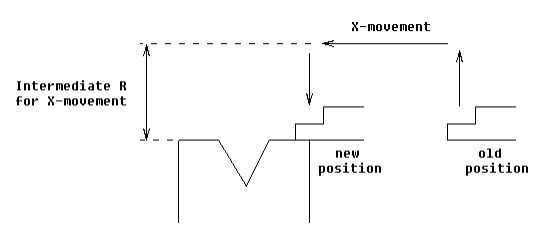
Efektívnou konfiguráciou týchto programových konštánt DELEM DA-52S môžete maximalizovať výkon stroja aj kvalitu výrobkov.
Rozmery zadného zarážacieho zariadenia
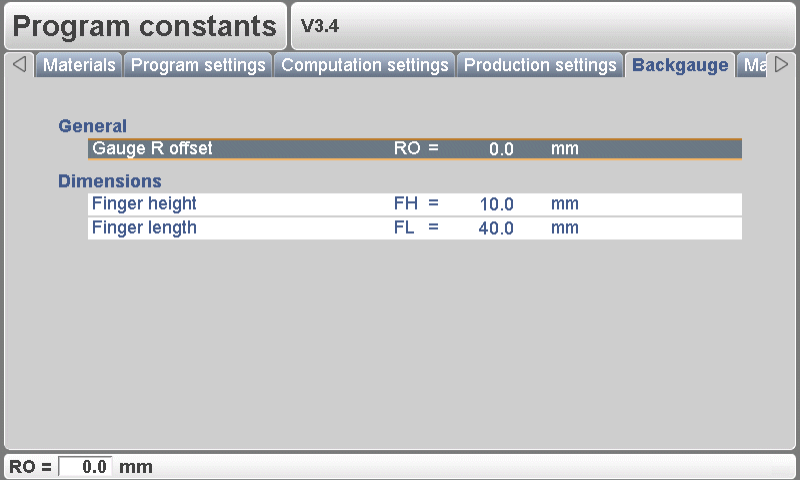
Správna konfigurácia zadného zarážacieho zariadenia je kľúčová pre zachovanie presnosti a opakovateľnosti ohybov.
Krok 1: Meranie rozmerov zadného zarážacieho zariadenia
Posun osi R (RO): Nastavte posun osi R pre prípady, keď je os X mimo bezpečnostnej zóny diely. Táto úprava zabezpečuje nižšie polohy zadného vodidla pri nulovej polohe meradla pre presné ohyby.
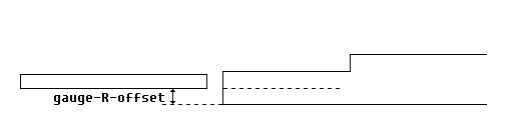
Výška prsta (FH): Upravte predvolenú výšku prsta, aby ste skorigovali os R pri situáciách, keď sa materiál kladie na prsty, čím sa zvyšuje presnosť ohybov.
Dĺžka prsta (FL): Skorigujte polohu osi X pomocou dĺžky prvej úrovne prstov, aby sa zachovala správna poloha počas prevádzky.
Krok 2: Kalibrácia mechanizmu zadného vodidla
Vykonávajte pravidelné kalibrácie, aby ste zabezpečili, že vaše zadné vodidlo presne udržiava programované polohy, čím sa zvyšuje konzistentnosť ohybových operácií.
Dôkladným nastavením a kalibráciou týchto parametrov môžete výrazne zvýšiť spoľahlivosť a výkon vášho systému DELEM DA-52S.
Údržba
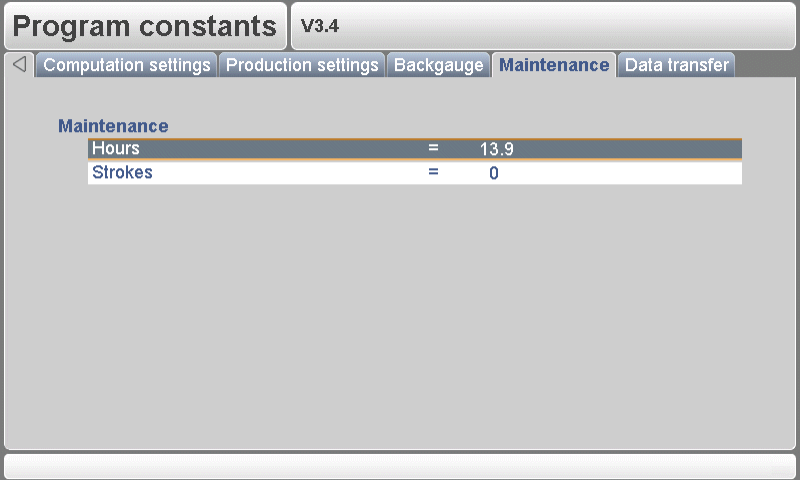
Údržba systému DELEM DA-52S zaisťuje jeho dlhú životnosť a optimálny výkon.
Krok 1: Pravidelné kontrolné prehliadky
Prevádzkové hodiny stroja: Sledujte prevádzkové hodiny na plánovanie včasnej údržby.
Počet zdvihov: Sledujte počet zdvihov vykonaných lisovacou tyčou, aby ste čo najskôr zistili potenciálne problémy.
Krok 2: Postupy mazania
Uistite sa, že všetky pohyblivé časti sú pravidelne mazané, aby sa znížilo trenie a opotrebovanie, pričom dodržiavajte pokyny výrobcu týkajúce sa typov mazív a harmonogramov mazania.
Prenos dát
Efektívny a bezpečný prenos dát je kľúčový pre správu programových konštánt DELEM DA-52S, čo umožňuje bezproblémové aktualizácie a zdieľanie medzi strojmi a počítačmi.
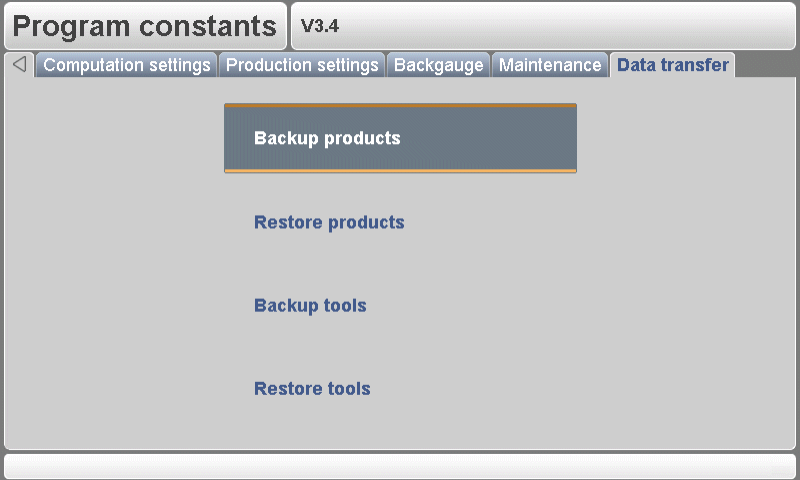
Z tohto menu je možné uložiť všetky programové údaje na riadiacom zariadení na vonkajšie USB zariadenie alebo ich z takéhoto zariadenia obnoviť.
Zálohovanie produktov: Skopírujte všetky produkty z riadiaceho zariadenia na USB disk. Existujúce produkty na USB disku so zhodným názvom budú prepísané.
Obnovenie produktov: Skopírujte všetky produkty prítomné na USB disku do riadiaceho zariadenia. Existujúce produkty na riadiacom zariadení so zhodným názvom budú prepísané.
Záložné nástroje: Skopírujte všetky nástroje z ovládania na USB disk. Existujúce nástroje na USB disku s rovnakým názvom sa prepíšu. Okrem nástrojov sa uložia aj programové konštanty.
Obnovenie nástrojov: Skopírujte všetky nástroje prítomné na USB disku do ovládania. Existujúce nástroje v ovládaní s rovnakým názvom sa prepíšu.
Záver
Zhrnutie: Konfigurácia programových konštánt DELEM DA-52S vyžaduje rad základných krokov, ktoré zabezpečujú presnosť a efektivitu pri prevádzke vašej zlomovej lisovacej strojníky. Presným definovaním vlastností materiálu, nastavení programu, výpočtových parametrov a výrobných konfigurácií môžete významne zvýšiť výkon aj presnosť stroja. Pravidelná údržba a bezpečné spravovanie dát ďalej prispievajú k dlhodobej spoľahlivosti a prevádzkovej stability systému.
Správna inštalácia a pravidelná údržba sú kľúčové pre udržanie výkonu vášho zohínaceho stroja vybaveného ovládacím systémom DELEM DA-52S. Ak budete dodržiavať tieto pokyny a stroj pravidelne servírovať, môžete minimalizovať výpadky a zvýšiť celkovú efektivitu výroby.
Ak potrebujete podrobnnejšiu podporu alebo máte ďalšie otázky, pozveme vás, aby ste kontaktovali našich odborníkov v spoločnosti HARSLE. Môžete tiež preskúmať časť dokumentácie, kde nájdete ďalšie komplexné návody a zdroje týkajúce sa prevádzky zohínacích strojov.

