





Mestring av bøyning av buer med stor radius: En omfattende veiledning for ESA S630-bøyemaskin
Innholdsfortegnelse
1. En oversikt over ESA S630
2. Trinnvis grafisk programmering for ESA S630
3. Trinnvis numerisk programmering for ESA S630
4. Konklusjon
Å forme buer med stor radius er en sømløs prosess med ESA S630, en moderne bøyemaskin som er utviklet for uovertruffen nøyaktighet og mangfoldighet i moderne produksjon. Utstyrt med avansert CNC-teknologi er denne maskinen tilpasset de strenge kravene til ulike produksjonsprosjekter og forenkler arbeidsflyten for buesveising – spesielt ved fremstilling av buer med stor radius. Dens eksepsjonelle egenskaper gjør den til et uunnværlig verktøy innen mange felt, blant annet strukturteknikk, byggproduksjon og fremstilling av kunstneriske metallarbeider. For teknikere og ingeniører som ønsker å øke produksjonseffektiviteten og levere resultater av første klasse, har behersking av teknikkene for håndtering av buer med stor radius blitt en sentral faglig ferdighet.
Uansett om du er en erfaren CNC-programmeringstekniker eller nykommer på feltet, er det avgjørende å beherske buekurver med stor radius. Denne ferdigheten øker ikke bare driftseffektiviteten, men sikrer også konsekvent, høykvalitets utførelse for hver enkelt arbeidsdelen. Denne veiledningen er utformet for å gi detaljerte, spesifikke instruksjoner for buing av buekurver med stor radius for ESA S630, og gir brukerne mulighet til å utnytte hele potensialet til denne høytytende maskinen. Ved systematisk mestring av disse prosessene og teknikkene kan produksjonsbedrifter optimalisere sine driftsprosesser og oppnå en tydelig konkurransafortrinn i den dynamiske globale markedet.
En oversikt over ESA S630
ESA S630 er en svært effektiv, multifunksjonell bøyemaskin som er kjent for sin nøyaktighet og tilpasningsdyktighet innen metallforarbeiding. Den er utformet for å behandle et bredt spekter av metallmaterialer og skiller seg ut ved å lage komplekse bøyer og buer med store radier med bemerkelsesverdig enkelhet. Dens avanserte CNC-styresystem ligger til grunn for ultra-nøyaktige operasjoner, noe som gjør at produsenter kan oppnå konsekvente, høykvalitative resultater både for små serier av kundespesifikke produkter og for storstilt masseproduksjon. Bygget for langvarig holdbarhet og stabil ytelse, er ESA S630 en uvurderlig ressurs for produsenter som ønsker å utvide sine produksjonsmuligheter og drive innovasjon innen kundespesifikk metallforarbeiding. Fra intrikate arkitektoniske metallkomponenter til tunge industrielle deler leverer ESA S630 en overlegen pålitelighet og bearbeidingsnøyaktighet.
Trinnvis grafisk programmering for ESA S630
1. Systemtilgang og modusvalg
• Maskinoppstart: Slå på bøye maskinen og bekreft at ESA S630-styringen initialiseres korrekt uten feil.
• Valg av grafisk programmeringsmodus: Naviger til alternativet «Grafisk programmering» via maskinens hovedmeny, deretter velg konfigurasjonsgrensesnittet som er dedikert til bøyning av buer med stor radius.
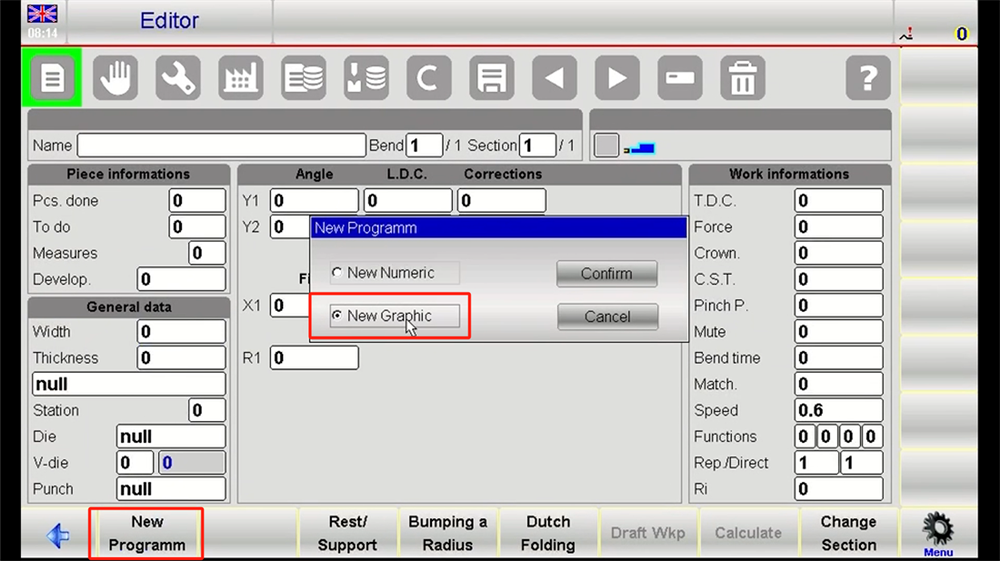
2. Arbeidsstykkets profilutforming
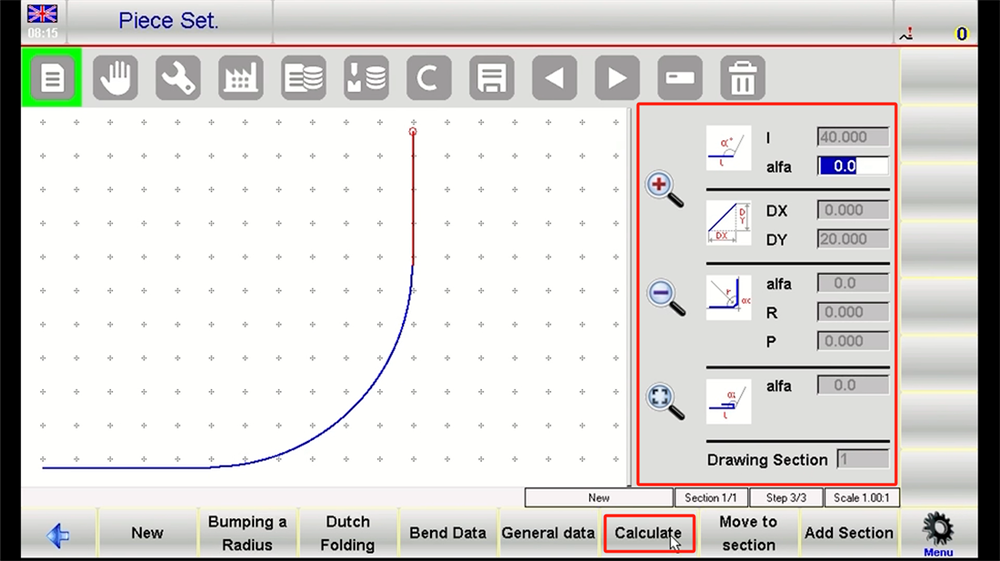
• Forhåndstegning: Gå inn i det grafiske redigeringsgrensesnittet og bruk de innebygde tegneverktøyene til å skissere grunnformen til arbeidsstykket, med særlig fokus på buedelene med stor radius.
• Forfining av geometriske egenskaper: Bruk tegneverktøyet «Bue», angi nøyaktige start- og sluttkoordinater for buen, og juster parametrene for radius og bøyevinkel for å nøyaktig gjenskape spesifikasjonene for buen med stor radius i designtegningen.
3. Innskriving av driftsparametere
• Definisjon av bueparametere: Klikk på det store buesegmentet i designgrensesnittet og angi nøkkelgeometriske parametere, inkludert buenes radius og koordinatene til sentrumspunktet.
• Oppsett av materialeegenskaper: Angi verkstykgets materialtype og tykkelse for å støtte systemets automatiske beregning av bøye-parametere, og bruk maskinens forhåndsdefinerte materialmaler til å initialisere bøye-parametrene for buer med stor radius for raskere oppsett.
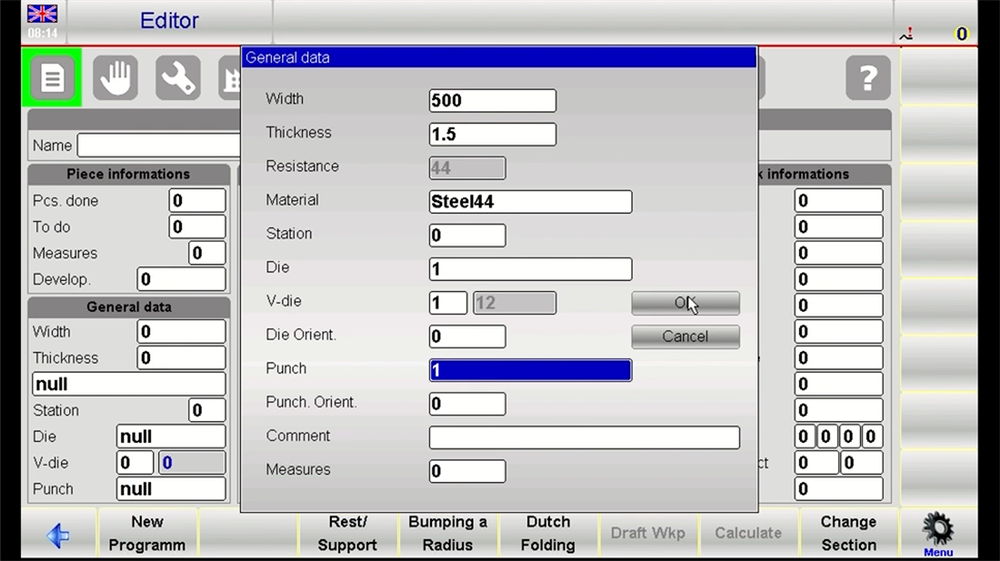
4. Automatisk generering av bøysteg
• Beregning og generering av bane: Aktiver maskinens innebygde automatisk beregningsfunksjon, som analyserer det utformede verkstykket og genererer en optimal bøyebane, og konverterer denne til utførbare bearbeidingssteg spesielt for buer med stor radius.
• Manuell parameterjustering: Gjennomgå den automatisk genererte bøyeveien og juster trinnavstanden og bøyevinkelen manuelt for å rette opp små geometriske avvik i delen med stor radius-bue og sikre nøyaktighet under bearbeiding.
5. Programverifisering og simulering
• 3D-visuell simulering: Kjør maskinens 3D-simuleringsfunksjon for å visualisere hele bøyeprinsessen i sanntid, med spesiell vekt på å verifisere målenøyaktigheten til buen med stor radius under hvert bearbeidingstrinn.
• Resultatvalidering og justering: Sammenlign simuleringens resultater med de opprinnelige konstruksjonskravene og foreta nødvendige parameterendringer for å sikre programmets nøyaktighet ved bøyning av buer med stor radius.
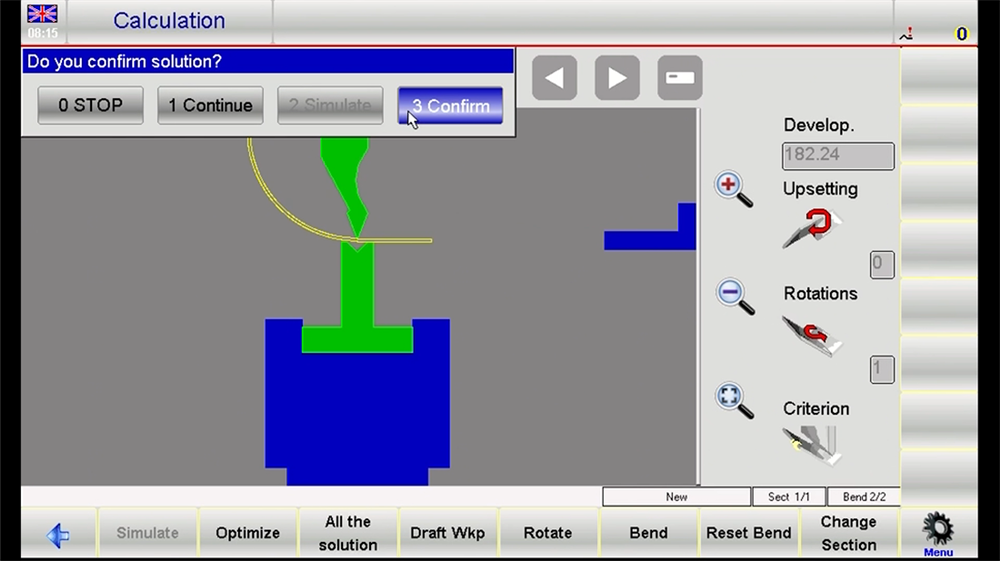
6. Programbekreftelse og utførelse
• Lagre og bekreft: Utfør en endelig sjekk av trinnkartleggingen og parameterne for buen med stor radius, og lagre deretter den programmerte bearbeidingssekvensen med et tydelig, beskrivende navn for enkel gjenfinning og fremtidig bruk.
• Start forberedelse av bearbeiding: Gå tilbake til maskinens hovedbetjeningspanel og fullfør alle forhåndsinspeksjoner før utførelse av programmet for bøyning av store radiusbuer.
Trinnvis numerisk programmering for ESA S630
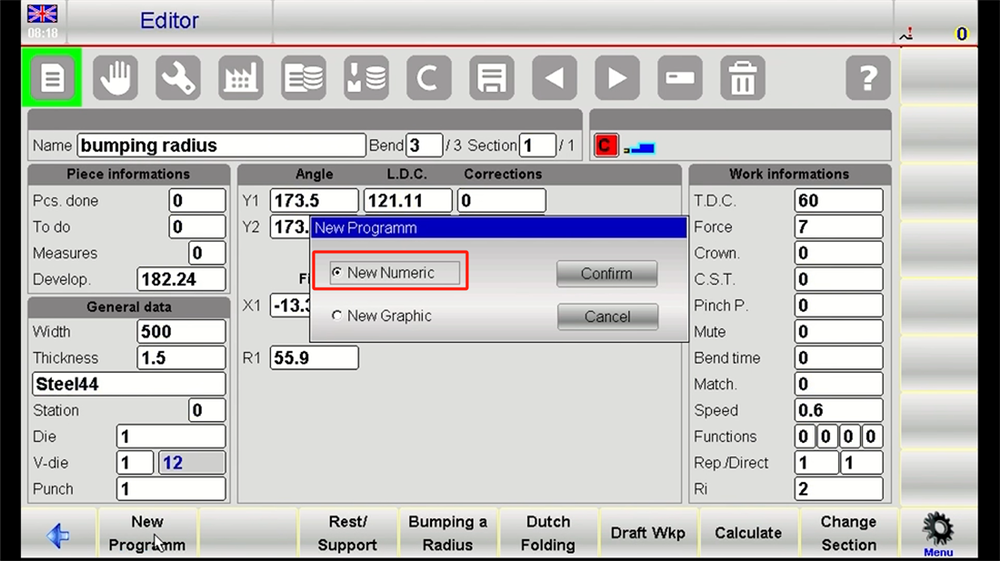
1. Opprettelse av nytt program
• Initialisering av program: Velg alternativet «Opprett nytt program» på kontrollenhetsgrensesnittet, og angi et beskrivende filnavn når du blir bedt om det – dette sikrer enkelt referanse og administrasjon av programmet senere.
• Definisjon av arbeidsstykketype: Angi arbeidsstykketypen som «Bøyning av buer» (for buer med stort radius), noe som får systemet til å automatisk justere sine innebygde bearbeidingsparametre slik at de samsvarer med kravene til fremstilling av buer med stort radius.
2. Innskriving av materialparametere
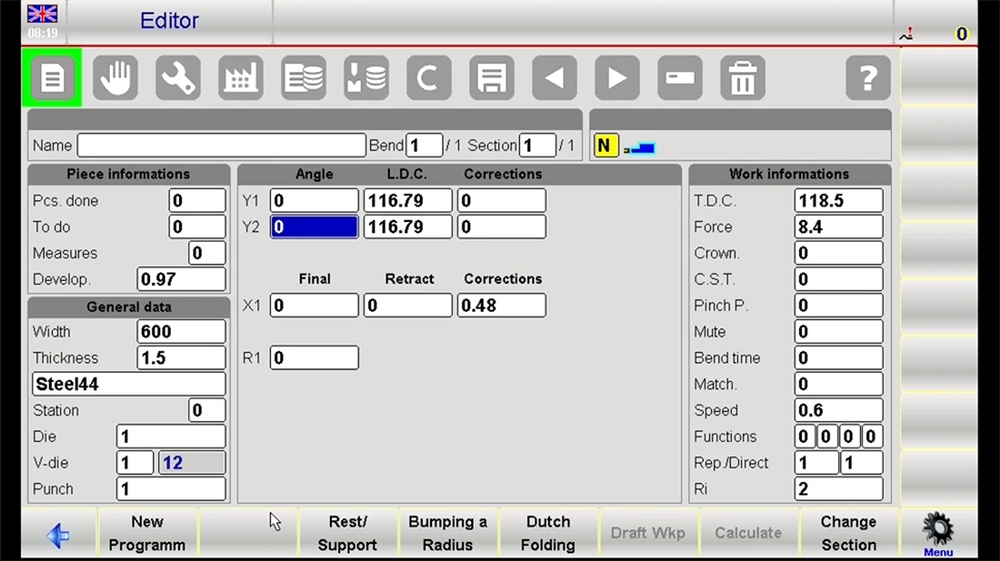
• Materialspesifikasjon: Angi nøyaktig materialtype (f.eks. rustfritt stål, aluminiumslegering) og tykkelsen på arbeidsstykket, slik at systemet kan beregne den nøyaktige bøyekraften som kreves for å danne buer med stort radius.
• Innstilling av korreksjonsfaktor for fjæring: Angi nødvendige korreksjonsfaktorer for fjæring basert på de mekaniske egenskapene til det valgte materialet – denne kritiske trinnet sikrer at den endelige buen med stor radius oppfyller designets krav til dimensjonell og vinkelrett nøyaktighet.
3. Konfigurasjon av bøye-parametre
• Inndata for buekjerne: Angi radius og bøyevinkel for buen med stor radius, og sørg for at disse verdiene nøyaktig samsvarer med designspesifikasjonene for å unngå bearbeidingsfeil.
• Innstilling av effektiv bøylengde: Angi den effektive bøylengden til arbeidsstykket, en parameter som er direkte knyttet til arbeidsstykkets bredde og plasseringen av delen med stor radius-bue under bearbeiding.
4. Definisjon av detaljerte bearbeidingssteg
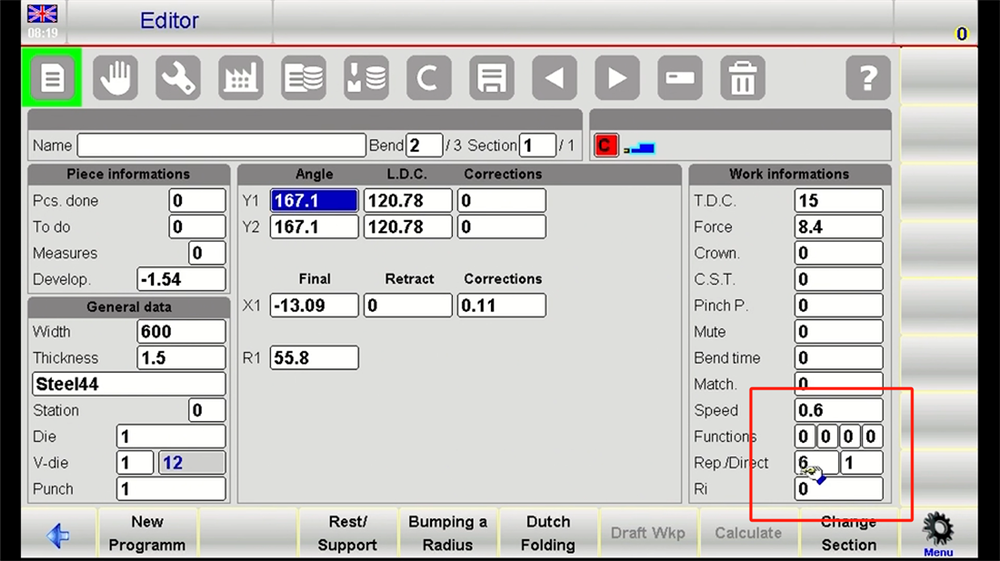
• Sekvensiell oppdeling i trinn: Del opp buen med stor radius i flere inkrementelle bøyetrinnsoperasjoner (f.eks. en bøyning på 10 grader per trinn), og definer tydelig bøyevinkelen og fremføringsavstanden for hvert enkelt trinn.
• Finjustering av parametere: Utfør målrettede finjusteringer av bearbeidingsparameterne for hver steg for å optimere bøyeveien og ytterligere forbedre bearbeidingsnøyaktigheten til buen med stor radius.
5. Programmeringssimulering og optimalisering
• Simuleringskjøring: Bruk maskinens programvaresimuleringsfunksjon til å simulere full utførelse av de programmerte stegene, og bekreft at det ikke oppstår kollisjoner eller overkjøring under bøyeprosessen for buen med stor radius.
• Feilsøking og forfining: Juster de aktuelle parameterne basert på simuleringsresultatene for å perfeksjonere bearbeidingen av buen med stor radius. Hvis det identifiseres problemer under simuleringen, gå tilbake og verifiser hvert programmeringssteg for å lokalisere og løse problemet.
6. Lagring av program og forberedelse for kjøring
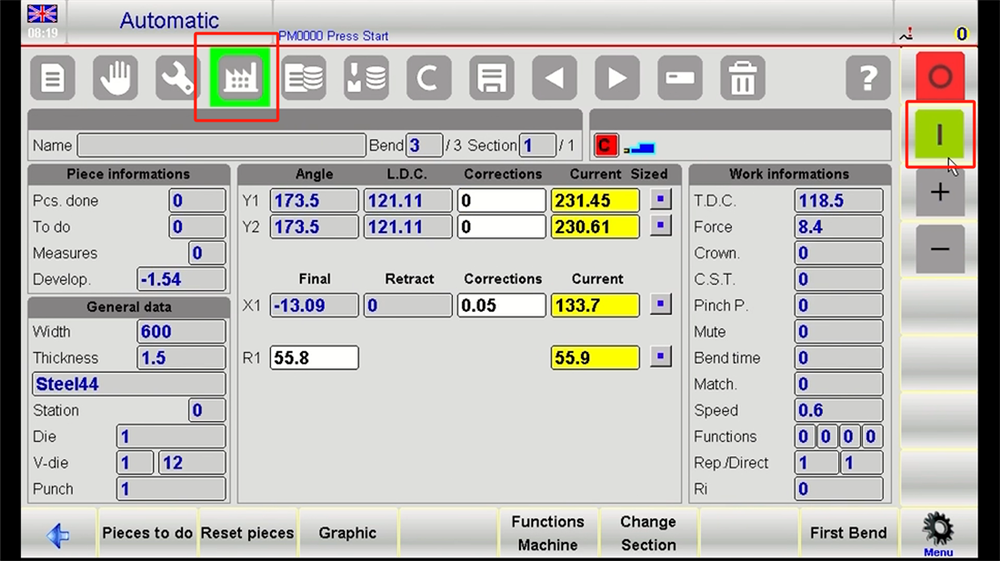
• Programlagring: Når alle parametre for bøyning av buen med stor radius er verifisert og optimalisert, lagre programmet og plasser det i en vanlig brukte mappe på kontrolleren for rask gjenbruk i senere produksjon.
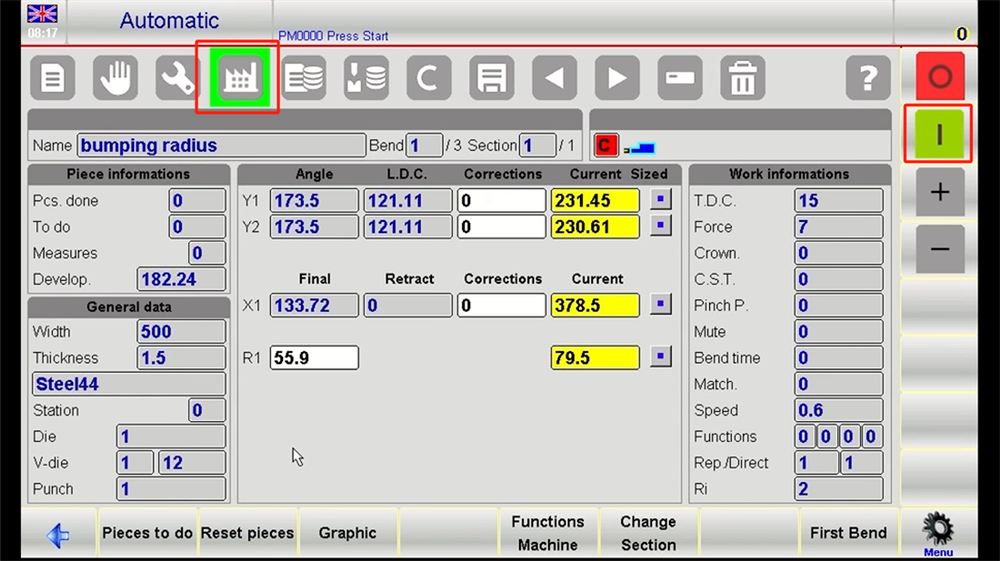
• Maskineringstilstandsskifter: Bytt ESA S630 til dens operative maskineringstilstand og fullfør alle forproduksjonskontroller for å forberede fysisk fremstilling av arbeidsstykket med stor bue-radius.
Konklusjon
Bøyemaskinen ESA S630, som er utstyrt med robuste og brukervennlige numeriske og grafiske programmeringsmuligheter, er et uunnværlig verktøy for nøyaktige buebøyingsoppgaver – spesielt når det gjelder de komplekse kravene til fremstilling av buer med stor radius. Ved å følge de detaljerte trinnvise instruksjonene i denne veiledningen nøye, kan brukere konsekvent produsere arbeidsstykker med høy kvalitet og stor bue-radius, optimalisere sine produksjonsarbeidsflyter og oppnå betydelige forbedringer i den totale produksjonsproduktiviteten. Når produsenter utvikler nye produksjonsprosesser eller forbedrer eksisterende prosesser, vil en god forståelse av ESA S630s spesialiserte funksjonalitet for bøyning av buer med stor radius plassere dem i forkant av innovasjon og effektivitet i metallforedlingsindustrien.
Når du fortsetter å utforske mulighetene med avansert CNC-programmering for ESA S630, er det avgjørende å regelmessig konsultere maskinens offisielle driftshåndbok for å sikre både driftssikkerhet og nøyaktighet i bearbeidingen. Å utnytte den omstøtende kraften i kompetent håndtering av buer med stor radius vil drive utvidelse og forbedring av dine produksjonsmuligheter. I det stadig utviklende landskapet innen produksjon og fremstilling vil produsenter, etter hvert som teknologier og metoder for bøyning av buer med stor radius fortsetter å utvikles, oppleve dramatiske fremskritt i driftseffektivitet og produksjonskapasitet – og dermed sikre sin konkurransekraft på den globale markedsplassen. Gjennom kontinuerlig læring og praktisk anvendelse av disse avanserte bearbeidingsmetodene kan produksjonsbedrifter oppnå uten sidestykke konkurransedyktige fordeler og åpne nye muligheter for bærekraftig vekst og utvikling.

