





Kaip pašalinti JUGAO lenkimo staklių CNC sistemos užšalimą
Turinys
1. Kas sukelia JUGAO lenktuvo CNC sistemos užšalimą?
2. Žingsnis po žingsnio trikčių šalinimas JUGAO lenktuvo CNC sistemos užšalimo atveju
○ Žingsnis 1: Saugus CNC valdiklio paleidimas iš naujo
○ Žingsnis 2: Patikrinkite CNC sistemos atmintį ir programos talpą
○ Žingsnis 3: Patikrinkite elektros skyrių ir aušinimo sistemą
○ Žingsnis 4: Patvirtinkite ryšį tarp CNC ir variklių valdiklių
○ Žingsnis 5: Išbandykite maitinimo šaltinio stabilumą
3. Kasdieniniai rekomenduojami veiksmai, kad būtų išvengta JUGAO lenktuvo CNC sistemos užšalimo
○ Reguliarios CNC programinės įrangos atnaujinimai
○ Suplanuota elektros įrangos priežiūra
○ Standartinis CNC programų valdymas
4. Dažniausiai užduodami klausimai
○ Kodėl mano JUGAO lenkimo staklių CNC sistema užšąla lenkiant?
○ Ar paprastas įrenginio paleidimas iš naujo gali išspręsti CNC sistemos užšalimą?
○ Kaip išvengti CNC sistemos užšalimo mano JUGAO lenkimo staklėse?
○ Ar perkaitymas gali sukelti CNC valdiklio užšalimą?
5. Išvada
Kai JUGAO lenkimo staklių CNC sistema užšąla gamybos metu, lenkimo darbai iš karto sustoja ir sumažėja visos dirbtuvės veiksmingumas. Ši problema dažnai pasitaiko aukštos dažnumo gamybos dirbtuvėse, kur lenkimo staklės veikia nuolat. CNC valdiklio užšalimas dažniausiai būna sukeliamas programinės įrangos klaidų, įrangos ryšio klaidų, atminties perkrovos ar nestabilios maitinimo įtampos. Gera žinia ta, kad dauguma užšalimo gedimų gali būti nustatyti ir ištaisyti taikant standartinę, žingsnis po žingsnio trikčių šalinimo metodiką. Šiame vadove išsamiai aptarsime šios problemos tipiškas priežastis ir pateiksime praktiškus, saugius sprendimus, kurie leis greitai grąžinti CNC sistemą į normalią veikseną.
Kas sukelia JUGAO lenktuvo CNC sistemos užšalimą?
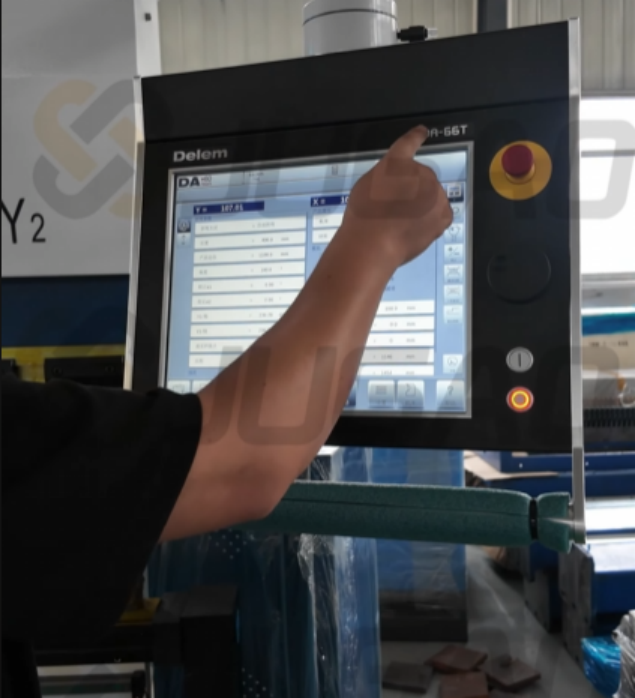
Prieš šalinant gedimą, būtina tiksliai nustatyti jo priežastį. CNC sistemos užšalimas JUGAO lenktuvuose beveik visada neatsiranda be esminių priežasčių.
Pagrindinės aktyvinančios priežastys yra:
• Perkrauta CNC atmintis dėl per didelių lenkimo programų
• Laikinosios programinės įrangos klaidos CNC valdiklyje
• Elektromagnetiniai trikdžiai arba kintamas įėjimo įtampa
• Pertrūkę ryšiai tarp valdiklio ir servosistemos
• Per didelė temperatūra elektros skyryje
Šių priežasčių aiškinimas padeda išvengti aklo paleidimo iš naujo ir užtikrina tikslų gedimų šalinimą.
Žingsnis po žingsnio trikčių šalinimas JUGAO lenktuvo CNC sistemos užšalimo atveju
Kai susiduriu su užšalusia CNC sistema JUGAO lenktuvuose, taikau struktūruotą gedimų šalinimo eigą, kad užtikrinčiau saugą ir efektyvumą.
Žingsnis 1: Saugus CNC valdiklio paleidimas iš naujo
Pirmasis ir paprasčiausias veiksmas – atlikti reguliuojamą CNC sistemos paleidimą iš naujo.
1. Iškart sustabdykite visus įrenginio veiksmus.
2. Išjunkite CNC valdiklį per valdymo skydelį.
3. Prieš vėl įjungdami maitinimą, palaukite 30–60 sekundžių.
4. Paleiskite valdiklį iš naujo ir patikrinkite, ar sistema reaguoja normaliai.
Paleidimas iš naujo gali pašalinti laikiną atminties perkrovą ir nedidelius programinės įrangos konfliktus, dėl kurių sistema užšąla. Jei problema kartojasi dažnai, reikia atlikti išsamų papildomą tyrimą.
Žingsnis 2: Patikrinkite CNC sistemos atmintį ir programos talpą
Per dideli lenkimo programų failai arba per daug saugomų failų gali lengvai perkrauti valdiklį.
Pagrindiniai tikrinimo punktai:
• Saugomų programų kiekis
• Nereikalingi nepanaudoti lenkimo failai
• CNC atminties naudojimo santykis
Jei atmintis beveik pilna, ištrinkite nereikalingas programas ir padarykite rezervinę kopiją svarbių failų išorėje esančiame saugyklos įrenginyje. Sistemos apkrovos sumažinimas veiksmingai prevencijuoja pakartotines užšalimo problemas.
Žingsnis 3: Patikrinkite elektros skyrių ir aušinimo sistemą
Perkaitymas elektros skydelyje yra viena iš dažniausiai pasitaikančių CNC sustojimų priežasčių.
Patikrinkite šiuos komponentus:
• Vėsinimo ventiliatorius
• Oro filtras
• Ventiliacijos angos
Dulkių kaupimasis bloškia oro srautą, dėl ko perkaista CNC procesoriai ir servoriniai varikliai. Elektros skydelio valymas ir ventiliacijos pagerinimas gali stabilizuoti sistemos veikimą ir pašalinti sustojimo gedimus.
Žingsnis 4: Patvirtinkite ryšį tarp CNC ir variklių valdiklių
Šiuolaikiniai JUGAO CNC lenktuvai priklauso nuo stabilaus signalų perdavimo tarp valdiklio, servorinių variklių ir jutiklių.
Signalų pertrauka tiesiogiai sukelia sistemos sustojimą.
Patikrinkite šiuos komponentus:
• Servorinio variklio ryšio laidai
• Kodaviklio jungties lizdai
• Atgalinio matavimo įrenginio variklio laidynas
• Lauko magistralės arba EtherCAT jungiamosios linijos
Nepritvirtinti jungikliai arba pažeisti laidai sutrikdo signalų perdavimą ir sukelia sustojimus. Šių laidų pakartotinis prijungimas ir patikrinimas dažniausiai atkuria sistemos stabilumą.
Žingsnis 5: Išbandykite maitinimo šaltinio stabilumą
Nestabili įtampa yra paslėpta CNC valdiklio sustojimų priežastis.
Išmatuokite ir patikrinkite šiuos parametrus:
• Stabilų įeinamąjį įtampą
• Patikimą įžeminimo jungtį
• Jokių akivaizdžių elektros trikdžių
Įdiegus įtampos stabilizatorius arba pernagrinėjimo apsaugos įrenginius, gamyklose su nestabiliu elektros tinklu sustojimų rizika žymiai sumažėja.
Kasdieniniai rekomenduojami veiksmai, kad būtų išvengta JUGAO lenktuvo CNC sistemos užšalimo
Prevencija yra veiksmingesnė nei remontas. Ilgalaikė praktika rodo, kad paprasta kasdienė priežiūra gali žymiai sumažinti CNC sistemos gedimų dažnį.
Reguliarios CNC programinės įrangos atnaujinimai
CNC programinės įrangos atnaujinimas užtikrina techninės įrangos suderinamumą ir ištaiso žinomus sistemos klaidų reiškinius. Visada diekite valdiklio gamintojo išleistus programinės įrangos atnaujinimus, laikydamiesi oficialių nurodymų.
Suplanuota elektros įrangos priežiūra
Planuojamos inspekcijos apima:
• Elektros terminalų priveržimą
• Valdymo skydų valymą
• Žemėjimo sistemų tikrinimą
• Variklių pavarų būsenos tikrinimą
Šie veiksmai užtikrina stabilią elektros našumą ir neleidžia CNC sistemai užstrigti.
Standartinis CNC programų valdymas
Veiksmingas programų valdymas taip pat yra vienodai svarbus.
Rekomenduojami veiksmai:
• Reguliariai šalinkite nenaudojamas lenkimo programas
• Periodiškai atsikurkite svarbius duomenis
• Programų failus tvarkykite struktūriškai
Tai sumažina atminties apkrovą ir pagerina sistemos reakcijos greitį.
Dažniausiai užduodami klausimai
Kodėl mano JUGAO lenkimo staklių CNC sistema užšąla lenkiant?
Dažniausios priežastys yra programinės įrangos gedimai, atminties perkrova, nesėkmingas ryšys su varikliukais, elektros skydo perkaitymas ir nestabili maitinimo įtampa.
Ar paprastas įrenginio paleidimas iš naujo gali išspręsti CNC sistemos užšalimą?
Daugumai atvejų – taip. Paleidus iš naujo išvaloma laikinoji atmintis ir atstatomas valdiklis. Tačiau dažni sustojimai rodo gilesnius elektros ar programinės įrangos problemas.
Kaip išvengti CNC sistemos užšalimo mano JUGAO lenkimo staklėse?
Reguliari elektros skydo priežiūra, stabili maitinimo įtampa, standartinis programų valdymas ir periodinės programinės įrangos naujinimų įdiegimas žymiai sumažina sustojimų riziką.
Ar perkaitymas gali sukelti CNC valdiklio užšalimą?
Taip. Bloga ventiliacija arba dulkių kaupimasis elektros skyde sukelia perkaitymą, dėl kurio gali sutrikti valdiklio veikimas arba jis gali sustoti.
Išvada
CNC sistemos užšalimas JUGAO lenktuvuose sutrikdo gamybą ir sukelia neplanuotą sustojimą, tačiau dauguma gedimų gali būti pašalinti sistemingai trikdančiosios veiklos metu. Patikrinus CNC valdiklį, apžvelgus elektros komponentus, patikrinus ryšio laidus ir užtikrinus stabilų maitinimą, įrenginys paprastai greitai grįžta prie normalios veiklos.
Svarbiausia, profilaktinės priemonės, tokios kaip reguliari techninė priežiūra, standartinis programų valdymas ir reguliarūs elektros komponentų patikrinimai, gali žymiai sumažinti būsimų užšalimų tikimybę. Jei jūsų JUGAO lenktuvo CNC sistema vis dar nuolat veikia netinkamai, rekomenduojama kreiptis į profesinę techninės priežiūros paslaugą tolimesnei diagnostikai.

