





ESA S875 ნახევარავტომატური კალიბრაციის მოქმედების სახელმძღვანელო
Თუ ძებნით სწრაფ და სწორ გზას მუშაობის დროს საჭიროების შემთხვევაში მოსახდელად გამოყენების შესაძლებლობას, ESA S875 ნახევარავტომატური კორექციები არის ძალიან მნიშვნელოვანი ფუნქცია, რომელსაც უნდა იცოდეთ. როდესაც წარმოების დროს ხდება კუთხის გადახრები ან უკანა გამომზომელის პოზიციონირების შეცდომები, ოპერატორებს ხშირად სჭირდება ეფექტური მეთოდი მათ შესასწორებლად, არ გადასახვევად მთლიანად პარამეტრების მენიუში. ეს ფუნქცია საშუალებას აძლევს პირდაპირ შეცვალოს Y1, Y2, X და R ღერძების მნიშვნელობები ნახევარავტომატური მასკიდან, როდესაც მანქანა ჩერდება (STOP სტატუსში). ამ სტატიაში მე ახსნის, თუ როგორ მუშაობს ESA S875 ნახევარავტომატური კორექციები, როგორ უნდა გამოვიყენოთ კორექციები ერთი ან რამდენიმე ერთნაირი კუთხის მქონე გამოხვევის შესასწორებლად და როგორ ხელს უწყობს ეს ფუნქცია სტაბილური და მუდმივი გამოხვევის შედეგების მიღებას.
Შესავალება
ESA S875 ნახევარავტომატური კორექციების ფუნქცია საშუალებას აძლევს ოპერატორებს პირდაპირ ნახევარავტომატური მასკიდან შეცვალონ გადაღების პარამეტრები, რაც არიდებს საჭიროებას დაბრუნდეს პარამეტრების დაყენებების ინტერფეისზე. ეს ფუნქცია შეიმუშავდა წარმოების მორგების გასწრაფებლად და საცდელი გადაღებებს შორის შეჩერების დროის მინიმიზაციის მიზნით და საშუალებას აძლევს სწრაფად კომპენსირონ კუთხის გადახრები ან უკანა გამომთვლელის (backgauge) სიზუსტის დაკარგვა — ყველაფერი მუშაობის ეკრანზე დარჩენის პირობით.
Როდესაც მანქანის სტატუსია «შეჩერებული» (STOP), ნახევარავტომატური მასკა ხდება რედაქტირებადი, რაც არის ნახევარავტომატური კორექციების გამოყენების ძირეული პირობა. ეს ინტერფეისი საშუალებას აძლევს ღერძების მნიშვნელობების რეალურ დროში კორექტირებას, რაც საშუალებას აძლევს სიზუსტის მაღალი დონის მიღწევას გადაღების პროცესში.
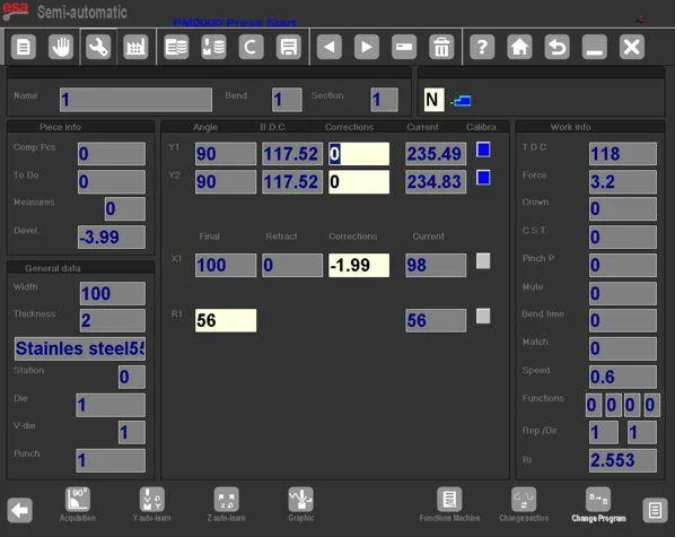
ESA S875 ნახევარავტომატური კორექციებში რედაქტირებადი პარამეტრები
ESA S875 ნახევარავტომატური კორექციების მასკაში ოპერატორი პირდაპირ შეძლებს რედაქტირებას:
Y1 ღერძის კორექცია
Y2 ღერძის კორექცია
X ღერძის კორექცია
R ღერძის სიმაღლის კორექცია
Ამ მნიშვნელობებს შეიძლება შეცვლა სრული პარამეტრების მასკის გახსნის გარეშე. ამიტომ ნახევარავტომატური კორექციები ამარტივებენ კორექციის სამუშაო პროცესს და ამცირებენ არასაჭიროებელ ნავიგაციურ ნაბიჯებს.
Როდესაც მანქანა გადაიყვანება ჩართული (START) რეჟიმში, ნახევარავტომატური კორექციები მაინც ჩანს, მაგრამ ხდება მხოლოდ საკითხველად. ეს უზრუნველყოფს უსაფრთხოებას და თავის არიდებს განუზღვრელ ცვლილებებს მანქანის მუშაობის დროს. რედაქტირება ნებადარებულია მხოლოდ მაშინ, როდესაც სისტემა დაბრუნდება STOP რეჟიმში.
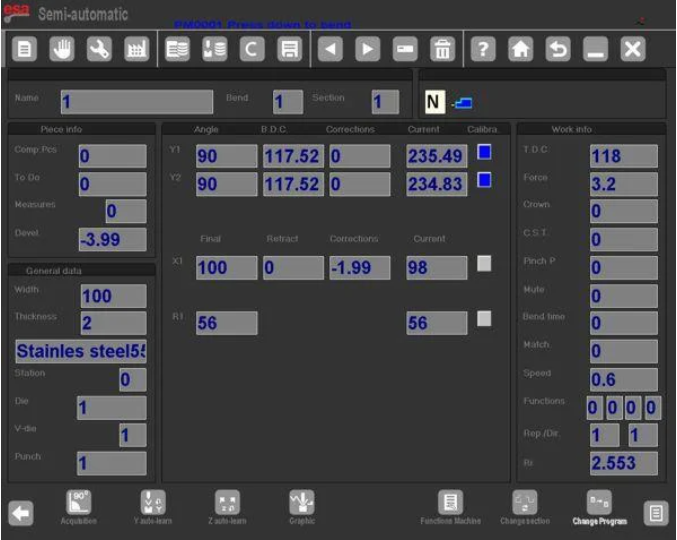
Ნახევარავტომატური კორექციების მიმდინარე გამოხრაზე გამოყენება
Როდესაც კორექცია შეიყვანება ESA S875 ნახევარავტომატური კორექციების მასკაში, ის პირდაპირ მიმდინარე გამოხრაზე იქნება გამოყენებული. სისტემა მყისიერად ახდენს მუშაობის მნიშვნელობის განახლებას.
Როდესაც პარამეტრი იცვლება:
Რედაქტირებული მნიშვნელობა ჩნდება შებრუნებული ფერებით
Ოპერატორი ვიზუალურ დასტურს იღებს
Ცვლილება ნაგულისხმევად აისახება მხოლოდ აქტიურ გამოხრაზე
Ეს დიზაინი უზრუნველყოფს სიმკაცესა და კონტროლს წარმოების რეგულირების დროს. ნახევარავტომატური კორექციები საშუალებას აძლევს ოპერატორს ცვლილებების სტუმარობას ნაბიჯ-ნაბიჯ მანამ, სანამ ისინი უფრო ფართო დაკვეთების დიაპაზონზე არ იქნება გამოყენებული.
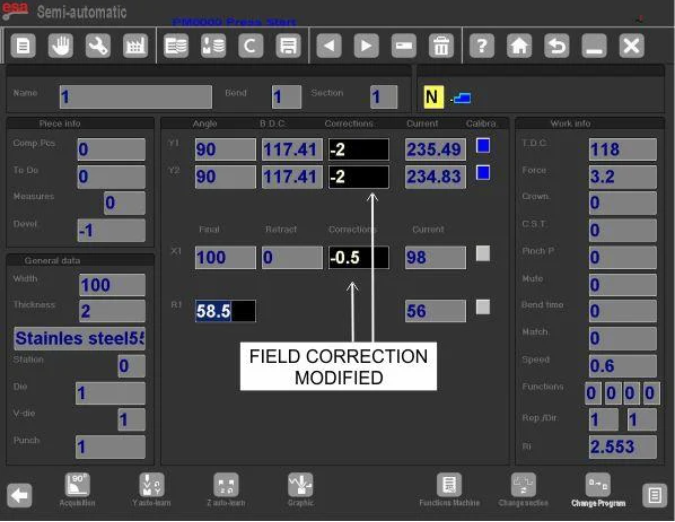
Გამოყენება იმავე სექციაში იმავე კუთხით
Თუ იმავე სექციაში მოთავსებული რამდენიმე დაკვეთა აქვს იგივე კუთხე, კორექცია შეიძლება გაფართოვდეს:
1. შეიყვანეთ საჭიროების შესაბამად კორექცია
2. დააჭირეთ ღილაკს მეორადი მენიუს გასახსნელად
3. აირჩიეთ [დადასტურება იმავე სექციაში იგივე კუთხით]
Ეს ფუნქცია ნახევარავტომატური კორექციების გამოყენებას უზრუნველყოფს მიმდინარე სექციაში მოთავსებულ ყველა დაკვეთაზე, რომელთა კუთხის მნიშვნელობა ემთხვევა აქტიური დაკვეთის კუთხის მნიშვნელობას.
Გამოყენება მთლიან ნაკეთობაზე იმავე კუთხით
ESA S875 ნახევარავტომატური კორექციების მთლიან ნაკეთობაზე მოთავსებულ ყველა დაკვეთაზე გაფართოებისთვის, რომლებსაც აქვთ იგივე კუთხე:
4. შეიყვანეთ კორექცია
5. მეორადი მენიუს წვდომა
6. აირჩიეთ [Conf.Pr. Same.Ang]
Ეს უზრუნველყოფს ერთნაირი კუთხეების ერთნაირ შესწორებას პროგრამის მთელი ხანგრძლივობის განმავლობაში. ESA S875 ნახევარავტომატური შესწორებების მოქნილობა მისცემს მას შესაძლებლობას გამოყენების რეპეტიციულ წარმოებაში რამდენიმე იდენტური გაღების შემთხვევაში.
Ნახევარავტომატური შესწორებებში შიდა რადიუსი
Გაღების შიდა რადიუსი შეიძლება გამოჩნდეს პარამეტრების ფანჯარაში და იგი ყოველთვის გამოითვლება კონტროლერის მიერ. გამოთვლის მეთოდი შეიძლება იყოს:
Გრაფიკა
Რიცხვითი
Არჩეული მეთოდი განისაზღვრება ზოგადი პარამეტრებში.
ESA S875 ნახევარავტომატური შესწორებებში შიდა რადიუსის ცვლილებები ზემოქმედებენ გაჭიმვის გამოთვლებზე მხოლოდ მაშინ, როდესაც პროგრამა რიცხვითია. თუ პროგრამა გრაფიკულად იქმნება, შიდა რადიუსის შეცვლა არ გამოიწვევს გაჭიმვის ავტომატურ გადათვლას.
Ამიტომ, როდესაც ESA S875 ნახევარავტომატური შესწორებები გამოიყენება რიცხვით პროგრამებში, ოპერატორებმა უნდა შეამოწმონ შიდა რადიუსის შეცვლების გავლენა გაშლილი სიგრძის მნიშვნელობებზე.
Ნახევარავტომატური შესწორებების ექსპლუატაციის მითითები
ESA S875 ნახევრავტომატური კორექციების გამოყენების დროს სტაბილური შედეგების უზრუნველყოფა:
Რედაქტირება შეიძლება მხოლოდ მაშინ, როდესაც მანქანა მდგომარეობაში „STOP“ იმყოფება
Გააკეთეთ პატარა, ნაკლებად მნიშვნელოვანი კორექციები
Დაადასტურეთ ცვლილებები შებრუნებული ფერის ინდიკატორების გამოყენებით
Გააფართოვეთ კორექციები საფრთხის გარეშე — ნაკლებად ან მთლიანად ნაკეთობებზე
Შეამოწმეთ შიგა რადიუსის პარამეტრები ციფრულ პროგრამებში
ESA S875 ნახევრავტომატური კორექციების ფუნქცია შეიმუშავებულია წარმოების სიზუსტის ოპტიმიზაციის მიზნით, ამავე დროს მომხმარებლის კონტროლის შენარჩუნებით. მუშაობის მასკის შიგნით პირდაპირი ღერძის კორექციის შეძლება ამ ფუნქციას უფრო ეფექტურს ხდის, კორექციების ციკლებს ამცირებს და გამოყენების განმავლობაში მუდმივ და სტაბილურ გამოკვეთის ხარისხს უზრუნველყოფს.
Ნახევრავტომატური კორექციების სწორი გაგება და სტრუქტურული გამოყენება ხელს უწყობს ზუსტი კუთხის კონტროლის, სწორი უკანა გამომზომველის პოზიციონირების და წარმოების სერიებში სტაბილური განმეორებადობის უზრუნველყოფას.
Დასკვნა
ESA S875 ნახევარავტომატური კორექციები საშუალებას აძლევს პირდაპირ და ეფექტურად შეასწოროთ Y1, Y2, X და R ღერძების მნიშვნელობები ნახევარავტომატური მასკიდან, მანქანის STOP რეჟიმში ყოფნის დროს. ამ ფუნქციას შეუძლია კორექციების გამოყენება მხოლოდ ერთი გამოხრის, ერთი კუთხით გაერთიანებული მთლიანი სექციის ან მთლიანი ნაკეთობის შესასწორებლად, რაც ხელს უწყობს გამოხრის კუთხეების ერთნაირობის და სრული წარმოების ეფექტურობის გაუმჯობესებას. სტაბილური და სწორი გამოხრის შედეგების მისაღებად მნიშვნელოვანია გაგება, როდის შეიძლება რედაქტირება, როგორ უნდა გავაგრძელოთ კორექციები სწორად და როგორ აისახება შიდა რადიუსის პარამეტრები გაჭიმვის გამოთვლებზე.
Თუ თქვენ სჭირდებათ დამატებითი ტექნიკური მიმართვა ESA S875-ის პროგრამირების, პარამეტრების კონფიგურაციის ან შეცდომების აღმოფხვრის შესახებ, გთხოვთ დააკონტაქტოთ ჩვენი ტექნიკური გუნდი პროფესიონალური მხარდაჭერობის მისაღებად. მეტი დეტალური კონფიგურაციის ინსტრუქციების მისაღებად შეგიძლიათ ასევე მიმართოთ მანქანის პარამეტრების სახელმძღვანელოს.

