





DELEM DA-58T Կարգավորումների Ռեժիմի Հիմնական Ֆունկցիաների Վերլուծությունը
Բովանդակության ցուցակ
1. Նախաբան
2. Ընդհանուր կարգավորումներ
3. Նյութերի կարգավորումներ
4. Տվյալների պահեստավորման և վերականգնման ֆունկցիոնալություն
○ Արտադրանքի տվյալների պահեստավորում
○ Արտադրանքի տվյալների վերականգնում
○ Գործիքների տվյալների պահեստավորում
○ Գործիքների տվյալների վերականգնում
○ Աղյուսակների և կարգավորումների պահեստավորում և վերականգնում
○ Կատարողական ցուցակի հավաքագրման գործողություններ
5. Ծրագրի կարգավորումներ
6. Լռելյայն և հաշվարկային կարգավորումներ
○ Հիմնական լռելյայն արժեքների կարգավորում
○ Հիմնական հաշվարկային պարամետրերի կարգավորումներ
7. Արտադրական կարգավորումներ
8. Ժամանակի և ցանցի կարգավորումներ
○ Արտադրական ժամանակի հաշվարկ
○ Հիմնական ժամանակի կարգավորումներ
○ Ցանցի կարգավորում (հասանելի է միայն ցանցային ընտրանքի տեղադրումից հետո)
9. Հաճախադեպ տրվող հարցեր (ՀՏՀ)
○ Ինչպե՞ս օպտիմալացնել ճկելու մեքենայի աշխատանքը DELEM DA-58T կարգավորումների ռեժիմի միջոցով:
○ Ինչպե՞ս սահմանել երկարության սահմանափակման սահմանները DELEM DA-58T կարգավորումների ռեժիմում:
10. Եզրակացություն
Այս հոդվածը մանրամասն վերլուծում է DELEM DA-58T ճկելու մեքենայի կառավարման համակարգի կարգավորումների ռեժիմի ֆունկցիոնալ հնարավորությունները՝ մանրամասն նկարագրելով դրա հիմնական կոնֆիգուրացիոն բնութագրերը և այդ կարգավորումների միջոցով ճկելու մեքենաների շահագործման արդյունավետության ու մշակման ճշգրտության բարելավման եղանակները: Արդյունավետության օպտիմալացման նպատակով սարքավորումների աշխատանքի բարելավման կամ մետաղների մշակման իրական պահանջներին համապատասխան շահագործման գործընթացների հարմարեցման դեպքում այս կարգավորումների ռեժիմի տարբեր ֆունկցիաների տիրապետումը կարևոր է: Այս հոդվածը պարզ ու կարճ մեկնաբանում է DELEM DA-58T կարգավորումների ռեժիմի հիմնական դրույթները՝ օգնելով ձեզ ամբողջությամբ բացահայտել սարքավորման կիրառման հնարավորությունները:
Նախաբան

DELEM DA-58T կառավարման համակարգը կարող է անցնել Կարգավորումների ռեժիմին՝ սեղմելով սարքի շահագործման վահանակի Կարգավորումներ նավիգացիոն կոճակը: Որպես հիմնական կոնֆիգուրացիայի կենտրոն՝ այս ռեժիմը թույլ է տալիս միասնաբար կարգավորել ստանդարտ արժեքները և ապրանքի ծրագրավորման համար անհրաժեշտ տարբեր առանձնահատուկ սահմանափակող պարամետրերը, ինչը դարձնում է այն ճնշման ճապաղների անհատականացված տեսակավորման հիմնական մուտքը:
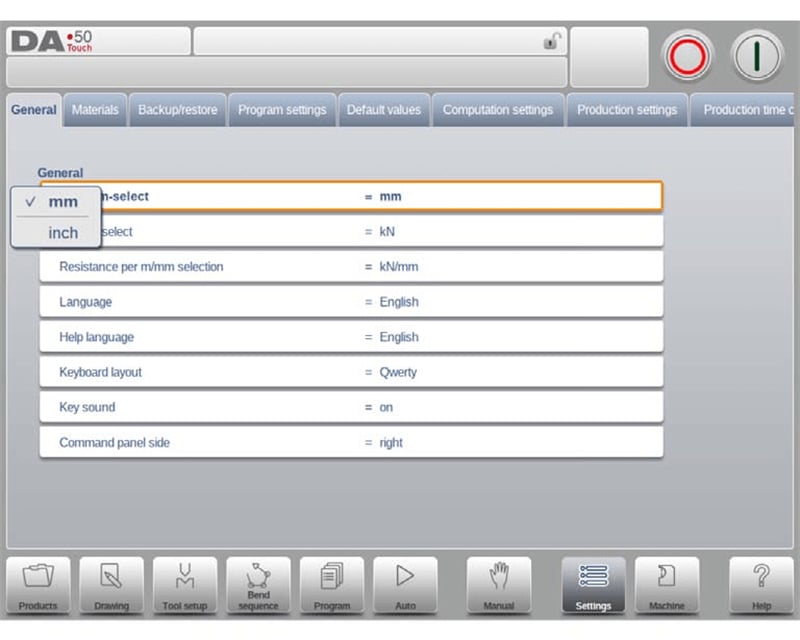
Կարգավորումների ռեժիմում բոլոր պարամետրերը ըստ գործառույթի բաժանված են տարբեր ներդիրների և աջակցում են հորիզոնական սահելու՝ ներդիրների փոխարկման համար: Օգտատերերը պետք է ընդամենը սեղմեն համապատասխան ներդիրը և կոնկրետ պարամետրի տարրը՝ բոլոր արժեքների ճշգրտման ավարտի համար: Գործողության տրամաբանությունը պարզ է և հեշտ է հասկանալու, ինչը զգալիորեն նվազեցնում է պարամետրերի կարգավորման անցման շեմը:
Ընդհանուր կարգավորումներ
DELEM DA-58T ընդհանուր կարգավորումների մոդուլը օգտագործողներին թույլ է տալիս հարմարեցնել սարքի հիմնական շահագործման պարամետրերը, այդ թվում՝ չափման միավորների ընտրություն (դյույմ/մմ, տոննա/կՆ), շահագործման ինտերֆեյսի լեզուն, ստեղնաշարի դասավորությունը և մուտքագրման վահանակի ստեղների ձայնը: Տեսողական շահագործման ինտերֆեյսը տարբեր կարգավորումների ընտրությունը դարձնում է ավելի հարմար, ամբողջությամբ հարմարվում է տարբեր օգտագործողների շահագործման սովորույթներին և ստեղծում է անհատականացված օգտագործողի փորձ:
Ինտերֆեյսի լեզու
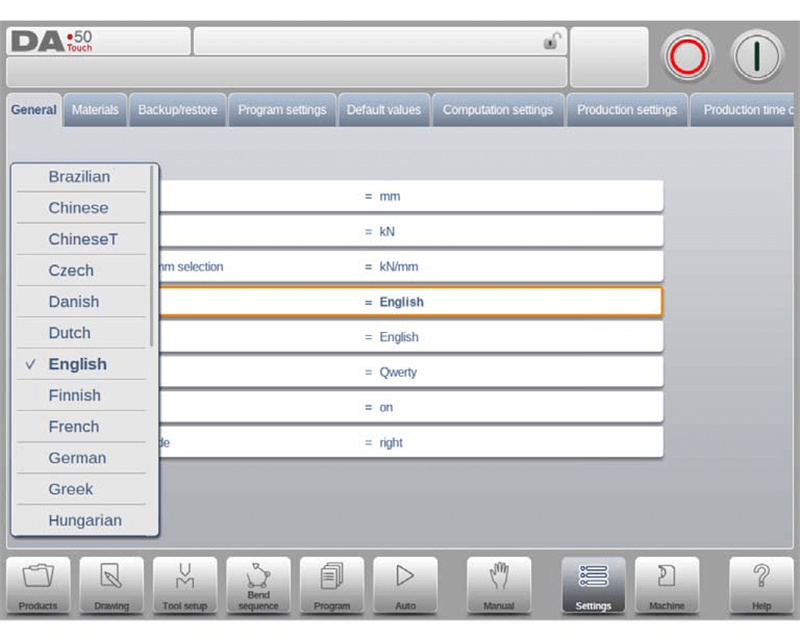
Շահագործման ինտերֆեյսի ցուցադրման լեզուն կարելի է ուղղակի ընտրել համակարգի ցուցակից: Ցուցակում ներառված լեզուների տեսակների քանակը ավելի մեծ է, քան սկզբում ցուցադրվածներինը: Օգտագործողները կարող են դիտել բոլոր ընտրելի լեզուները՝ ցուցակը վերև-ներքև սահեցնելով, և լեզվի փոխարկումն ավարտել մեկ սեղմմամբ: Ուշադրություն՝ եթե ընտրվի հատուկ ոչ ստանդարտ տառաթվային սիմվոլներ պարունակող լեզու, ապա կառավարման համակարգը ավտոմատ կվերսկսվի՝ կարգավորումն ավարտելու համար:
Օգնության փաստաթղթերի լեզու
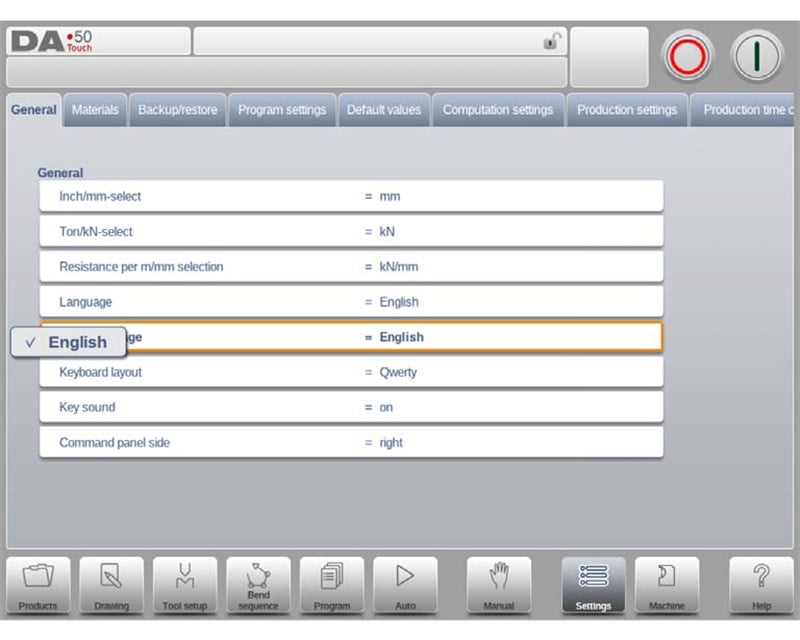
Օնլայն օգնության ֆունկցիայի ստանդարտ էկրանի լեզուն համապատասխանում է գործառնական ինտերֆեյսի լեզվին: Եթե ընտրված լեզվի համար չկա համապատասխան օնլայն օգնության փաստաթուղթ, համակարգը ավտոմատически անցնում է անգլերեն լեզվի ցուցադրմանը: Երբ օգտատերը ընտրում է «Օգնության լեզու» տարբերակը, ինտերֆեյսում հայտնվում է ընդլայնված ֆունկցիան՝ «Ավելացնել օգնության լեզու»: Նոր օգնության փաստաթղթերի լեզվային փաթեթները կարող են տեղադրվել կառավարման համակարգում այս ֆունկցիայի միջոցով: Տեղադրման առաջ համոզվեք, որ անհրաժեշտ լեզվային փաթեթի ֆայլերը պահվում են սարքի տեղական սկավառակում, USB ֆլեշ սարքում կամ մատչելի ցանցային ճանապարհով, և համակարգը ավտոմատически կճանաչի դրանք և կավարտի տեղադրումը:
Ստեղնաշարի դասավորություն
Համակարգը աջակցում է երեք ստեղնաշարի դասավորությունների փոխարկմանը՝ Qwerty, Qwertz և Azerty: Ստանդարտ կարգավորումը Qwerty դասավորությունն է, որը հարմարեցված է տարբեր տարածաշրջաններում գտնվող օգտատերերի մուտքագրման սովորույթներին:
Ստեղների ձայն
Մուտքային վահանակի ստեղների ձայնը կարելի է ազատորեն включить կամ անջատել: Համակարգը ստեղների ձայնը թույլատրում է ըստ լռուման, ինչը օգտագործողների համար հարմար է՝ գործողության հրահանգների մուտքը հաստատելու համար:
Հրահանգների վահանակի դիրք
Գործողության հրահանգների վահանակը կարելի է փոխարկել՝ ցուցադրելու էկրանի ձախ կողմում, իսկ համակարգը ըստ լռուման այն ցուցադրում է աջ կողմում: Օգտագործողները կարող են դրան համապատասխան կարգավորել իրենց գործարկման սովորույթների համաձայն:
Նյութերի կարգավորումներ
Նյութերի կարգավորումների ներդիրում DELEM DA-58T կարգավորման ռեժիմը աջակցում է մինչև 99 մշակվող նյութերի պարամետրերի ծրագրավորմանը, և յուրաքանչյուր նյութի համար կարելի է անկախ կարգավորել հիմնական ֆիզիկական հատկություններ, ինչպես օրինակ՝ ձգման ամրությունը և ճկունության մոդուլը: Այս ֆունկցիան հնարավորություն է տալիս իրականացնել տարբեր նյութերի համար ճշգրիտ մշակում, ապահովել ծալման գործողության բարձր համապատասխանությունը նյութի հատկություններին և բարձրացնել մշակման ճշգրտությունը:
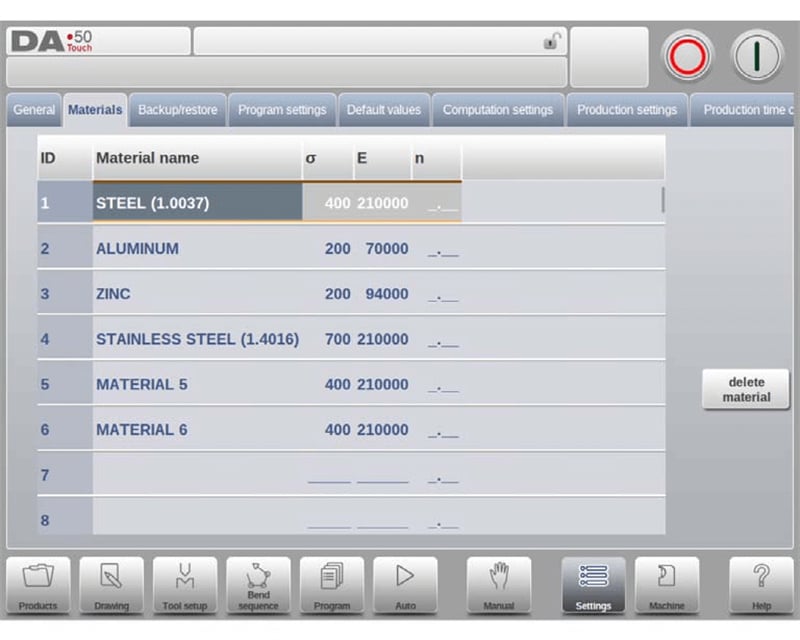
Համակարգը յուրաքանչյուր նյութի համար կարգավորում է երեք հիմնական դիտելի և խմբագրելի ատրիբուտ՝ Նյութի անվանում, Ձգման ամրություն և Էլաստիկության մոդուլ: Նյութի անվանումը ցուցադրվում է անմիջապես ծրագրավորման ինտերֆեյսում՝ առավելագույն 25 սիմվոլի երկարությամբ և պետք է սկսվի տառով: Ձգման ամրությունը և Էլաստիկության մոդուլը ուղղակիորեն կապված են նյութի ֆիզիկական մշակման բնութագրերի հետ և հանդիսանում են ծալման գործընթացի պարամետրերի հաշվարկման կարևոր հիմք:
Նյութերի ցուցակը սկզբում դասավորված է նյութի համարով (ID)՝ առաջին սյունակում: Օգտատերը կարող է սեղմել ցանկացած ատրիբուտի սյունակի վերնագիրը՝ վերադասավորելու այդ ատրիբուտով: Արդեն գոյություն ունեցող նյութի պարամետրերը փոփոխելու համար պարզապես ընտրեք համապատասխան նյութի տողը և ճշտեք արժեքները: Նյութը ջնջելու համար ընտրեք նպատակային տողը և սեղմեք «Ջնջել նյութը»: Նոր նյութ ավելացնելու համար ընտրեք ցուցակում դատարկ տողը և անմիջապես մուտքագրեք յուրաքանչյուր ատրիբուտի արժեքները՝ ավարտելու կարգավորումը:
Տվյալների պահեստավորման և վերականգնման ֆունկցիոնալություն
DELEM DA-58T կարգավորումների ռեժիմը սարքավորված է լիարժեք պահեստավորման և վերականգնման ֆունկցիայով, որը կարող է կատարել ամբողջական չափանի տվյալների պահեստավորում և վերականգնում՝ ներառյալ արտադրանքի ծրագրերը, գործիքների պարամետրերը, համակարգի կարգավորումները և տարբեր կոնֆիգուրացիոն աղյուսակները: Դա ոչ միայն ապահովում է արտադրական տվյալների անվտանգությունը, այլև իրականացնում է տվյալների անխաթար տեղափոխում տարբեր տիպի կառավարման համակարգերի միջև: Հին կառավարման համակարգերում արտադրանքի կամ գործիքների տվյալների համար այս ռեժիմը նաև ունի ներդրված ներմուծման ֆունկցիա՝ հնարավորություն տալով պատմական տվյալների արագ ինտեգրման:
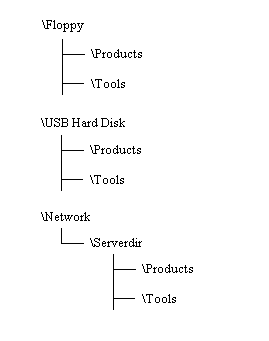
Պահեստավորման և վերականգնման գործողությունների ընթացակարգերը ապրանքի և գործիքի տվյալների համար բավականին միասնականացված են: Անկախ նրանից՝ տվյալների փոխանցումը իրականացվում է ցանցի միջոցով, թե USB ֆլեշ-սարքի միջոցով, կիրառվում են ստանդարտացված գործողությունների քայլեր, ինչը նվազեցնում է օգտագործողների համար գործողությունների կատարման բարդությունը: Պահեստավորման կատալոգը բաղկացած է ընտրված պահեստավորման սարքից (USB ֆլեշ-սարք, ցանցային սկավառակ և այլն) և օգտագործողի կողմից սահմանված կատալոգից: Օգտագործողները կարող են ստեղծել և ընտրել իրենց համար առանձնահատուկ պահեստավորման կատալոգ՝ իրենց պահանջներին համապատասխան: Բացի այդ, ապրանքի և գործիքի տվյալների պահեստավորման ճանապարհները կարող են առանձին սահմանվել՝ տվյալների դասակարգված կառավարումն իրականացնելու համար:
Ապրանքի տվյալների պահեստավորում
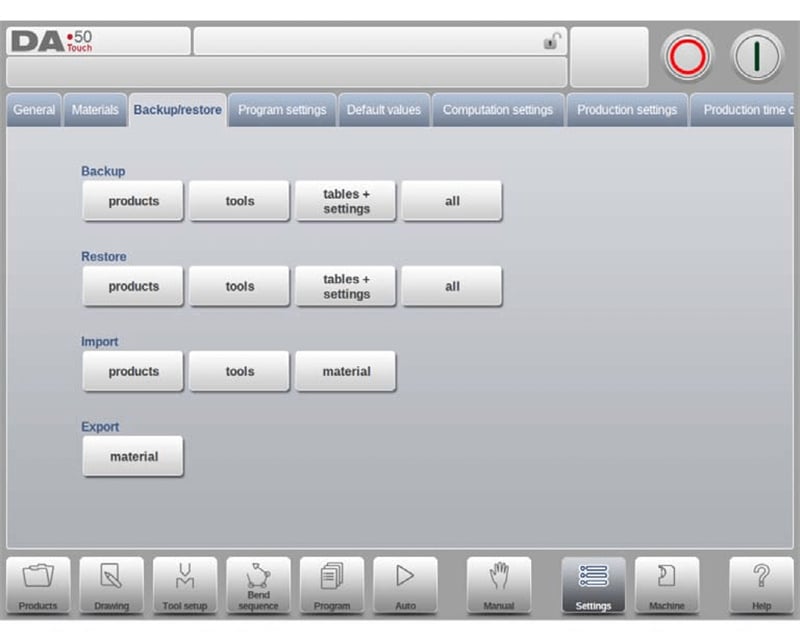
Պահեստավորում/Վերականգնում ներդիրում Պահեստավորում տիրույթում ընտրեք Ապրանքներ տարբերակը՝ ապրանքի ծրագրերի սկավառակի պահեստավորման գործընթացը սկսելու համար: Սկզբնական պահեստավորման կատալոգի սահմանման ավարտից հետո համակարգը ավտոմատически մտնում է ապրանքի պահեստավորման գործողության ինտերֆեյս: Կոնկրետ գործողությունների քայլերը հետևյալն են.
1. Ապրանքների դիտում. Ընտրված կատալոգում գտնվող բոլոր ապրանքային ծրագրերը կարելի է դիտել պահեստավորման ինտերֆեյսում, և կարելի է օգտագործել Ապրանքային ռեժիմին համապատասխան հիմնական ֆունկցիաները՝ ապրանքային ծրագրերը դիտելու և գտնելու համար, որոնք պետք է պահեստավորվեն;
2. Ճանապարհների ստուգում. Ինտերֆեյսի վերին մասում իրական ժամանակում ցուցադրվում է ապրանքային ծրագրերի ընթացիկ սկզբնաղբյուրային ճանապարհը և նշված պահեստավորման ստորագրության ճանապարհը: Գործողությունն իրականացնելուց առաջ հաստատեք, որ ճանապարհները ճիշտ են;
3. Ապրանքների ընտրություն. Սեղմեք ցուցակում գտնվող ապրանքային ծրագիրը՝ նրան նշելու համար որպես պահեստավորման ենթակա ծրագիր, և համակարգը կցուցադրի պահեստավորման նշանը՝ ընտրությունը հաստատելու համար; եթե պահեստավորման ճանապարհում առկա է նույն անվանումով ապրանքային ծրագիր, համակարգը կցուցադրի հայտարարություն՝ օգտատիրոջը թույլ տալով ընտրել՝ արդյոք փոխարինել այն;
4. Խմբային պահեստավորում. Սեղմեք «Բոլորը» կոճակը՝ միանգամից պահեստավորելու ցուցակում գտնվող բոլոր ապրանքային ծրագրերը և բարձրացնելու պահեստավորման արդյունավետությունը;
5. Փոխել սկզբնաղբյուրի տեղադրությունը. Եթե անհրաժեշտ է ճշգրտել պահեպահման ենթակա ապրանքային ծրագրերի սկզբնաղբյուրի տեղադրությունը, սեղմեք «Սկզբնաղբյուրի տեղադրություն» ընտրանքը և ընտրեք նոր սկզբնաղբյուրի ճանապարհը՝ օգտագործելով տեղադրությունների դիտարկիչը;
6. Փոխել պահեպահման տեղադրությունը. Սեղմեք «Պահեպահման տեղադրություն» ընտրանքը՝ անցնելու նոր պահեման տեղամաս և ընտրելու այն որպես պահեպահման նպատակային տեղադրություն:
Ապրանքային տվյալների վերականգնում
«Պահեպահում/Վերականգնում» ներդիրում վերականգնման տիրույթում ընտրեք «Ապրանքներ» ընտրանքը՝ վերականգնելու սկավառակում գտնվող ապրանքային ծրագրերը կառավարման համակարգում:

Սկզբնական վերականգնման տեղադրության կարգավորումն ավարտելուց հետո մուտք գործեք ապրանքային վերականգնման գործողության ինտերֆեյս։ Գործողության քայլերը հետևյալն են.
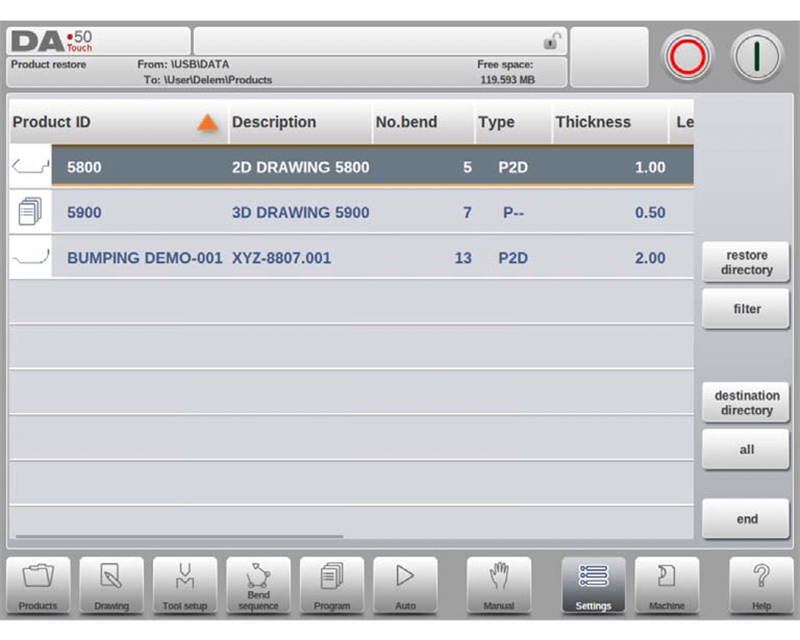
1. Մուտք գործել վերականգնման ինտերֆեյս. Դիտեք ընտրված վերականգնման տեղադրության մեջ գտնվող բոլոր ապրանքային ծրագրերը;
2. Դիտման ճշգրտում. Արագ գտեք վերականգնման ենթակա ապրանքային ծրագրերը՝ օգտագործելով դիտման ճշգրտման ֆունկցիան;
3. Ճանապարհների ստուգում. Հաստատեք ապրանքային ծրագրերի վերականգնման սկզբնաղբյուրի ճանապարհը և սարքի վրա նպատակային պահեման ճանապարհը;
4. Ընտրեք ապրանքները. Սեղմեք նպատակային ապրանքային ծրագիրը՝ վերականգնման համար նշելու համար;
5. Կրկնօրինակ ֆայլերի մշակում. Եթե սարքում առկա է նույն անվանումով ապրանքային ծրագիր, համակարգը կհարցնի օգտագործողին՝ որոշելու արդյոք փոխարինել այն;
6. Աղբյուրի տեղադրման փոփոխում. Անհրաժեշտության դեպքում անցեք նոր վերականգնման աղբյուրի տեղադրման վրա՝ ապրանքային ծրագրերի համար;
7. Նպատակային տեղադրման սահմանում. Ընտրեք սարքում վերականգնված ապրանքային ծրագրերի պահպանման տեղադրումը:
Գործիքների տվյալների պահեստավորում
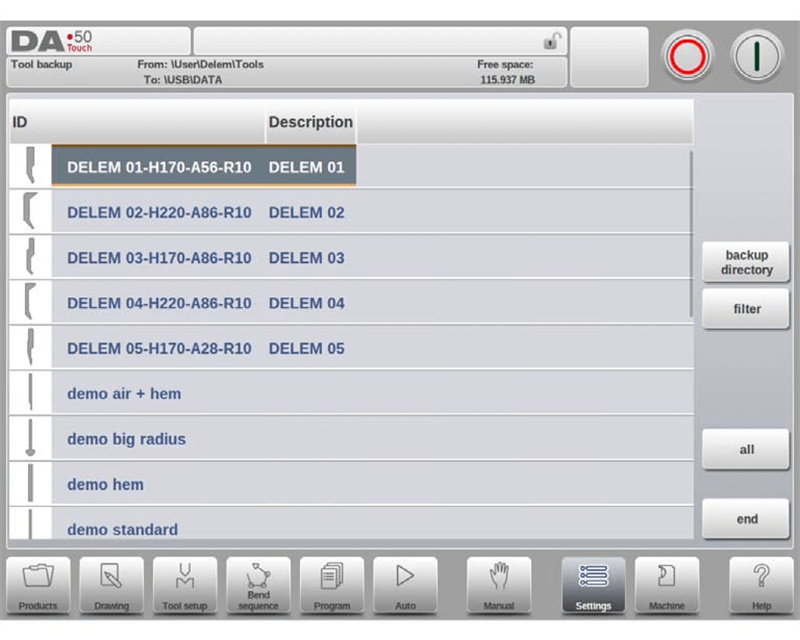
Պահեստավորման/վերականգնման ներդիրում Պահեստավորում տեղամասում ընտրեք «Գործիքներ» տարբերակը՝ գործիքների պարամետրերի սկավառակի պահեստավորման գործընթացը սկսելու համար: Սկզբնական պահեստավորման տեղադրման սահմանման ավարտից հետո մուտք գործեք գործիքների պահեստավորման գործողության ինտերֆեյս:
Կառավարման համակարգում առկա տարբեր գործիքների պարամետրեր, ինչպես օրինակ՝ մատրիցաներ, մատրիցային մասեր և սարքավորումների ձևավորման գործիքներ, կարող են միասնաբար պահեստավորվել: Գործողության ընթացքը ճիշտ նույնն է, ինչ ապրանքային տվյալների պահեստավորման դեպքում, ինչը հնարավորություն է տալիս միավորել գործողությունների տրամաբանությունը:
Գործիքների տվյալների վերականգնում
Գործիքների պարամետրերի վերականգնման գործընթացը համապատասխանում է ապրանքների տվյալների վերականգնման գործընթացին: Օգտագործողները կարող են կատարել գործիքների տվյալների վերականգնումը ստանդարտացված քայլերով և արագ վերականգնել գործիքների մշակման կոնֆիգուրացիայի պարամետրերը:
Աղյուսակների և կարգավորումների պահուստային պատճենների ստեղծում և վերականգնում
«Պահեստավորում/Վերականգնում» ներդիրը նախատեսված է օգտագործողի կողմից սահմանված համակարգի կարգավորումների և տարբեր կոնֆիգուրացիայի աղյուսակների համար առանձին պահեստավորման և վերականգնման ֆունկցիաների համար, իսկ գործողության ընթացակարգը համապատասխանում է ապրանքների և գործիքների տվյալների պահեստավորման ու վերականգնման ընթացակարգին: Համակարգը նաև ապահովում է «Բոլորը» արագ ֆունկցիան: Սեղմելուց հետո այն ինքնաբերաբար կատարում է ապրանքների, գործիքների, աղյուսակների և համակարգի կարգավորումների լիարժեք պահեստավորումը կամ վերականգնումը հերթականությամբ, ինչը զգալիորեն բարձրացնում է մեծ ծավալի գործողությունների արդյունավետությունը:
Կատարողական ճանապարհի գործողություններ
«Պահեստավորման ճանապարհ» սեղմելուց հետո համակարգը ցուցադրում է հասանելի պահեստավորման ճանապարհների ցուցակի պատուհանը: Ճանապարհի նավիգացիայի և կառավարման գործողությունները պարզեցնելու համար կոնկրետ քայլերն են՝
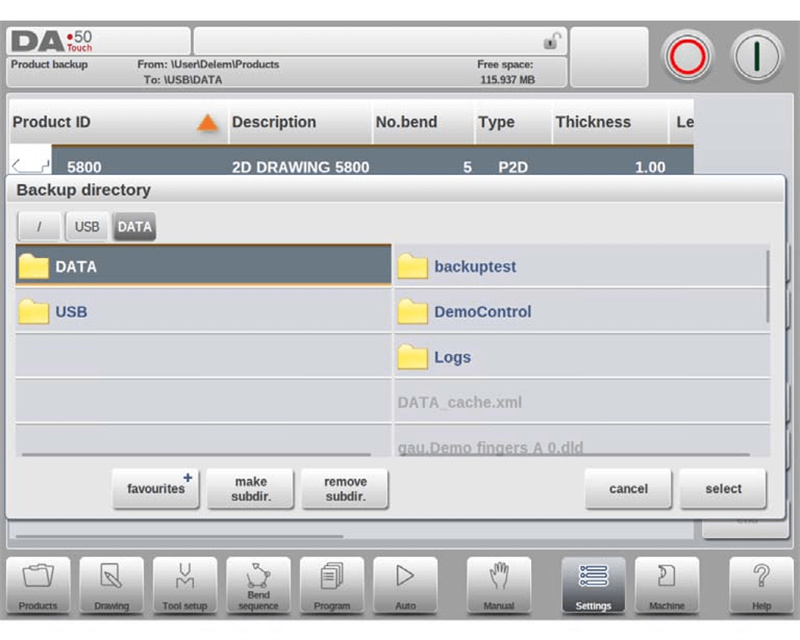
1. Կատալոգի դիտում. Սեղմեք կետի նշանը՝ մտնելու ենթակատալոգ, սեղմեք «Վերևի կատալոգ» նշանը՝ վերադառնալու վերևի մակարդակի կատալոգ, և սեղմեք «Ընտրել»՝ հաստատելու ընթացիկ գործողության կատալոգը։
2. Սարքի փոխարկում. Շարունակաբար սեղմեք «Վերևի կատալոգ» նշանը՝ մինչև մտնել վերին մակարդակի կատալոգ, ապա կրկին ընտրեք պահպանման սարքը և համապատասխան ենթակատալոգը։
3. Ցանցին միացում. Եթե սարքը միացված է ցանցին, նախ ընտրեք «Ցանց» տարբերակը, ապա ընտրեք նպատակային ցանցային հատվածը, իսկ հետագա նավիգացիոն գործողությունները համապատասխանում են տեղական պահպանման սարքի գործողություններին։
4. Ենթակատալոգների կառավարում. Սեղմեք «Ստեղծել ենթակատալոգ»՝ ստեղծելու առանձին պահպանման կատալոգ, և սեղմեք «Ջնջել ենթակատալոգ»՝ հեռացնելու անօգուտ կատալոգները. ցանկացած ենթակատալոգի մեջ մտնելուց հետո սեղմեք «Ընտրել»՝ ավարտելու կատալոգի հաստատումը։
Ծրագրի կարգավորումներ
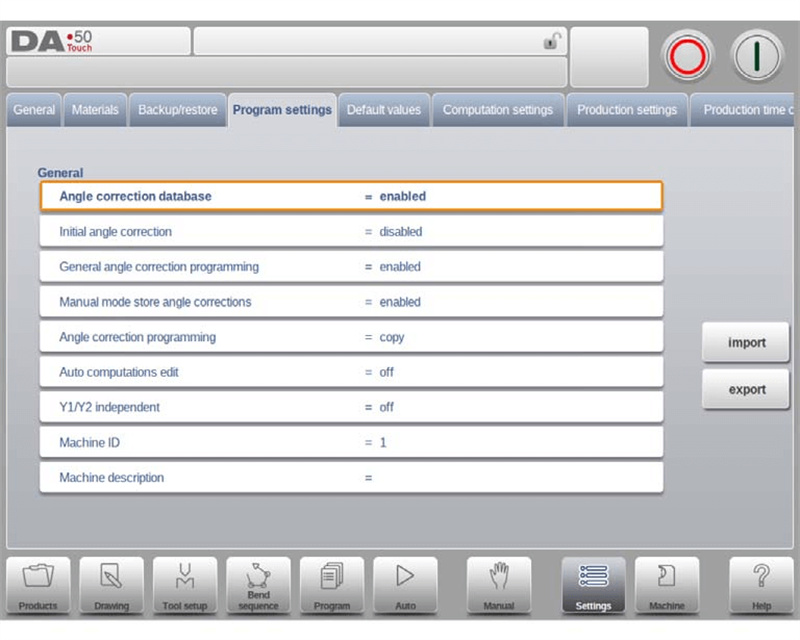
Անկյունային ճշգրտման տվյալների բազան DELEM DA-58T կարգավորումների ռեժիմի հիմնական ֆունկցիաներից մեկն է: Այս տվյալների բազան կարող է իրական ժամանակում պահպանել արտադրության ընթացքում մուտքագրված անկյունային ճշգրտման պարամետրերը, ապահովել տարբեր նյութերի և տարբեր ծալման տեսակների համար մշակման ճշգրտության համատեղելիությունը և հանդիսանում է ապրանքի ծրագրավորման ընթացքում մշակման ճշգրտությունն ապահովող հիմնական կարգավորում: Անկյունային ճշգրտման տվյալների բազայի դերը լիովին օգտագործելու և կարգավորումների ռեժիմի շահագործման արդյունավետությունը օպտիմալացնելու համար ստորև ներկայացված են կոնկրետ կարգավորման կետերը.
Անկյունային ճշգրտման տվյալների բազա
1. Տվյալների բազայի միացում՝ Այս պարամետրը միացնելուց հետո տվյալների բազան ինքնաբերաբար կպահպանի արտադրության ռեժիմում (ինքնաշահագործման ռեժիմում) մուտքագրված անկյունային ճշգրտման արժեքները; արտադրության ընթացքում համակարգը ինքնաբերաբար կստուգի՝ տվյալների բազայում արդյոք առկա են նմանատիպ ծալումների համար ճշգրտման պարամետրեր, և եթե դրանք առկա են՝ կօգտագործի դրանք անմիջապես, իսկ եթե չեն առկա՝ կստեղծի հարմարվողական ճշգրտման արժեքներ ինտերպոլյացիայի ալգորիթմի միջոցով;
2. Կորացման հատկանիշների համապատասխանեցման կանոններ. Համակարգը կհամեմատի կորացման գործողության մի քանի հիմնարար հատկանիշներ, այդ թվում՝ նյութի բնութագրերը, թիթեղի հաստությունը, մատրիցայի բացվածքի չափը, մատրիցայի շառավիղը, մուտքագրման շառավիղը և կորացման անկյունը: Առաջին հինգ հատկանիշները պետք է լիովս համընկնեն, իսկ կորացման անկյան ճշգրտման արժեքները կանվանվեն կամ ինտերպոլյացվեն՝ հիմնված նմանության վրա;
3. Սկզբնական անկյան ճշգրտում. Այս պարամետրը անկախ ծրագրավորման տարր է, որը ցուցադրվում է միայն «Ինքնաշարժ» ռեժիմում և նախատեսված է փոքր անկյունների ճշգրտման համար: Նրա արժեքը գումարվում է վիզուալիզացված ճշգրտման արժեքին՝ ձևավորելու վերջնական ընդհանուր անկյան ճշգրտման արժեքը;
4. Ընդհանուր անկյան ճշգրտման ծրագրավորում. Այս ճշգրտման պարամետրը վերաբերում է ծրագրի բոլոր կորացման գործընթացներին, չի սահմանվում որոշակի կորացման անկյան համար և համապատասխան արժեքները չեն պահվում «Անկյան ճշգրտման տվյալների բազայում»;
5. Ձեռքով կարգավորման ռեժիմի ճշգրտման արժեքների պահպանում. Այս ֆունկցիան ակտիվացնելուց հետո ձեռքով կարգավորման ռեժիմում ստացված անկյունային ճշգրտման արժեքները պահպանվում են՝ հետագա ապրանքի ծրագրավորման համար տվյալների աջակցություն ապահովելու նպատակով;
6. Անկյունային ճշգրտման ծրագրավորման եղանակներ. Անկյունային ճշգրտման արժեքները հարմարեցնելիս կարող եք ընտրել սկզբնական արժեքները պատճենել, պահպանել դելտա-արժեքները կամ անկախ հարմարեցնել երկու հիմնարար պարամետրերը՝ Cα1 և Cα2, որպեսզի համապատասխանեն տարբեր մշակման ճշգրտման պահանջներին:
Ինքնաշխատ հաշվարկների խմբագրում
Նյութի տեսակը, թերթի հաստությունը, մշակման երկարությունը, մատրիցայի կամ մատրիցայի կոնֆիգուրացիան փոփոխելիս համակարգը ինքնաշխատ վերահաշվարկում է հիմնարար մշակման ցուցանիշները (օրինակ՝ ծռման ուժը, ազատագործման հեռավորությունը և կորացման սարքի պարամետրերը), ըստ մշակման մեթոդների նման կոնկրետ սցենարների, առանց ձեռքով հաշվարկի, ինչը բարձրացնում է ծրագրավորման արդյունավետությունը:
Y1 և Y2-ի անկախ ծրագրավորում
Այն աջակցում է երկու Y-առանցքերի համար անկախ ծրագրավորման ռեժիմի կամ ինտեգրված ծրագրավորման ռեժիմի սահմանմանը: Օգտագործողները կարող են ընտրել հարմարվողական ծրագրավորման ռեժիմը՝ հաշվի առնելով ծռման գործընթացի ճշգրտության պահանջները, որպեսզի բավարարվեն բարդ ծռման գործողությունների առանցքերի կառավարման պահանջները:
Մեքենայի ID և նկարագրություն
Յուրաքանչյուր ճկելու մեքենայի համար կարելի է կարգավորել եզակի մեքենայի ID՝ արտադրական ծրագրերի միասնական կառավարումը հեշտացնելու համար; միաժամանակ կարելի է ավելացնել մեքենայի նկարագրության տեղեկատվություն՝ JUGAO նման օֆլայն ծրագրավորման համակարգերում սարքավորումների արագ նույնականացման և դասակարգման իրականացման համար և օպտիմալացնել արտադրական կառավարման գործընթացը:
Լռելյայն և հաշվարկման կարգավորումներ
Այս մոդուլը կարող է կարգավորել ծռման գործողության հիմնական սկզբնական արժեքները, այդ թվում՝ Y-առանցքի բացման չափը, սեղմման արագությունը, կայունացման ժամանակը և այլն. միաժամանակ այն կարող է ճշգրտել հիմնարար հաշվարկային պարամետրերը, օրինակ՝ ծռման թույլատրելի աղյուսակի ակտիվացումը, տվյալների նախապատրաստման կարգավորումը և այլն, որպեսզի արտադրանքի ծրագրավորումը լիովին հարմարվի տարբեր արտադրական և մշակման պահանջներին և բարձրացնի գործընթացի ճկունությունը:
Հիմնական սկզբնական արժեքների կարգավորում
1. Y-առանցքի բացման սկզբնական արժեք՝ սահմանել Y-առանցքի սկզբնական բացման արժեքը՝ ծռման գործողության համար հիմնական առանցքային կառավարման պարամետրեր տրամադրելու համար;
2. Սեղմման արագություն՝ սահմանել նոր ստեղծված մշակման ծրագրի սկզբնական սեղմման արագությունը;
3. Սպասել հետադարձ շարժմանը՝ ծռման ծրագրում «Սպասել հետադարձ շարժմանը» ֆունկցիայի սկզբնական կարգավորումը միացված է (Այո);
4. Փուլի փոփոխման կոդ՝ սկզբնական փուլի փոփոխման կոդը UDP է;
5. Դադարի ժամանակ՝ X-առանցքի փուլի փոփոխման համար սկզբնական սպասման ժամանակը 0 է;
6. Դադարի տևողություն. Սահմանեք ծռման ծրագրի սկզբնական դադարի տևողությունը՝ ծռման ձևավորման էֆեկտը ապահովելու համար;
7. Նախնական ծռման անկյուն. Սահմանեք գրաֆիկական ապրանքի ծրագրավորման համար սկզբնական նախնական ծռման անկյունը;
8. Կրկնաշերտի բացվածք. Ճառագայթի դիրքի համար սկզբնական կրկնաշերտի բացվածքը 0,0 մմ է;
9. Չափսեր. Սահմանեք գրաֆիկական նկարման համար սկզբնական հիմնական չափսի պարամետրը (D1):
Հիմնական հաշվարկման պարամետրերի կարգավորումներ
1. Ակտիվ ծռման թույլատրելի արժեքի աղյուսակ. Կարելի է ընտրել երկու հաշվարկման ռեժիմ. մեկը ծռման թույլատրելի արժեքը հաշվարկելն է ստանդարտ բանաձևով, իսկ մյուսը՝ ճշգրտման աղյուսակի կիրառումը (եթե այն գոյություն ունի, այն կարելի է ուղղակիորեն խմբագրել): Այս կարգավորումը հնարավորություն է տալիս ճշգրտել X-առանցքի ճշգրտությունը՝ թերթի կարճացման պատճառով;
2. Տվյալների պատրաստում. Կորության թույլատրելի արժեքը. Այն ներառում է երեք կարգավորման ռեժիմ։ Եթե ճշտումը անջատված է, կորության թույլատրելի արժեքը չի ներառվում ծրագրավորման հաշվարկներում. եթե ճշտումը միացված է, ճշտման արժեքը ցուցադրվում է և խմբագրելի է արտադրության ընթացքում. այս կարգավորումը չի ազդում Նկարի ռեժիմում տեղի ունեցող հետվերլուծության գործընթացի վրա, և համակարգը ինքնաբերաբար ներառում է կորության թույլատրելի արժեքը հաշվարկներում, երբ CNC ծրագիր է ստեղծվում Նկարի ռեժիմում։ Եթե կորության թույլատրելի արժեքի աղյուսակը ակտիվացված է, աղյուսակի արժեքները կարող են ճշտվել նոր պատուհանում՝ «Խմբագրել աղյուսակ» ֆունկցիայի միջոցով։ Գործարկման ընթացքում ընտրեք խմբագրման դաշտը Tab ստեղնի օգնությամբ, մուտքագրեք նոր արժեքը և սեղմեք Enter ստեղնը՝ հաստատելու համար։ Այս մենյուն չի աջակցում նոր աղյուսակների ստեղծումը։ Կորության թույլատրելի արժեքի մանրամասն կարգավորման սպեցիֆիկացիաների համար խնդրում ենք ծանոթանալ DELEM-ի պաշտոնական ձեռնարկին։ Եթե այլ աղյուսակներ եք պետք ունենում, գտեք դրանք և ներմուծեք «Բեռնել աղյուսակ» ֆունկցիայի միջոցով։
3. Ստորին ճնշման ուժի գործակից. Ստորին ճնշման ուժի հստակ արժեքը կարող է հաշվարկվել՝ այս գործակիցը բազմապատկելով օդային ծռման ուժով, ինչը հիմք է հանդիսանում ծռման ճնշման կարգավորման համար;
4. Z-հեռավորություն. Այս պարամետրը մատի եզրից մինչև թերթի անկյունն է: Եթե Z-առանցքը տեղադրված է սարքի վրա, համակարգը ավտոմատաբար հաշվարկում է մատի օպտիմալ աշխատանքային դիրքը՝ դիրքավորման ճշգրտությունը բարելավելու համար:
Արտադրատեխնիկական կարգավորումներ
DELEM DA-58T կարգավորման ռեժիմի «Արտադրության կարգավորումներ» մոդուլը մշակված է արտադրության արդյունավետությունը օպտիմալացնելու նպատակով և աջակցում է արտադրության հիմնական պարամետրերի՝ պաշարի հաշվարկման ռեժիմի, ավտոմատ ծռման փոփոխման ռեժիմի քայլի և զուգահեռության շեղման կարգավորման համար անհատականացված կարգավորմանը: Օգտատերերը կարող են հարմարեցնել արտադրական գործընթացը՝ համաձայն իրական արտադրական գործողությունների պահանջների, որպեսզի հասնեն մշակման արդյունավետության և ճշգրտության երկուսի միաժամանակյա բարելավման:
1. Պաշարների հաշվարկման ռեժիմ՝ Աջակցում է վերևից դեպի ներքև և ներքևից դեպի վեր հաշվարկման երկու ռեժիմների։ Ներքևից դեպի վեր հաշվարկը ավտոմատաբար կանգնում է, երբ արժեքը հասնում է 0-ի, և սարքի վերագործարկման դեպքում վերականգնվում է սկզբնական արժեքը, ինչը հարմար է ֆիքսված քանակով արտադրանքի արտադրության աշխատանքների համար։ Վերևից դեպի ներքև հաշվարկը թույլ է տալիս իրական ժամանակում հետևել արտադրության ընթացքին, ինչը հարմար է սերիական մշակման ընթացքի հետևելու համար։
2. Ավտոմատ ծալման փոփոխման ռեժիմի քայլ՝ Անջատված վիճակում անհրաժեշտ է հաջորդ գործընթացի պարամետրերի ձեռքով ընտրությունն ու միացումը։ Միացված վիճակում համակարգը ավտոմատաբար բեռնում է հաջորդ գործընթացի պարամետրերը, և սարքը սկսելու կոճակը սեղմելուց հետո ավտոմատաբար կատարում է դիրքավորումը՝ ապահովելով գործընթացների անխաթար փոխանցումը։
3. Զուգահեռության շեղում՝ Սահմանում է Y առանցքի ընդհանուր զուգահեռության պարամետրը, որը ազդում է բռնակի կետից ցած (Y2 + շեղում), որպեսզի ապահովվի ծալման գործողության ժամանակ թերթի զուգահեռությունը։
4. Բլոկավորել շփման էկրանը սկսելուց հետո. Այս ֆունկցիան ակտիվացնելուց հետո շփման էկրանը բլոկավորվում է սարքի աշխատանքի ընթացքում՝ կանխելու սխալ գործողությունները, որոնք կարող են ազդել արտադրության վրա;
5. Ճնշման ճշգրտում. Ճշգրտված ծռման ուժի տոկոսային արժեքի միջոցով իրականացվում է ճնշման կափարիչի ճշգրտված կառավարում՝ համապատասխանելու տարբեր նյութերի ծռման ճնշման պահանջներին;
6. Կայունացման ճշգրտում. Համակարգը ավտոմատաբար հաշվարկում է ճարմանդի դիրքը, երբ թիթեղը կայունացվում է: Որպեսզի ապահովվի թիթեղի կայունացման արդյունավետությունը, հաշվարկված կայունացման կետը կարող է շեղվել և ճշգրտվել այս պարամետրի միջոցով: Դրական արժեքը ճարմանդի դիրքը տեղափոխում է ներքև, իսկ բացասական արժեքը՝ վերև;
7. X-շարժման միջանկյալ R. Սահմանել ժամանակավոր R-առանցքի դիրքը՝ խուսափելու սարքի հետ բախման համար X-առանցքի շարժման ընթացքում, և այս ֆունկցիան կարող է ակտիվացվել միայն զրոյից տարբեր արժեք սահմանելու դեպքում;
8. Հետին չափագրիչ և X-դիրքի անվտանգություն. Անվտանգության գոտու դիրքի համաձայն՝ համակարգը ավտոմատически համապատասխանեցնում է տարբեր առանցքների շարժման ստրատեգիաներ.
○ Հին և նոր դիրքերը երկուսն էլ անվտանգության գոտուց դուրս են. X-առանցքը և Z-առանցքը շարժվում են միաժամանակ;
○ Հին դիրքը դուրս է, իսկ նոր դիրքը՝ ներսում. սկզբում շարժվում է Z-առանցքը;
○ Հին դիրքը ներսում է, իսկ նոր դիրքը՝ դուրս. սկզբում շարժվում է X-առանցքը;
○ Հին և նոր դիրքերը երկուսն էլ ներսում են անվտանգության գոտում. սկզբում X-առանցքը տեղափոխվում է միջանկյալ դիրք, այնուհետև Z-առանցքը, իսկ վերջում X-առանցքը ճշգրտվում է նպատակային դիրքին:
Անվտանգության գոտու սահմանման բանաձև՝ SZ = X-անվտանգ + SD (SD-ն սարքավորման մատակարարի կողմից սահմանված անվտանգության հեռավորությունն է):
Ժամանակի և ցանցի կարգավորումներ
Ժամանակի սահմանադրումները օգտատերերին թույլ են տալիս հարմարեցնել ամսաթվի և ժամանակի ցուցադրման ձևաչափը՝ ապահովելու սարքի ժամանակի համաժամանակեցումը արտադրական գործողությունների պլանի հետ; ցանցային կարգավորումը կարող է միացվել միայն ցանցային ֆունկցիայի տեղադրումից հետո, ինչը հնարավորություն է տալիս սարքի և այլ համակարգերի միջև միացում իրականացնել և ավարտել արտադրական տվյալների համակարգերի միջև կիսումը:
Արտադրության ժամանակի հաշվարկ
DELEM DA-58T սահմանադրումների ռեժիմում պաշարների հաշվարկման ռեժիմը կարող է ինքնաբերաբար հաշվարկել ծալման հաջորդականության հաշվարկի ընթացքում արտադրության ժամանակը՝ միավորելով առանցքի դիրքավորման արագությունը և արտադրանքի մշակման ժամանակը, ինչը տվյալների աջակցություն է տրամադրում արտադրական պլանների մշակման համար: Ձեռքով կատարվող գործողությունների (օրինակ՝ արտադրանքի շրջում) ընթացքում ծախսված ժամանակը ուղղակիորեն կապված է արտադրանքի չափսերի հետ: Z ուղղությամբ փոքր չափսեր ունեցող արտադրանքները շրջելու համար պահանջում են ավելի քիչ ժամանակ, իսկ X ուղղությամբ երկար չափսեր ունեցող արտադրանքները պահանջում են ավելի շատ ժամանակ շրջման գործողության համար:
Համակարգը սահմանում է երեք երկարության շեմի մակարդակ (սահմանագիծ 1/2/3), որպես ապրանքի չափսի բաժանման ստանդարտ: Օգտագործողները կարող են անկախ կարգավորել տարբեր շեմի միջակայքերում գտնվող ապրանքների շրջման համար ծախսվող ժամանակի պարամետրերը՝ այնպես, որ ժամանակի հաշվարկը ավելի ճշգրիտ համապատասխանի իրական արտադրական իրավիճակին:
Հիմնական ժամանակի կարգավորումներ
1. Ցուցադրման ժամանակ. Վերնագրի վահանակի ցուցադրման բովանդակությունը կարող է կարգավորվել՝ աջակցելով երեք ռեժիմի՝ ամսաթվի և ժամանակի ցուցադրում, միայն ժամանակի ցուցադրում կամ ժամանակի թաքցում:
2. Ժամանակի ձևաչափ. Աջակցում է 24-ժամյա և 12-ժամյա ձևաչափերի միջև անցմանը՝ հարմարվելով տարբեր ժամանակի դիտման սովորույթներին;
3. Ամսաթվի ձևաչափ. Աջակցում է երեք ցուցադրման ձևաչափի՝ dd-mm-yyyy, mm-dd-yyyy և yyyy-mm-dd, որոնք օգտագործողները կարող են ըստ անհրաժեշտության ընտրել;
4. Ժամանակի ճշգրտում. Սարքի ամսաթիվը և ժամանակը կարող են ուղղակի ճշգրտվել, իսկ ճշգրտված ժամանակը միաժամանակ թարմացվում է սարքի Windows օպերացիոն համակարգում՝ համակարգի ժամանակի միասնականությունն ապահովելու համար:
Ցանցի կարգավորում (հասանելի է միայն ցանցային ընտրանքի տեղադրումից հետո)
Ցանցային ֆունկցիան ընտրովի մոդուլ է: Տեղադրումից հետո այն թույլ է տալիս սարքի և տեղական ցանցի, ինչպես նաև արտադրական կառավարման համակարգի միջև կապ հաստատել և ավարտել արտադրական ծրագրերի ու մշակման տվյալների սարքերի միջև փոխանցումն ու կիսումը: Մանրամասն կարգավորման վերաբերյալ տեղեկատվությունը տեսեք սարքի պաշտոնական ձեռնարկում:
Հաճախակի տրվող հարցեր (FAQ)
Ինչպե՞ս օպտիմալացնել ճկելու մեքենայի աշխատանքը DELEM DA-58T կարգավորման ռեժիմի միջոցով:
Ճկելու մեքենայի աշխատանքի օպտիմալացման հիմնարար գործոնը DELEM DA-58T կարգավորման ռեժիմում արտադրանքների իրական մշակման չափսերի և տարբեր գործողությունների ժամանակային պարամետրերի ճշգրիտ կարգավորումն է. միաժամանակ սարքը պետք է ճշգրիտ կալիբրվի՝ ապահովելու համար, որ բոլոր պարամետրերի կարգավորումները համապատասխանեն արտադրության և մշակման սպեցիֆիկացիաներին ու պահանջներին, որպեսզի սարքի աշխատանքային պարամետրերը բարձր աստիճանով համապատասխանեն իրական արտադրական պահանջներին:
Ինչպես սահմանել երկարության սահմանափակման սահմանները DELEM DA-58T կարգավորման ռեժիմում
Մուտք գործեք կարգավորման ռեժիմի երկարության սահմանների կարգավորման տիրույթ և մուտք գործեք Boundary 1, Boundary 2 և Boundary 3 սահմանների համապատասխան արժեքները՝ երկարության սահմանափակման սահմանների կարգավորումն ավարտելու համար: Երեք մակարդակային սահմանների հիմնավորված կարգավորումը հնարավորություն է տալիս տարբեր չափսերի արտադրանքների ճշգրիտ համապատասխանեցումը թեքման ժամանակի համար անհրաժեշտ պարամետրերի հետ, ինչը բարելավում է ժամանակի հաշվարկի և արտադրական գործընթացների հիմնավորվածությունը:
Եզրակացություն
Ընդհանուր առմամբ, DELEM DA-58T կարգավորման ռեժիմը ճնշման ճաղատարների շահագործման ֆունկցիաների և մշակման ճշգրտության բարելավման հիմնարար գործիք է: Դրա հարուստ ֆունկցիոնալ կարգավորումները և բարձր կարգավորելիությունը հնարավորություն են տալիս օպտիմալացնել արտադրանքի ծրագրավորումը և արտադրական գործընթացների հոսքը, ինչը ճնշման ճաղատարների մանրամասնեցված արտադրության կարևոր երաշխիք է:
Մեքենայի ճնշման ճապաղտի կատարումը լիովին օգտագործելու և սարքավորման ծառայության ժամկետը երկարացնելու համար ստանդարտացված պարամետրերի սահմանումը և սարքավորման օրական սպասարկումը անհրաժեշտ են: Այս կարգավորման ռեժիմի տարբեր ֆունկցիաների ռացիոնալ օգտագործումը կարող է արդյունավետորեն նվազեցնել սարքավորման անջատման ժամանակը և զգալիորեն բարձրացնել արտադրական արդյունավետությունը: Եթե օգտագործման ընթացքում առաջանում են հարցեր կամ անհրաժեշտ է մասնագիտական տեխնիկական աջակցություն, կարող եք ցանկացած պահի կապվել համապատասխան տեխնիկական թիմի հետ; միաժամանակ կարող եք նաև ծանոթանալ համապատասխան աջակցող փաստաթղթերին՝ սարքավորման օպտիմալացման համար ավելի շատ գործնական հմտություններ ուսումնասիրելու և ճնշման ճապաղտի արտադրական կիրառման արժեքը հետագայում բարձրացնելու նպատակով:

