





Hogyan javítja a DELEM DA-52S kézi üzemmódja a hatékonyságot?
Amikor a fémfeldolgozó folyamatok hatékonyságának növeléséről van szó, elengedhetetlen a DELEM DA-52S kézi üzemmód funkcióinak megismerése. Ha információkat keres arról, hogyan növelheti ez az üzemmód a pontosságot és a termelékenységet, akkor éppen a megfelelő helyre érkezett. Ebben a cikkben bemutatjuk a DELEM DA-52S kézi üzemmód legfontosabb funkcióit, és bemutatjuk, hogyan egyszerűsíti a hidraulikus hajlítógépek kezelését. Akár tapasztalt munkavállalóként, akár újoncként használja ezeket a gépeket, ez az útmutató értékes ismeretekkel látja el a kézi üzemmód segítségével történő hatékonyságoptimalizálásról, így segít maximálisan kihasználni berendezéseit.
Bevezetés
A DELEM DA-52S kézi üzemmód egy olyan pontosság és rugalmasság kombinációját kínálja, amely növeli a műhelyben zajló munkafolyamatok hatékonyságát. Ez az üzemmód közvetlen irányítási lehetőséget biztosít az operátorok számára a gépen, lehetővé téve a valós idejű testreszabásokat és finom beállításokat – amelyek elengedhetetlenek összetett és részletgazdag feladatok esetén.

Ezzel a gombbal a CNC kézi üzemmódba kapcsol.
A „Start” gomb megnyomása után minden paraméter aktívvá válik, és a hátsó vezetőkészülék a megfelelő pozícióba mozog. Lehetőség van a tengelyek kézi mozgatására is.
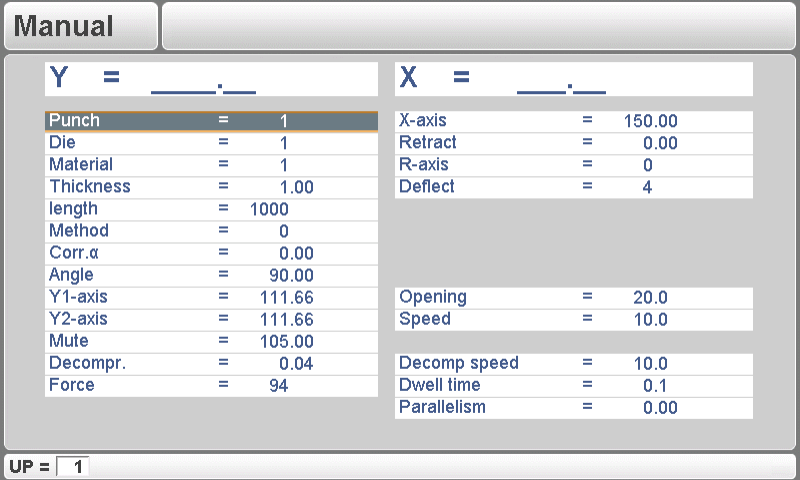

A nézetváltó gomb segítségével váltson át egy olyan képernyőre, amely nagyított értékeket jelenít meg részletesebb figyelés céljából.
Paraméterek magyarázata
A DELEM DA-52S kézi üzemmódban található alapvető paraméterek megértése elengedhetetlen a gép hatékony kezeléséhez. Az egyes tengelyek igazítása, a ciklus sebessége és az eszköz pozíciója jelentős szerepet játszanak a pontos és hatékony hajlítógép-működtetés biztosításában.
Minden paraméter függetlenül programozható, így testre szabott működés érhető el az adott anyagokhoz és feladatokhoz.
Doboz (UP): Válasszon a szerszámkönyvtárból a hajlítás alakjának és mélységének meghatározásához.
Ellenszerszám (UN): Válassza ki a hajlítási műveletekhez szükséges ellenszerszám-konfigurációt.
Anyag (MA): Válasszon legfeljebb 6 előre programozott anyag közül a pontos hajlítási mélység kiszámításához.
Vastagság (TH): Adja meg a lemez vastagságát a pontos erő- és szögszámításokhoz.
Hossz (BL): Határozza meg a lemez hosszát, amely befolyásolja a hátsó irányzék pozícionálását.
Hajlítási mód (BM): Válasszon levegős hajlítás és teljes behajlítás között, amely hatással van az alkalmazott erőre és az eredményekre.
Szögkorrekció (Cα): Állítsa be a programozott és a mért szög közötti eltérések kiegyenlítésére.
Szög (α): Adja meg a kívánt hajlítási szöget, amely befolyásolja a Y-tengely beállításait.
Y1 és Y2 tengelyek (Y): Határozza meg az értékeket a pontos szög eléréséhez, ami különösen fontos kúpos hajlításnál.
Némítás (M): Az Y-tengely átmenetének beállítása gyorsról nyomási sebességre egy meghatározott pozícióérték esetén.
Lazítás (BP): A nyomásoldás számára szükséges lökethossz programozása hajlítás után.
Erő (P): A szükséges erő kiszámítása az anyag, a vastagság és a szerszámnyílás alapján.
X-tengely (X): A hátsó vezető pozíciójának beállítása pontos lemezfelhelyezéshez.
Visszahúzás (DX): A hajlítás során történő visszahúzási távolság megadása a csípési ponttól kezdve.
Segéd tengely (R): További tengelyek (pl. R vagy Z) konfigurálása összetett feladatokhoz.
Nyitás (DY): A dörzspofa és a szerszám közötti rés szabályozása hajlítás után a kezelési idő csökkentése érdekében.
Sebesség (S): A nyomási sebesség meghatározása az hatékonyság és a pontosság egyensúlyának biztosításához.
Lazítási sebesség (BS): A lazítási lökethossz során a gerenda sebességének beállítása.
Tartási idő (T): A hajlítási ponton való tartási idő meghatározása az egyenletesség érdekében.
Párhuzamosság (Y2): Állítsa be a hengerek közötti egyenletesség biztosításához.
E paraméterek aktiválása indításkor optimalizálja a vezérlést és növeli a működési hatékonyságot a DELEM DA-52S kézi üzemmódban.
Nagyított értékek
A DELEM DA-52S kézi üzemmód tartalmaz egy nagyított értékek funkciót, amely lehetővé teszi a műszaki személyzet számára, hogy részletesen megvizsgálja a beállításokat és korrekciókat. Ez a funkció különösen hasznos a kritikus paraméterek pontos finomhangolásához, így biztosítva a felsőbb szintű minőségellenőrzést.
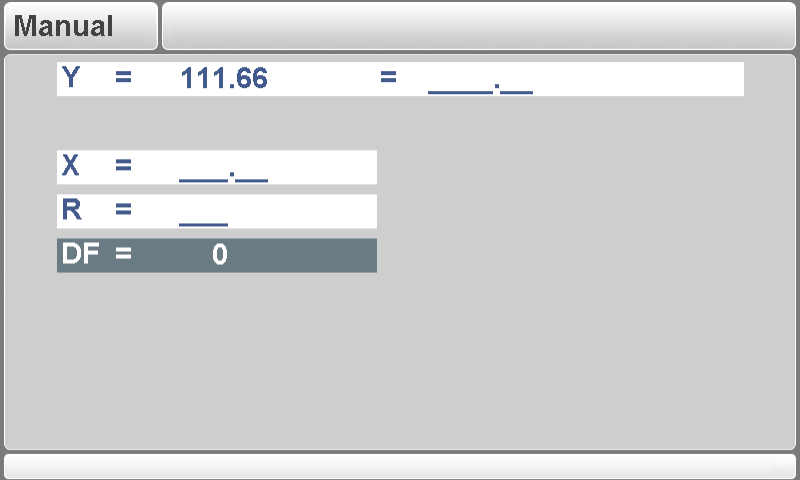
A nagyított értékek alkalmazásával a műszaki személyzet részletes kalibrációkat végezhet, amelyek elengedhetetlenek a több művelet során való konzisztencia fenntartásához és a bonyolult feladatok során fellépő hibák minimalizálásához.
Tengelyek kézi működtetése

Nyomja meg ezt a gombot a kézi mozgatási mód aktiválásához.
Miután a „kézi poz.” gombot aktiválták, használja a kurzormozgató sávot a kívánt tengely kiválasztásához.
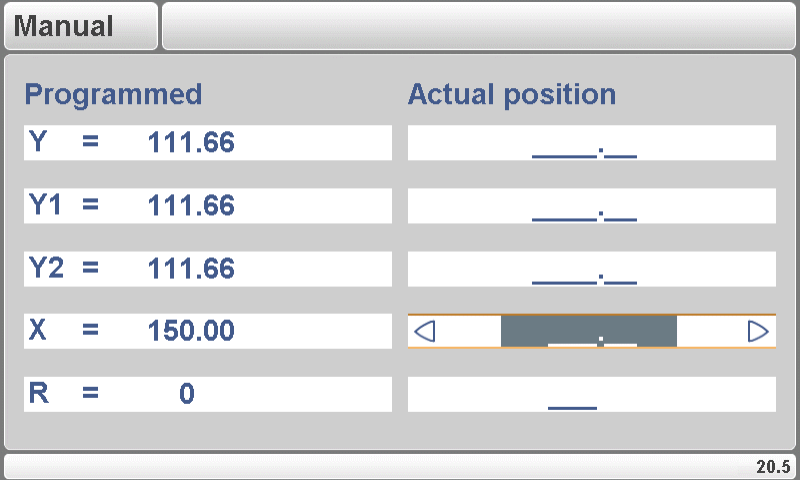
Segéd tengelyek: A „Leállítás” + „Kézi üzemmód” esetén kézzel állíthatja be a hátsó mérőszalagot a „Kézi pozicionálás” gombbal történő kiválasztásával, majd a billentyűzettel történő mozgatásával. Ez lehetővé teszi a pontos és egyedi beállításokat.
Y-tengely: A „Indítás” + „Kézi üzemmód” esetén kézzel állítsa be az Y-tengelyt úgy, hogy:
Az „Állítás” funkció aktív legyen, amit a képernyőn megjelenő „Állítás” szöveg jelez.
A tengely a némítási pont alatt helyezkedjen el.
Nyomóparancs legyen beállítva a CNC-ben.
Tanítási pozíciók
A DELEM DA-52S kézi üzemmódja lehetővé teszi meghatározott tengelypozíciók mentését. Miután elmozdított egy tengelyt, nyomja meg az ENTER gombot a pozíció tárolásához, amellyel az aktuális tengelyérték átkerül a programozott mezőbe. Ez biztosítja a műveletek ismételhetőségét és pontosságát jövőbeli felhasználásra.
Általános működés
A DELEM DA-52S kézi üzemmódjának aktiválása növeli a rugalmasságot és a hatékonyságot, mivel lehetővé teszi a tengelyek kézi vezérlését. A frontpanel nyilbillentyűivel navigáljon a „kézi pozíció” menüponthoz, és válassza ki a kívánt tengelyt. A billentyűk lenyomásával mozgathatja a tengelyt, így pontos vezérlést érhet el.
Segédtengelyek: A „Leállítás” + „Kézi üzemmód” kombinációban kézzel állíthatja be a hátsó irányzékot a „Kézi pozicionálás” gombbal történő kiválasztásával, majd a billentyűzettel történő mozgatásával. Ez lehetővé teszi a pontos és egyedi beállításokat.
Y-tengely: A „Indítás” + „Kézi üzemmód” kombinációban állítsa be kézzel az Y-tengelyt úgy, hogy:
Az „Állítás” funkció aktív legyen, amit a képernyőn megjelenő „Állítás” szöveg jelez.
A tengely a némítási pont alatt helyezkedjen el.
Nyomóparancs legyen beállítva a CNC-ben.
Tanítási pozíciók
A DELEM DA-52S kézi üzemmódja lehetővé teszi meghatározott tengelypozíciók mentését. Miután elmozdított egy tengelyt, nyomja meg az ENTER gombot a pozíció tárolásához, amellyel az aktuális tengelyérték átkerül a programozott mezőbe. Ez biztosítja a műveletek ismételhetőségét és pontosságát jövőbeli felhasználásra.
Összegzés
Összefoglalva a DELEM DA-52S kézi üzemmód jelentősen növeli a működési hatékonyságot, pontos vezérlési és testreszabási lehetőségeket kínálva a hidraulikus hajlítógépek működtetéséhez. A kulcsfontosságú paraméterek – például a tengelyek igazítása és a ciklussebesség beállításai – megértése és alkalmazása, valamint a részletgazdag kalibrációkhoz szükséges nagyított értékek kihasználása révén az üzemeltetők kiváló minőségű és nagy pontosságú munkát érhetnek el. A tengelyek kézi beállításának lehetősége tovább növeli a gép sokoldalúságát és reagálóképességét összetett feladatok esetén.
E stratégia alkalmazása hozzájárul a zavartalan és hatékony működés biztosításához, ezzel egyidejűleg maximalizálva a termelékenységet és a berendezés élettartamát. További segítségért vagy a DELEM DA-52S funkcióiról szerzett részletesebb információért kérjük, lépjen kapcsolatba csapatunkkal, illetve tekintse meg további erőforrásainkat és dokumentációinkat honlapunkon.

